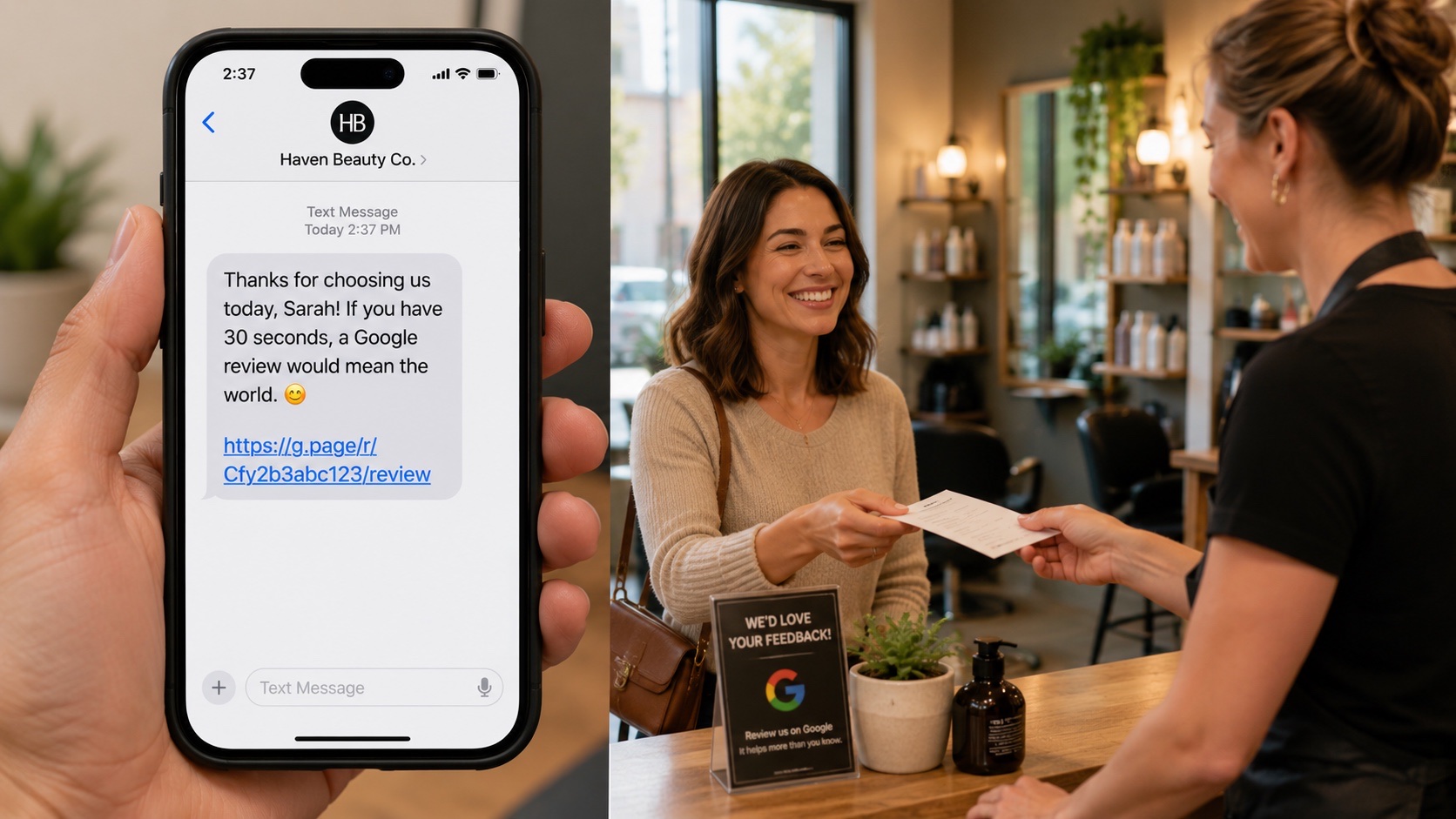
You've decided to start asking customers for Google reviews. The next problem: most templates floating around the internet are generic, robotic, and convert at under 1%. "Hi [Name], we hope you enjoyed your visit. Click here to leave us a Google review" looks fine in a blog post and works terribly in real life.
This guide has 20 templates that actually convert. 8 SMS, 7 email, 5 in-person scripts. Each one comes with timing guidance, an effectiveness estimate, and an industry-specific variant where it matters. By the end you'll have a copy-and-paste system you can deploy across your business in 30 minutes.
Quick foundational read before you dive into templates: the full guide to getting more Google reviews covers the broader strategy these templates fit into.
The Anatomy of a Great Review Request
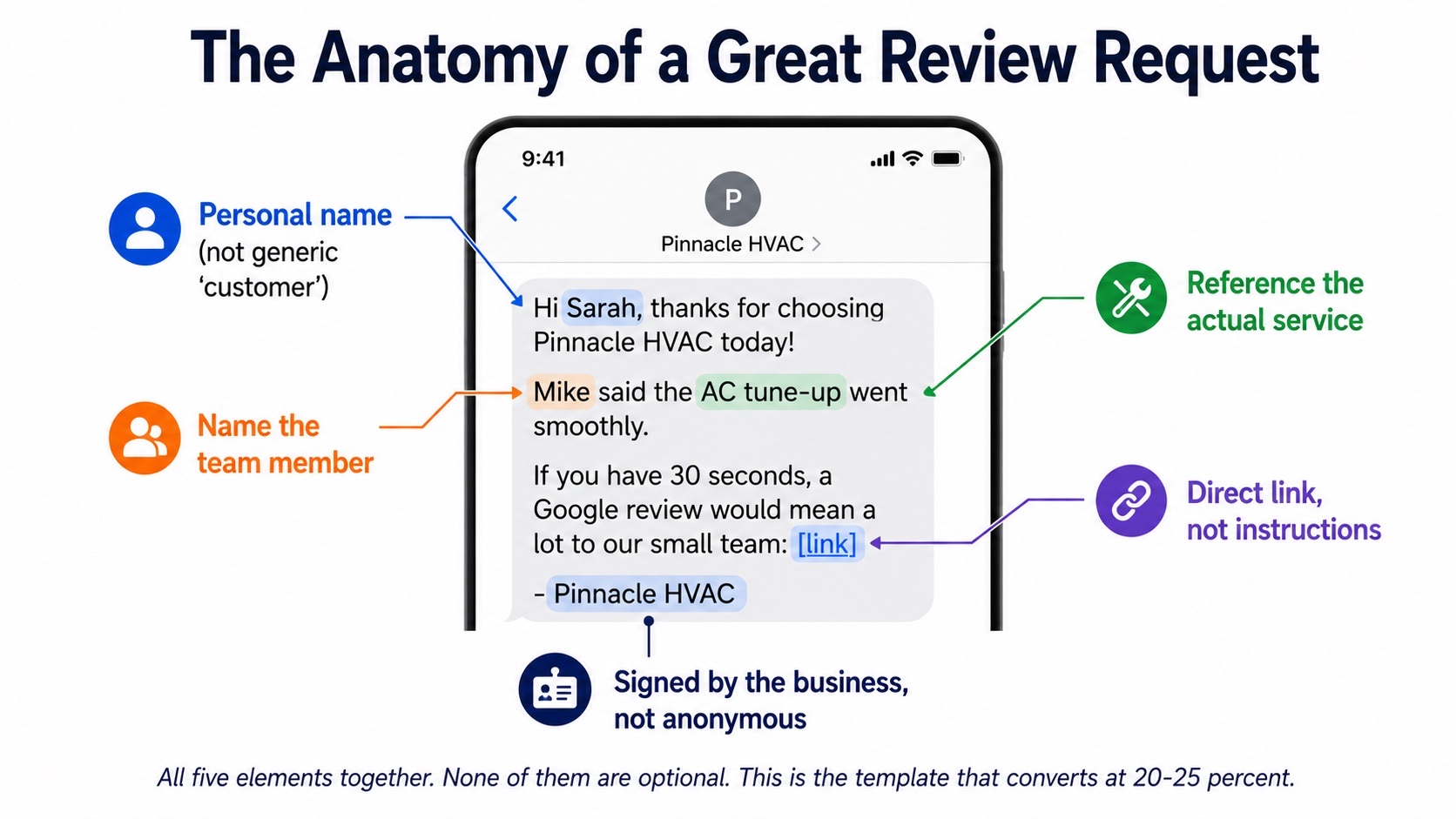
The difference between a 1% template and a 20% template is five elements. Every high-converting review request has them all.
- Personal name. "Hi Sarah" beats "Hi there" by a wide margin. Generic openers signal to the reader that this is a mass message and convert at half the rate of personalized ones.
- Reference the specific service or visit. "Thanks for choosing us for the AC tune-up today" beats "Thanks for choosing us." Specificity proves the message isn't a bot blast.
- Name a team member if you can. "Mike said the install went smoothly" or "Glad Lauren made the experience easy." Putting a real human in the message anchors the customer's positive memory.
- Provide a direct review link. Not "find us on Google." Not "search for our business name." A direct link that opens the review form when tapped. Friction kills conversion harder than anything else on this list.
- Sign with the business name (or a real person at the business). An anonymous "thanks again!" feels suspicious. "— Pinnacle HVAC" or "— Mark, Owner" feels real.
If you take nothing else from this guide: every template you use should have all five elements. Drop any of them and you lose conversion. Drop two or three and you might as well not send the request.
Conversion Rates by Channel
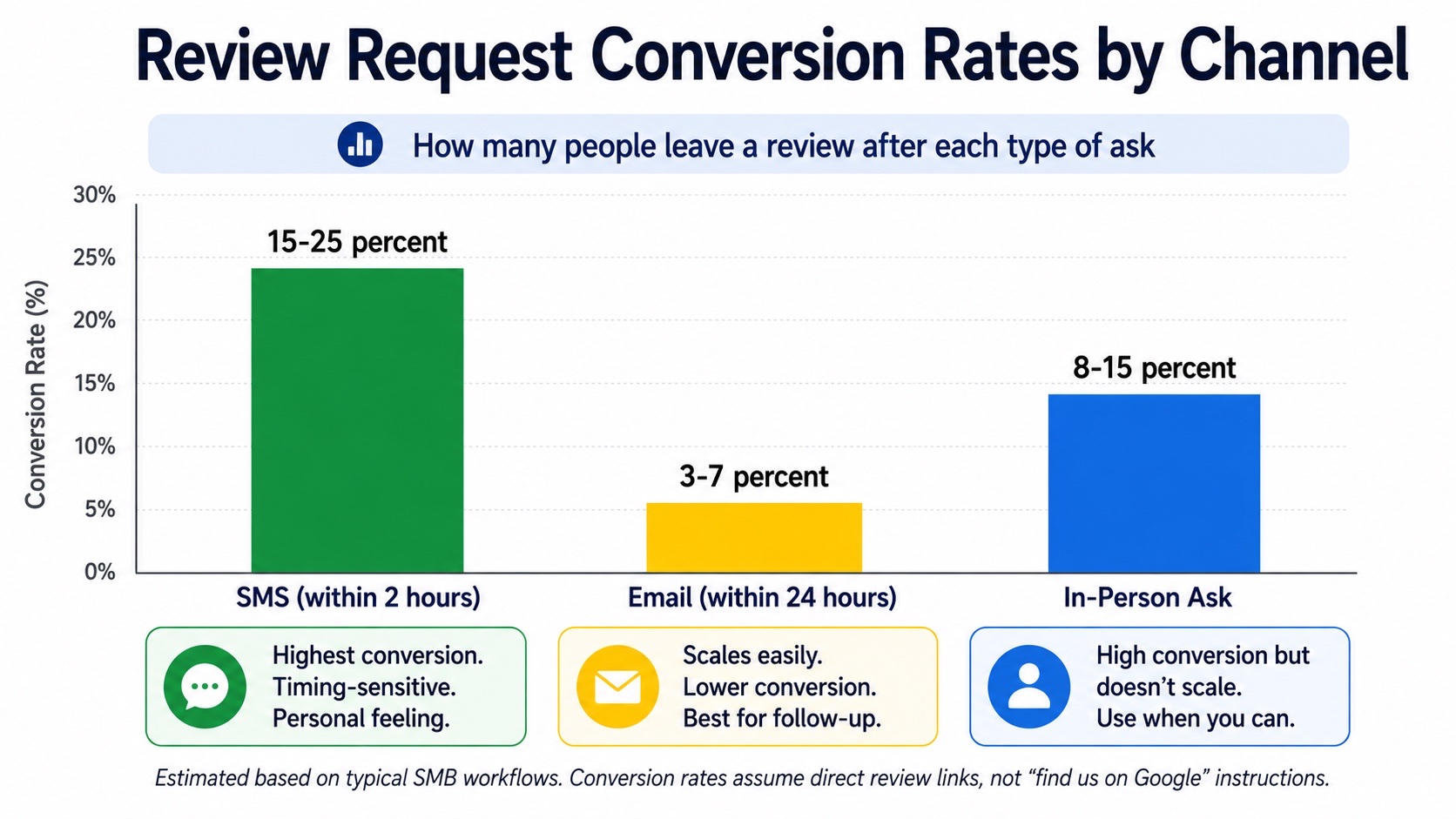
Before we get into templates, know which channel is worth the most effort. Real-world conversion rates for SMB review requests:
- SMS within 2 hours of service: 15-25% conversion. The single highest-converting channel. Phone is in hand, experience is fresh, single tap to the review form.
- In-person ask at the moment of peak satisfaction: 8-15% conversion. High when timed right (the moment they say "thank you"). Doesn't scale beyond your customer-facing team.
- Personalized email within 24 hours: 3-7% conversion. Lower than SMS but easier to scale and automate. Generic mass email drops to under 1%.
- Generic email blast: Under 1%. Functionally useless.
- Social media post: Effectively 0%. Don't bother.
Practical implication: invest the most effort in SMS templates (they convert highest), keep email as your scalable backstop, and train your team on the in-person script for the few minutes they have face-to-face.
8 SMS Templates That Convert
Send all of these within 2 hours of service completion. Keep under 160 characters when possible. One ask. No follow-up text if they don't review.
SMS Template 1: The Direct Ask (Universal)
"Hi [Name], thanks for choosing [Business] today! If you have 30 seconds, a Google review would mean a lot to our small team: [link] — [Business]"
Estimated conversion: 15-20%. Best general-purpose SMS template. Works for almost any service business. Use this as your default.
SMS Template 2: The Specific Service Reference
"Hi [Name], we appreciate you trusting us with [specific service today, e.g., 'your AC tune-up']. If you have a moment, we'd love a quick Google review: [link] Thanks! — [Business]"
Estimated conversion: 18-25%. The specific-service mention boosts conversion noticeably. Use whenever your CRM or dispatch system can populate the service type automatically.
SMS Template 3: The Team Member Shoutout
"Hi [Name], [team member] said your visit today went well! If you've got a minute, we'd love a Google review: [link] — [Business]"
Estimated conversion: 20-25%. Naming the team member humanizes the message and creates a small social-debt feeling. Works especially well for service trades where one tech handles the whole job.
SMS Template 4: The Owner-Signed
"Hi [Name], this is [Owner Name], owner of [Business]. Thanks so much for your business today. If you have 30 seconds, a Google review really helps us: [link]"
Estimated conversion: 20-30%. The owner signature is a flex that signals "this isn't a bot blast." Use for high-value customers or post-emergency calls where the owner-touch lands well.
SMS Template 5: The Soft 24-Hour Follow-Up (only if no review yet)
"Hi [Name], just following up from yesterday. If your experience was a good one, a quick Google review would help us a lot: [link] No pressure if you're busy! — [Business]"
Estimated conversion: 5-8% (incremental on top of the initial ask). Send only if the initial 2-hour SMS didn't convert. "No pressure" softens the second-ask feeling. Never send a third.
SMS Template 6: The Recovery (After Resolving an Issue)
"Hi [Name], glad we got that sorted today. If you'd be willing to share how we handled it on Google, we'd really appreciate it: [link] — [Owner Name]"
Estimated conversion: 25-35%. Counterintuitive but true: customers who had a problem you resolved well are some of the highest-converting reviewers. They have a real story to tell.
SMS Template 7: The Casual Friendly
"Hey [Name], thanks again for today! Quick favor if you have a sec? A Google review would seriously make our week: [link] — [Business]"
Estimated conversion: 18-22%. Warmer tone for businesses where the customer relationship is informal (salons, cafes, indie services). Tonally wrong for B2B or formal services.
SMS Template 8: The Repeat Customer Update
"Hi [Name], always great seeing you. We're trying to grow our Google reviews this quarter and we'd love yours if you can spare 30 seconds: [link] Thanks! — [Business]"
Estimated conversion: 15-25%. For customers who've been with you a while but haven't left a review. The "we're trying to grow our reviews" reason gives them a why beyond pure ask.
7 Email Templates That Don't Get Ignored
Email converts lower than SMS but scales easier. Send within 24 hours of service. Subject line matters more than the body for whether the email gets opened.
Email Template 1: The Personalized Standard
Subject: Quick favor, [Name]?
Hi [Name],
Thanks for choosing [Business] for [specific service] this week. [Team member] mentioned the visit went smoothly and we wanted to follow up.
If you have a minute, a Google review would mean a lot to a small business like ours. It takes about 30 seconds and helps more than you'd think.
Here's the direct link: [Direct Google Review Link]
Thanks again,
[Owner Name], [Business]
Estimated conversion: 5-8%. Best general-purpose email. Subject line "Quick favor, [Name]?" has 30-40% open rates for this kind of message, far above generic "Leave us a review!" subjects.
Email Template 2: The Service Specific
Subject: How did we do on your [service]?
Hi [Name],
Hope your [specific service, e.g., "kitchen remodel," "AC install," "haircut"] is treating you well.
If you have a quick moment, we'd really appreciate you sharing how it went on Google. We're a small team and reviews genuinely help us grow:
[Direct Google Review Link]
Thanks for your trust,
[Owner Name], [Business]
Estimated conversion: 6-9%. The service-specific subject line creates curiosity ("How did it go?") and triggers customers to think about the experience.
Email Template 3: The Owner Personal Note
Subject: A personal thank you, [Name]
[Name],
I'm [Owner Name], the owner of [Business]. I just wanted to personally thank you for choosing us for your [service]. It means a lot.
If you have 30 seconds, a Google review would help us reach more people like you. Here's the direct link: [Direct Google Review Link]
Either way, thank you for the trust.
[Owner Name]
Owner, [Business]
Estimated conversion: 7-12%. Owner-signed email feels personal even at scale. Reserve for higher-value customers or where the touch lands.
Email Template 4: The Repeat Customer
Subject: Could you help us out?
Hi [Name],
You've trusted us with [number] visits / projects over the years, and we genuinely appreciate it.
We're working on growing our Google reviews this year, and yours would carry a lot of weight. If you've got a minute, here's the direct link: [Direct Google Review Link]
Thanks for being one of our long-time customers,
[Owner Name], [Business]
Estimated conversion: 10-15%. Repeat-customer asks convert at high rates because the relationship is already established. The number-of-visits anchor creates a small sense of obligation in a good way.
Email Template 5: The Gentle 7-Day Follow-Up
Subject: One more ask — sorry to bug you
Hi [Name],
Sorry for the second email. I know everyone's busy.
If your experience with [Business] was a good one, a Google review would help us a lot. Here's the link one more time: [Direct Google Review Link]
Either way, thanks again for choosing us.
[Owner Name], [Business]
Estimated conversion: 3-5% incremental. Send only once, 7 days after the initial email. The "sorry to bug you" acknowledgment is the key to this not feeling pushy. Never send a third email.
Email Template 6: Post-Resolution Recovery
Subject: Thanks for letting us make it right
Hi [Name],
Thanks for letting us turn things around on [specific issue].
If you'd be willing to share how we handled the resolution on Google, we'd really appreciate it. A response to a problem says more about a business than a perfect-from-the-start experience:
[Direct Google Review Link]
Thanks for your patience,
[Owner Name], [Business]
Estimated conversion: 15-25%. Customers who experienced a problem you resolved well are among your highest-converting reviewers. Don't skip this one.
Email Template 7: The Holiday or Milestone
Subject: A quick year-end thank-you
Hi [Name],
As we wrap up the year, I wanted to personally thank you for being one of our customers. [Business] would not exist without people like you trusting us.
If you've ever thought about leaving us a Google review, this would be a great time. We're trying to hit [milestone number] reviews this year, and yours would help: [Direct Google Review Link]
Wishing you a great new year,
[Owner Name], [Business]
Estimated conversion: 8-15%. Holiday and milestone framings perform well because they give the ask a natural context. Don't overuse; once or twice per year max.
5 In-Person Scripts (For the Moment of Peak Satisfaction)
In-person asks have the highest conversion when timed right (the moment the customer expresses satisfaction) and the lowest when forced into an awkward closeout. These scripts focus on natural delivery.
In-Person Script 1: The "Right After Thank You"
Trigger: The customer says "Thank you so much" or compliments your work.
"Honestly, the best way to thank us is a quick Google review when you get a chance. I can text you the link right now if it's easier?"
Estimated conversion: 30-40%. The highest-converting in-person ask. Use the customer's "thank you" as the natural opening. The "text you the link right now" offer is the key, because it eliminates the find-us-on-Google friction.
In-Person Script 2: The QR Code Handoff
Trigger: Customer is paying or signing the invoice.
"Before you go — this card has a QR code. If you scan it, it takes you straight to leave us a Google review. We really appreciate it."
Estimated conversion: 10-15%. Combines well with our free Google review QR code generator for the printed card. Lower conversion than the "text you the link" ask because more friction, but easier to deploy at scale.
In-Person Script 3: The Tech / Tradesperson Handoff
Trigger: Service tech finishing up a home visit.
"Alright, you're all set. If you have a sec and the work looks good, a Google review really helps small teams like ours. I'm going to text you the link from my phone right now, no pressure."
Estimated conversion: 20-30%. The tech-on-site script is one of the highest-converting moments in home services because the work was just completed and the customer is in the room. "No pressure" softens what could otherwise feel like an awkward ask.
In-Person Script 4: The Counter Service
Trigger: Customer leaving the counter (restaurant, salon, retail).
"Thanks so much, [Name]. If you have a minute later, we'd really appreciate a Google review — the QR code on the counter takes you straight there."
Estimated conversion: 5-10%. Lower than the home-service script because the customer is already half out the door. The QR code reference helps because they can scan it without committing to write the review on the spot.
In-Person Script 5: The Quote / Estimate Win
Trigger: Customer signs a big contract or accepts a quote.
"Thanks for choosing us for this project, [Name]. I won't ask you for a review now because we have to earn it. But after the install, if it goes well, a Google review would mean a lot. I'll send you the link when the work is done."
Estimated conversion: 25-40% (after the eventual follow-up). Setting the review ask as a future expectation when the customer signs increases conversion at the post-job text. Don't ask for the review at signing; just set up that you'll ask later.
Industry-Specific Variants
Some industries need tone adjustments. A few variants for common SMBs:
Home Services (HVAC, Plumbing, Electrical)
"Hi [Name], thanks for trusting us with the [service]. [Tech] got everything squared away. If you have a sec, a Google review really helps us land more jobs: [link] — [Business]"
Trade-specific terms ("squared away," "jobs") feel natural to the customer base. Mention the tech by name. For more context on the home services side, see our home services AI phone agent page.
Restaurants & Cafes
"Hi [Name], so glad you joined us today! If you have a sec, your Google review really helps a small spot like ours: [link] Hope to see you back soon. — [Restaurant]"
Warmer, more hospitality-tone. "Joined us" instead of "chose us." Soft mention of return visit at the end.
Salons & Spas
"Hi [Name], so happy with how your [service] turned out today! If you have 30 seconds, a Google review would totally make our day: [link] — [Stylist] at [Salon]"
Sign with the stylist's name (the relationship is with them, not the salon). "Totally make our day" feels right for this category and would feel wrong in HVAC.
Healthcare (Dental, Chiropractic, Optometry)
"Hi [Name], thanks for visiting [Practice] today. If you have a moment, a Google review helps other patients find us. Here's the link: [link] — [Practice]"
More professional tone. Avoid anything that might feel manipulative for healthcare. The "helps other patients find us" framing aligns with how healthcare consumers think about choosing providers.
Professional Services (Legal, Accounting, Real Estate)
"Hi [Name], thank you for trusting us with [matter / closing / filing]. When you have a moment, a brief Google review would be deeply appreciated and helps us reach more clients like you: [link] — [Owner / Partner], [Firm]"
Formal tone. Sign with title (Partner, Esq., CPA) when appropriate. Avoid casual language ("totally," "sec").
What NOT to Send
Some patterns reliably tank your conversion or worse, get your reviews removed. Avoid these:
- "5-star" anything in the ask. "If you can give us a 5-star review" is a textbook violation of Google's review-gating policy. It can get your reviews removed and your profile flagged. Always ask for an "honest review" or just "a review," never a star count.
- Anything offering a reward. "Leave us a review and get $10 off your next visit" violates Google's policy on incentivized reviews. Don't do it. Don't even hint at it.
- "If you had a bad experience, contact us first" filters. This is also review gating. Routing unhappy customers to private feedback while sending happy customers to public reviews violates Google's policies and can result in reviews being removed.
- Generic mass blasts with no personalization. "Dear customer, please leave us a review." Conversion under 1%. Just don't.
- "Find us on Google" instructions instead of a direct link. Every step you make the customer take loses 30-50% of conversion. Always provide a direct link to the review form.
- Multiple follow-ups. One initial ask, one optional follow-up after 24 hours (SMS) or 7 days (email). Anything beyond that is harassment and damages your customer relationship.
- Asking customers who had a known bad experience. If you know they were unhappy, don't send the review request. You're asking them to leave a 1-star.
Legal Compliance (TCPA & Google Policy)
Two compliance areas you must navigate:
TCPA for SMS Review Requests
Sending review request SMS in the US falls under the Telephone Consumer Protection Act (TCPA). The practical implications:
- You generally need prior express consent from the customer to send marketing-style SMS. Capturing a phone number for service purposes is not the same as consent to send promotional SMS. The cleanest path: include a checkbox at intake or invoicing that says "I agree to receive transactional and follow-up text messages from [Business]."
- Review request SMS are arguably transactional rather than marketing (they relate to a specific service the customer purchased), which gives you more latitude. Most courts treat them this way, but the line is fuzzy.
- Always include an opt-out instruction: "Reply STOP to opt out." Some SMS platforms add this automatically.
- Stay current. TCPA rules and FCC interpretations have shifted multiple times. Check current guidance or talk to a lawyer before mass-sending review SMS.
Google's Review Policies
- No incentives. Discounts, gift cards, freebies, raffle entries, or anything of value in exchange for reviews violates Google's policies. Can result in review removal and profile penalty.
- No review gating. You can't filter customers by sentiment before steering them to public review. Asking everyone honestly is required.
- No "5 stars" language. Asking specifically for a 5-star rating (vs. an honest review) violates Google's policies.
- No fake reviews. Self-explanatory but worth stating: you can't write reviews yourself, ask employees to write reviews, or pay for reviews.
The compliance footprint is small. Stick with honest asks, no incentives, no star-count language, and respect TCPA consent. That covers 99% of the risk.
Frequently Asked Questions
Should I send a review request to every customer?
Generally yes, with two exceptions: customers who had a known bad experience that you haven't resolved (you're asking for a 1-star), and customers who explicitly told you they don't want follow-up communication. Otherwise, asking everyone is the right call and actually protects you from review-gating policy violations.
What's the single highest-converting review request template?
SMS, sent within 2 hours of service completion, signed by the owner, referencing the specific service and the team member who handled it. The full template would be roughly: "Hi [Name], this is [Owner], thanks for trusting us with the [service] today. [Tech] said it went well. A quick Google review would mean a lot: [link]". Expected conversion 25-35%.
How long should a review request SMS be?
Under 160 characters when possible (so it sends as a single segment and looks like a normal text). Going over is fine if the message reads naturally; just know that 480+ character SMS feel like marketing copy and convert lower.
What's the best time of day to send a review request?
Within 2 hours of service is the dominant factor, not time of day. That said, late morning (10am-12pm) and early evening (5pm-7pm) tend to outperform midday and late night. Avoid before 9am and after 9pm; both feel intrusive.
Should I send the review request from my personal number or a business number?
Business number is better for compliance (TCPA opt-out, professional separation) but personal number can convert higher for small operators where the customer relationship is personal. For most SMBs above 1-2 employees, business number is the right answer.
Can I use AI to personalize review request templates at scale?
Yes, carefully. AI can populate templates with customer name, service type, tech name, and basic personalization at scale. The risk is over-automation where the templates feel mechanical. Best practice: use AI to fill in variables, but use templates that read naturally even when personalized fields are sparse.
Do I need a CRM or special software to send review requests?
For SMS at scale, yes. You need a platform that handles compliance (TCPA opt-out, message sending), tracks who's been asked, and integrates with your customer data. For 5-10 sends per week, manually copying a template into your phone works fine. Above that, automation pays for itself.
What if a customer responds to the review request with a complaint?
Handle the complaint directly via the same channel (don't redirect them through five layers of customer service). Address the issue, follow up with resolution, and never ask the same customer for a review again until you've genuinely fixed the underlying problem. A handled complaint often converts into a positive review later if the resolution was good.
Can I include a Google review request in my email signature?
Yes. A short line in your email signature ("Happy with our service? Leave us a Google review → [link]") generates a slow but real trickle of reviews from your normal email traffic. Conversion per email is tiny, but the volume of emails over time produces results. Combine with the active templates above.
The mistake most small business owners make isn't picking the wrong template — it's not having a system at all. Pick one SMS template and one email template from above, set up the trigger (post-service SMS, 24-hour email), and run it for 90 days. Adjust based on what converts. The compounding effect of consistent, well-crafted asks is bigger than any one perfect template.
Related reading: our pillar guide on how to get more Google reviews (where templates fit into the broader strategy), the guide to responding to negative Google reviews (because you'll need it), and our free Google review QR code generator for the in-person ask. To make sure every customer who calls actually gets through to ask in the first place, see how Zinng's AI phone agents answer every call 24/7.
Ready to get started?
Set up your AI phone agent in minutes. No credit card required.
Try Zinng Free for 7 Days
About the Author
Timothy Bramlett
Co-Founder & CEO, Zinng
Timothy Bramlett is an American entrepreneur, software engineer, and product strategist. He is the founder of Zinng, an AI-powered phone agent platform that helps businesses never miss a customer call with intelligent call handling, real-time transcripts, and instant summaries.