Most small business owners know they need more Google reviews. The actual problem is that almost every "get more reviews" article on the internet recycles the same five tactics, none of which tell you which ones actually move the needle and which ones are filler. So owners try a little of everything, nothing works particularly well, and they conclude review-building is hopeless.
This guide is the opposite of that. We've cataloged 15 tactics that real small businesses use to grow Google reviews in 2026, ranked them by how effective each one actually is, and told you which ones to ignore. The goal: a clear, prioritized playbook you can execute in 90 days.
Why Google Reviews Are the Highest-Leverage Marketing You're Not Doing
Three numbers worth keeping in your head before we get into tactics:
- 93% of consumers say online reviews influence their purchasing decisions. For local services, that number climbs to 98%.
- An average of 47-150 reviews is what businesses ranking in the Google local map pack typically have. Owners below this band fight an uphill battle to show up at all.
- 0.1 stars of rating difference can mean a 25% swing in conversion rate for high-consideration purchases. Going from a 4.4 to a 4.5 is genuinely worth real money.
The compounding effect is what makes reviews so high-leverage. Each new review marginally improves your local search ranking, which surfaces you to more searchers, which generates more customers, which generates more reviews. The flywheel only works once you get it spinning, and most small businesses never do.
Reviews also directly affect call volume. The phone rings more often when you show up higher in the local pack. If you've ever wondered why a competitor with a worse service gets more business than you do, the answer is usually that they're showing up first on Google because they have 180 reviews and you have 23.
What Actually Works (And What Doesn't)
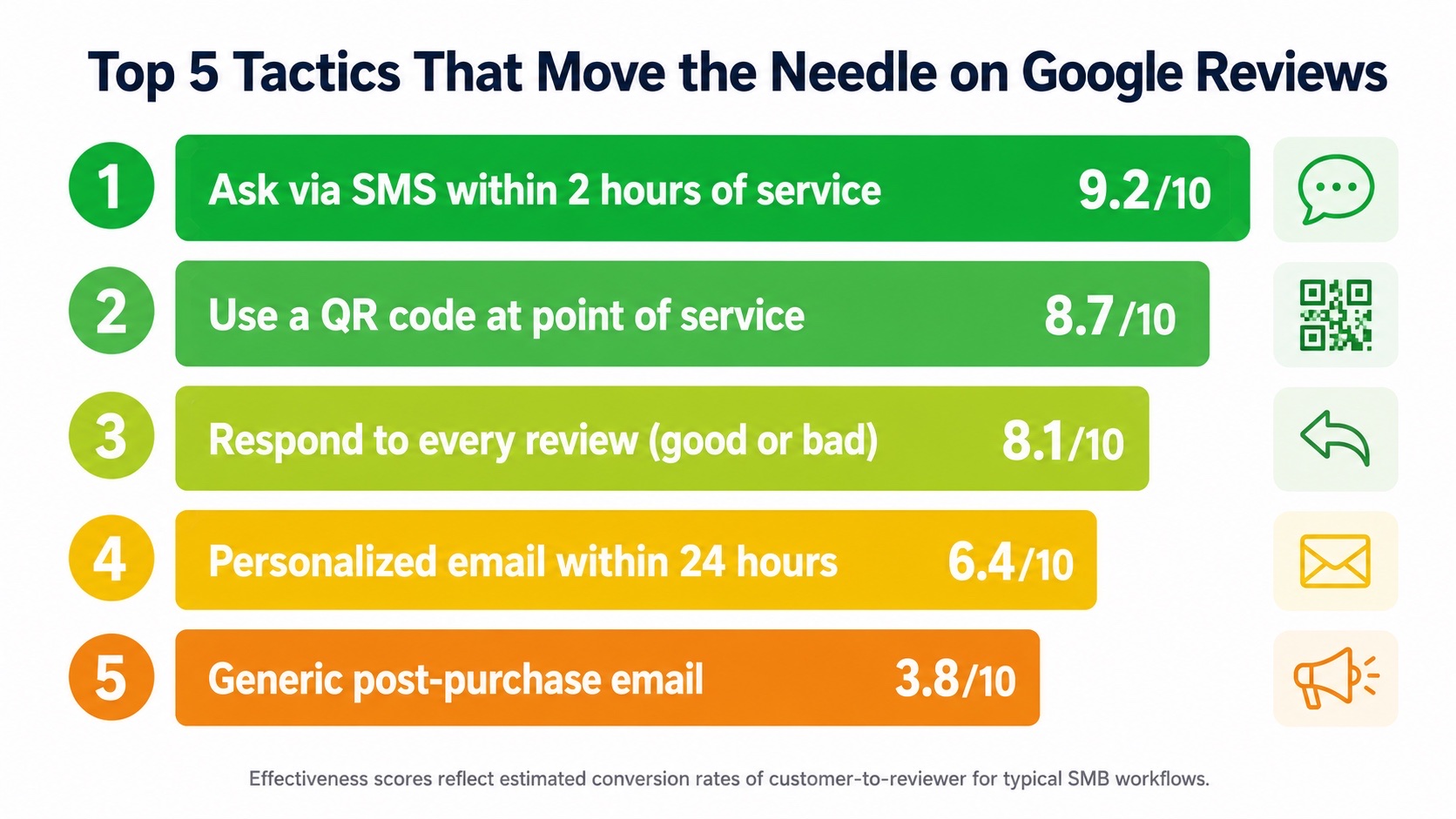
The single biggest factor in whether a customer leaves a review is not the quality of your service. It's the friction between them and the review form, and the timing of the ask. A customer who had a perfectly fine experience and gets a one-tap review request 90 minutes after their service will convert at 3-5x the rate of a customer who had a great experience but has to remember to leave a review three days later from their laptop.
Translating that into actionable hierarchy:
- The single highest-converting tactic: SMS request with a direct review link, sent within 2 hours of service completion. Typical conversion: 15-25% of texted customers leave a review.
- The second highest: QR code at point of service (counter, invoice, leave-behind card). Typical conversion: 8-15% of customers who see it.
- Email: Personalized, sent within 24 hours. Typical conversion: 3-7%. Generic mass email: under 1%.
- In-person ask without a tool: Roughly 5-10% if the ask is genuine and timed well. Drops to near-zero if it feels scripted.
- Social media post asking for reviews: Functionally useless. Less than 0.1% conversion.
If you do nothing else from this guide, set up tactic #1 (SMS within 2 hours) and tactic #2 (QR codes at point of service). Together they will outperform every other tactic combined, and they're both nearly free to deploy.
The 15 Tactics, Ranked
Each tactic below is rated by realistic conversion rate for a typical small business. The top tactics are leverage-multipliers; the bottom ones are filler. We've kept the bottom of the list intentionally so you can see what's not worth your time.
1. Send an SMS review request within 2 hours of service
Effectiveness: 9.2/10. A text message with a direct Google review link sent within 2 hours of service completion is the single highest-converting tactic that exists. The customer's phone is in their hand, the experience is fresh, and tapping a link takes them straight to the review form. Typical script: "Thanks for choosing [Business Name] today. If you have a minute, we'd love a Google review: [link]". Keep it under 160 characters. Send only once. Don't follow up.
If you use an AI phone agent like Zinng, the post-call SMS can fire automatically at the end of every successful call, with the right review link for that customer's account. For service businesses, the dispatcher or invoicing system should be set up to trigger the text the moment the job is marked complete. For 8 ready-to-use SMS templates (plus 7 email templates and 5 in-person scripts), see our full collection of Google review request templates.
2. Print a Google review QR code at the point of service
Effectiveness: 8.7/10. A QR code on a counter sign, a printed invoice, a receipt, or a leave-behind card converts 8-15% of customers who see it. The moment of payment or job completion is the highest-converting placement. A scanner-friendly QR code means customers go directly to your review form on their phone, skipping the search step that loses 80% of would-be reviewers.
If you don't have one yet, our free Google review QR code generator creates one in 30 seconds. For full placement strategy and design tips, see our guide to Google review QR codes.
3. Respond to every review within 24 hours
Effectiveness: 8.1/10. Responses don't directly generate new reviews, but they have a huge indirect effect. Google's algorithm rewards engaged businesses (Google has confirmed this multiple times). Owners who respond to reviews get more reviews over time because:
- Google promotes engaged businesses higher in the local pack, which increases visibility
- Future customers see that you respond and feel safer leaving their own review
- Reviewers feel heard and tell their friends to review you too
Reply to every review, good or bad. A short "Thanks so much, [Name]! We appreciate you taking the time to leave this." takes 30 seconds and pays off. For negative reviews, take it offline politely but always reply publicly first — see our dedicated guide on how to respond to negative Google reviews for the framework and 10 copy-paste templates by review type.
4. Personalized email request within 24 hours
Effectiveness: 6.4/10. A personalized email mentioning what the customer bought, who served them, and any specific detail from the interaction converts 3-7%. Generic "Hi, please leave us a review" emails convert under 1%. The difference is real personalization, not "Hi [First Name]" mail-merge. Include a direct review link, not just instructions to "find us on Google."
5. Ask in person at the moment of peak satisfaction
Effectiveness: 5.8/10 when timed right. The moment the customer says "thank you" or compliments your work is the highest-converting window for an in-person ask. Have a script ready: "I'm so glad you're happy with the work. Would you mind leaving a quick Google review? I can text you the link right now." Don't ask cold and don't ask at the start. The ask only works when their satisfaction is at peak and they want to do something nice for you.
6. Train your team to ask, with a script
Effectiveness: 5.5/10. Most owners ask for reviews; most team members don't. The fix is a written script and a habit. Make it a normal part of the closeout: "Before you go, can I send you a quick review link? It really helps us." Reward team members who get reviews (a $10 gift card per review attributed to their service is a high-ROI incentive).
7. Email signature with a direct review link
Effectiveness: 4.2/10. Add a line to every employee's email signature: "Happy with our service? Leave us a Google review → [link]". Passive but cumulative. Every email you send becomes a tiny review request. The conversion rate per email is low, but the volume of emails sent over time produces real results.
8. Review request page on your website
Effectiveness: 4.0/10. Create a simple page like yoursite.com/review that redirects to your Google review form. Print this URL on receipts, business cards, signage. Customers who weren't sure if they could find the link see "go to yoursite.com/review" and follow the breadcrumb. Use the page itself for additional CTAs ("While you're here, follow us on Instagram").
9. Run a review velocity campaign for 30 days
Effectiveness: 4.0/10 with diminishing returns. Pick a 30-day window. Train every team member to ask every customer. Use SMS, QR codes, and email together. Goal: 2-3 new reviews per week minimum. The "velocity" approach signals to Google that your business is active and surging, which lifts your local pack ranking. Do not stack 50 reviews in one week (Google detects this and discounts the bump).
10. Add review request to your invoice template
Effectiveness: 3.8/10. A short note at the bottom of every invoice ("Loved our work? A Google review would mean the world: [link or QR code]") generates a steady trickle. Combines well with tactic #1: invoice goes out, then SMS follow-up two hours later.
11. Ask repeat customers who haven't reviewed yet
Effectiveness: 3.5/10. Pull a list of customers who have transacted with you more than twice but haven't left a review. Send a personalized email to each one. The "loyal customer who hasn't reviewed" segment converts at higher than average because they already like you. The trick is having a CRM or list that lets you find them.
12. Use voice AI to ask at the end of phone calls
Effectiveness: 3.5/10 for sales calls, 5.0/10 for support calls. An AI phone agent (like Zinng) handling inbound calls can be configured to send a review request SMS to satisfied callers automatically. Works particularly well for service businesses where the call concludes a successful job ("the tech is on his way") or for follow-up calls after service. Lower conversion than in-person ask, but it scales without effort.
13. Showcase recent reviews on your website
Effectiveness: 2.5/10. Embedding fresh reviews on your homepage doesn't directly generate new reviews, but it does subtly nudge readers ("oh, they have a Google review section, I should add mine"). Combines well with a CTA: "Read more reviews or leave your own →".
14. Run a paid ad targeting recent customers
Effectiveness: 2.0/10. Facebook and Instagram allow custom audiences from your customer email list. A small-budget ad ("Hey, was your visit great? Leave us a review here") to your existing customer list has a tiny ROI but is dirt cheap. Not worth setting up unless you already run ads.
15. Post on social media asking for reviews
Effectiveness: 0.3/10. Don't bother. Generic "Hey, please leave us a Google review!" social media posts convert almost nobody. The audience is wrong (followers aren't necessarily recent customers), the friction is too high, and the post gets buried within an hour. Skip this one.
Why Review Velocity Beats Review Count
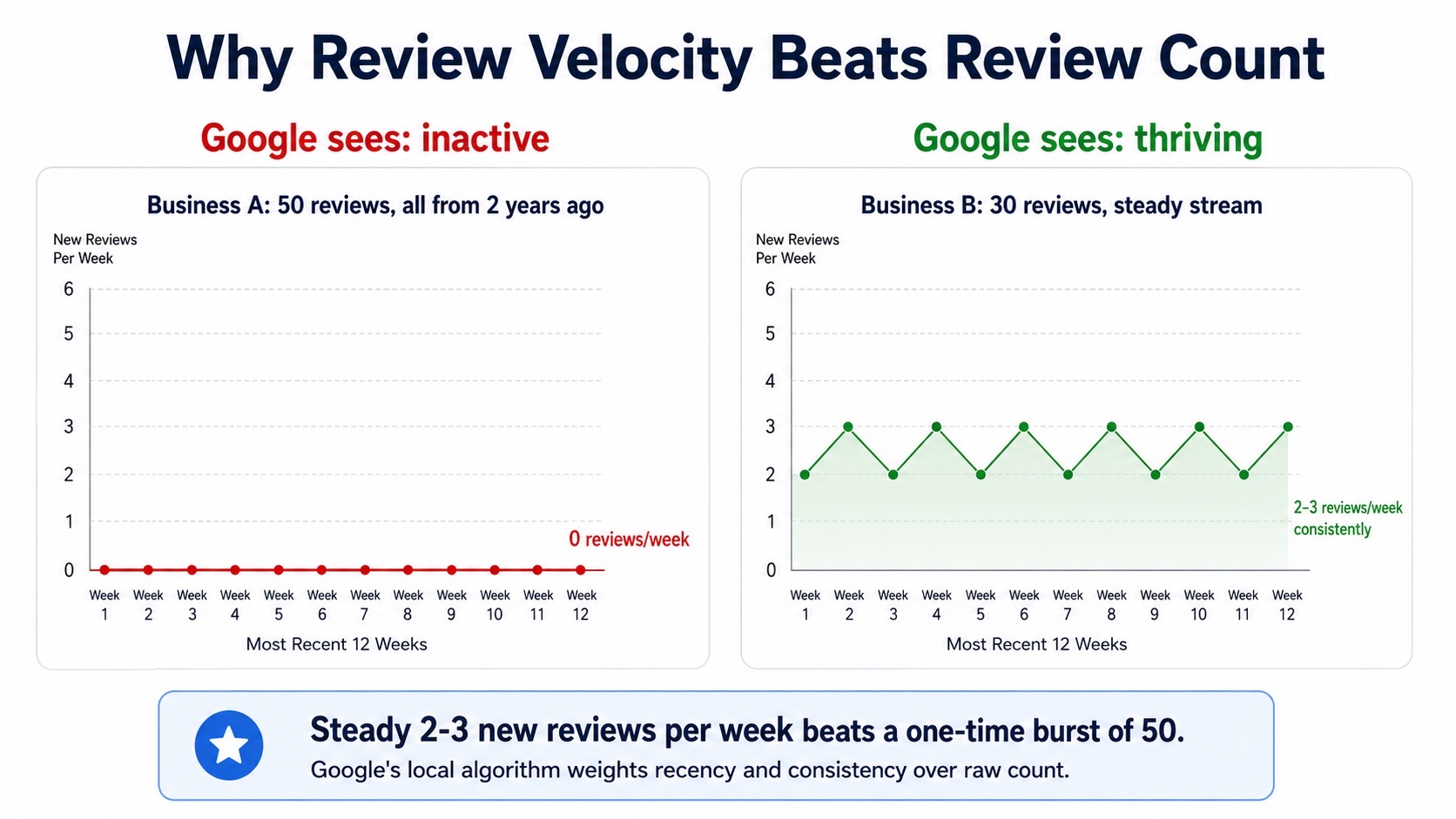
One of the least-understood factors in Google's local algorithm is review velocity: how often new reviews come in. A business with 30 reviews and a steady stream of 2-3 new reviews per week consistently outranks a business with 50 reviews where the most recent one is two years old.
Why this matters for your tactics:
- A one-time push to get 30 reviews in a single week is a worse outcome than getting 2-3 reviews per week for 10 weeks straight, even though the count is identical.
- Burst signals also look unnatural to Google's spam detection and can get flagged or discounted.
- The compounding visibility from steady velocity creates a flywheel. Bursts don't.
The implication is that your review system should be permanent infrastructure, not a quarterly campaign. Set up the SMS-after-service automation once, train your team once, print the QR codes once, and let it run forever. Steady wins.
Mistakes That Will Set You Back
Some of the most popular review tactics are genuinely bad ideas. Avoid these:
- Offering incentives for reviews. Google explicitly prohibits offering discounts, freebies, or anything of value in exchange for reviews. Caught reviews get removed, and the profile can be penalized. "Leave a review and get 10% off" is the fastest way to lose your reviews and possibly your listing.
- Buying fake reviews. Google's detection has gotten very good. Fake reviews get flagged, removed, and the business gets a soft penalty in local rankings. The risk-reward is terrible.
- Filtering by sentiment before asking. "Only ask happy customers" sounds smart but normalizes review-fishing behavior. Google has hinted that filtering customer feedback before steering them to public review is against policy ("review gating"), and large platforms have started discounting reviews that look gated. Ask everyone. Most customers are happy. The unhappy ones rarely leave reviews unless you really mishandled them.
- Asking too many times. One SMS, one email, one in-person ask. After that, you're harassing the customer. Three asks for one review is the line where you start losing future business.
- Using a fake review service / review pod / review exchange group. Same category as buying reviews. Don't.
- Asking via QR code with no context. A QR code with no text next to it ("Scan to leave a review") converts at a fraction of a QR code with a clear ask. Always pair the code with a line of copy.
- Ignoring negative reviews. A negative review with a thoughtful public reply often looks better to future customers than a flat 5-star review with no engagement.
Your 90-Day Plan
If you do everything in this guide, here's the realistic plan to triple your monthly review count:
Week 1: Set up the infrastructure.
- Generate your QR code using our free QR code maker. Print 25 copies.
- Add review request to your invoice template and your email signatures.
- Create a yoursite.com/review redirect that goes to your Google review form.
- Write the 160-character SMS script you'll send after every service.
Weeks 2-4: Deploy SMS as your default review channel.
- Set up an automated SMS to fire 2 hours after every service-complete event in your dispatching software.
- If you use Zinng for inbound calls, configure the post-call review SMS.
- Train every team member on the in-person ask script.
Weeks 5-12: Run the velocity play.
- Aim for 2-3 new reviews per week as a steady baseline.
- Respond to every review within 24 hours, good or bad.
- Track which channels are converting (most CRMs can attribute).
- At week 12, pull a list of customers who interacted but didn't review, and send the polite personalized follow-up email.
If you start with 30 reviews and add 2-3 per week consistently, you'll be at 50-60 reviews by month 3. Your local pack visibility will be noticeably better. By month 6, the flywheel is spinning on its own, and you'll be in the 80-100 review range without thinking about it.
While you're optimizing for reviews, it's also worth running a broader audit. Our free AI SEO audit will catch other on-page and technical issues holding your local rankings back.
Frequently Asked Questions
How long does it take to see results from a review-building program?
You'll see a count increase in the first week of consistent effort. Local pack ranking shifts usually take 4-12 weeks because Google's local algorithm updates aren't instantaneous. The compounding effect (more reviews driving more visibility driving more reviews) typically kicks in around month 3-4 of steady effort.
How many Google reviews do I need to compete locally?
There's no magic number, but businesses ranking in the local map pack have an average of 47-150 reviews. Below 30, you're at a structural disadvantage no matter how good your rating is. 50 should be your near-term floor; 100+ is where things get easy.
Should I focus on Google reviews, Yelp reviews, or both?
For most local SMBs in the US: Google first by a wide margin. Google reviews directly affect local search and Google Maps visibility, which is where 70-80% of "near me" traffic comes from. Yelp is still relevant for restaurants in major metros and some service categories. For everyone else, Google is 10x the priority.
Is it bad to have a perfect 5.0 rating?
Counterintuitively, yes. A perfect 5.0 with very few reviews looks suspicious to both Google and savvy customers. A 4.6 to 4.9 rating with 100+ reviews actually converts better than a perfect 5.0 with 10 reviews. Don't aim for perfection. Aim for high volume with a great-but-realistic average.
What's the best way to ask for a review without sounding pushy?
Keep it short, time it to the moment of satisfaction, and only ask once. The most effective ask is something like: "Thanks so much for [the work/your visit/your purchase] today. If you have a minute, a Google review would really help us. Here's a quick link: [link]". No follow-up. No second ask. If they didn't review, they didn't review.
Can I delete or hide a negative Google review?
Generally no. Google only removes reviews that violate their content policies (spam, fake reviews, conflicts of interest, harassment, off-topic content). Reviews you simply don't like will not be removed. The best strategy is to respond professionally and bury the bad review with more positive ones over time.
Should I respond to positive reviews too, or just negative ones?
Respond to all of them. Positive reviews get a short, genuine thank-you. Google has confirmed that businesses that respond to reviews get a ranking boost over businesses that don't. Skipping the positive ones leaves a free ranking signal on the table.
Can AI help me respond to reviews?
Yes, carefully. A good AI response generator drafts replies that you can polish in 20 seconds rather than 5 minutes. The trap is letting AI auto-post replies without you reviewing them, which produces generic-sounding responses that customers and Google can both spot. Use AI to draft, never to publish unsupervised.
How often should I check my Google reviews?
Daily is ideal for businesses with steady review flow; every 2-3 days is fine for lower-volume businesses. Set up Google Business Profile notifications to your phone so you can respond within 24 hours, which is the window where responses have the most impact on both customer perception and ranking signals.
The Google reviews game is won by businesses that treat it as ongoing infrastructure, not a one-time push. Print the QR code, automate the SMS, train the team, respond fast, and let the flywheel spin. Six months from now, you'll be in a different category.
Related reading: our QR code playbook for placement strategy, the free Google review QR code generator, and our free AI SEO audit to find other ranking issues. If you also want to make sure none of your inbound calls go unanswered (so every happy customer is one you can ask for a review), see how Zinng's AI phone agents handle every call 24/7.
Ready to get started?
Set up your AI phone agent in minutes. No credit card required.
Try Zinng Free for 7 Days
About the Author
Timothy Bramlett
Co-Founder & CEO, Zinng
Timothy Bramlett is an American entrepreneur, software engineer, and product strategist. He is the founder of Zinng, an AI-powered phone agent platform that helps businesses never miss a customer call with intelligent call handling, real-time transcripts, and instant summaries.