If your business number is currently on Google Voice and you want your Zinng AI receptionist to answer calls and texts on that number, you need to transfer (port) it to Zinng. This guide walks you through the entire process step by step. It takes about 10 minutes of your time, plus 1 to 5 business days for the port to complete.
Porting is the cleanest way to use a Google Voice number with Zinng. Google Voice's design prevents direct forwarding to most AI services (we cover the technical reasons in our Using Google Voice with Zinng doc). Once you port the number into Zinng, none of those limitations apply. Your number behaves like any other Zinng number, calls hit your AI agent directly, and there is no forwarding chain to manage.
Important
Do not close your Google Voice account or release the number through Google Voice until the port is fully complete. If you do, the number can be lost permanently and cannot be recovered. We will tell you the moment the port lands so you know when it is safe to release.
What You'll Need
- The Google account that owns your Google Voice number, with access to voice.google.com
- A payment method on the Google account to pay the $3 USD unlock fee (Google charges this when you start the port-out process)
- About 10 minutes to complete the steps
Step 1: Unlock Your Number for Porting
Google Voice numbers are locked to your account by default. To move yours to Zinng, you first need to unlock it on Google's side and pay the small unlock fee.
- Go to voice.google.com and sign in with the Google account that owns the number you want to port.
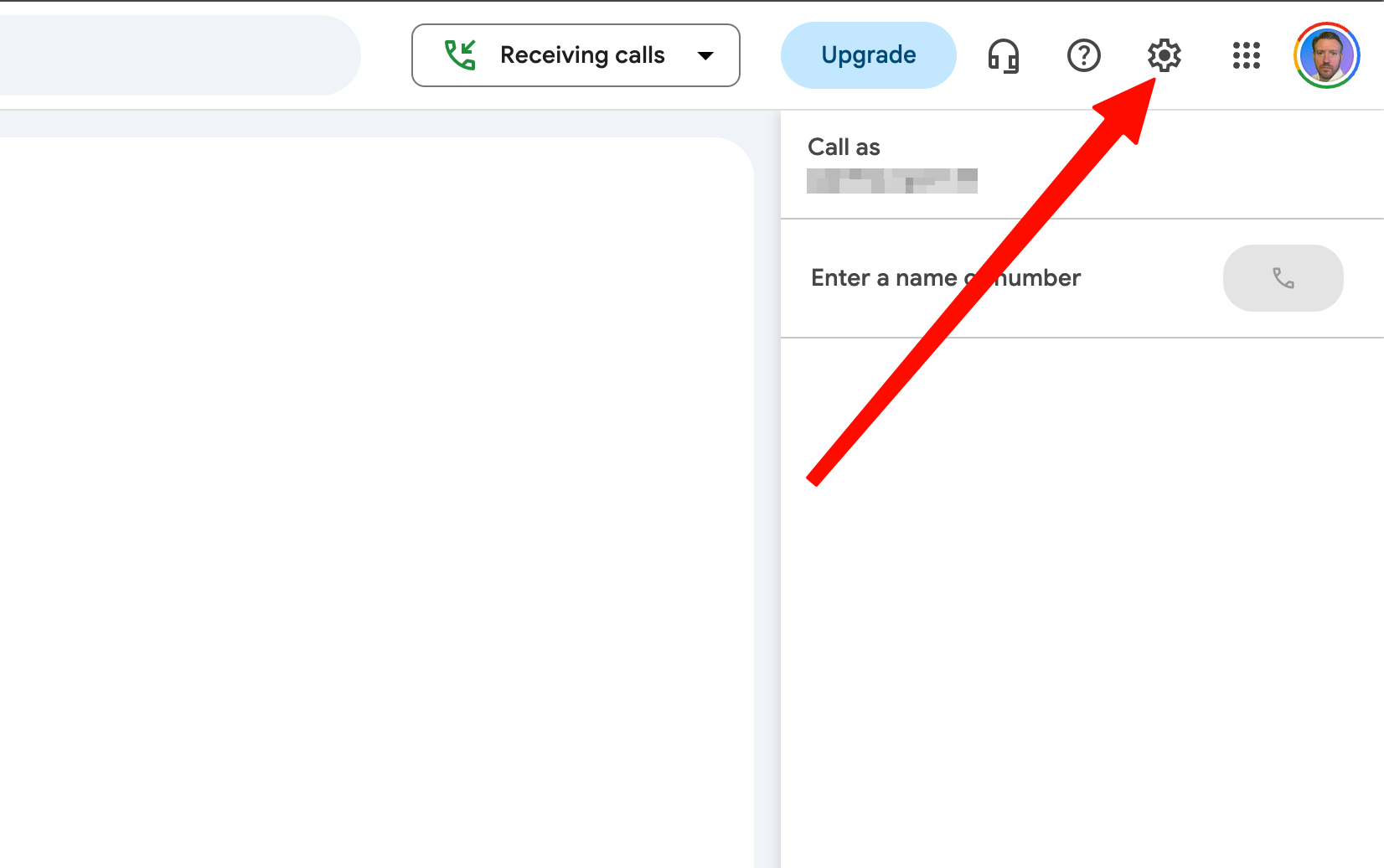
- Click the Settings (gear) icon in the top right.
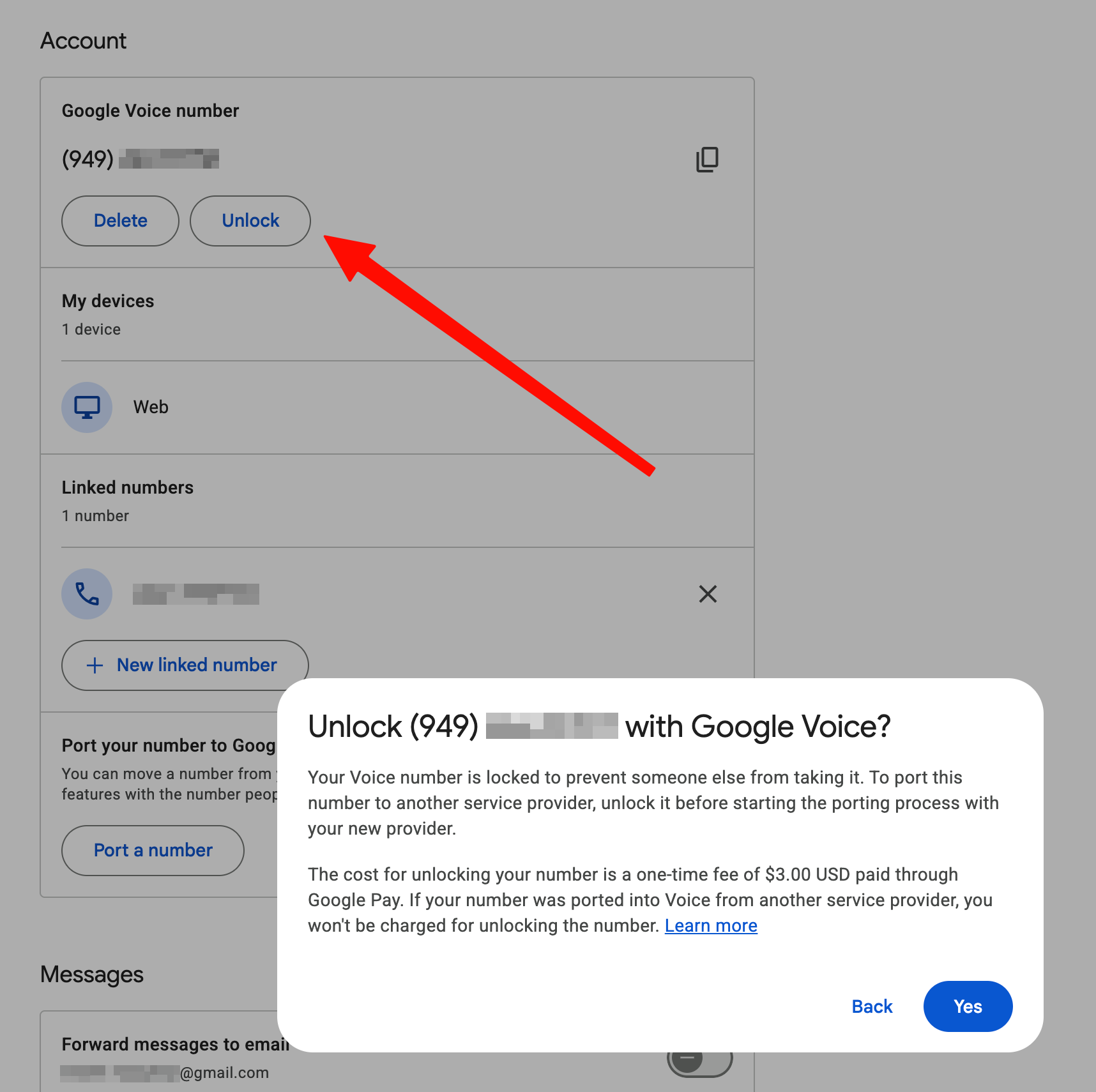
- Open the Account tab. Under your Google Voice number, click Unlock.
- Confirm, then pay the one-time $3 USD unlock fee through Google Pay. (If your number was originally ported into Google Voice from another carrier, unlocking is free.) Google confirms the unlock right away.
Move quickly once unlocked
The unlock has a limited validity window. If you wait too long to submit the port to Zinng, the number can re-lock to your Google account and you may have to pay the unlock fee again. We recommend completing Steps 2 and 3 the same day.
Step 2: Get Your Port-Out Info from Google
Unlike most carriers, Google Voice does not show you a special "account number" or "transfer PIN" on a port-out screen. The information your new provider needs is information you already have. Record these exactly:
| Phone number to port | Your Google Voice number |
| Account number | Your 10-digit Google Voice number itself. Google uses the number as the account number. |
| Transfer PIN | Your Google Voice voicemail PIN (the one you use to check voicemail from a different phone). This is not your Google account password. If you do not have one set, create or reset it first in Google Voice Settings → Voicemail. |
| Account holder name | The name on the Google account that owns the Google Voice number |
| Service address | A real US street address tied to the Google account. No PO boxes. If you do not have one on file, set one in your Google Voice settings before porting. |
| Authorized signer email | Email address that will sign the Letter of Authorization. Typically the Google account email. |
Everything must match Google's records exactly
A misspelled name, a wrong billing address, or the wrong PIN is the number one reason ports get rejected. Use the account holder name and address exactly as they appear on the Google account. You do not need a receipt for the $3 unlock fee, the four items above are all we need.
Step 3: Send Everything to Zinng
Reply to your Zinng contact's email (or send a new email to [email protected]) with all of the following:
- Your Google Voice number and its transfer PIN (your Google Voice voicemail PIN)
- All the account details from Step 2 (account holder name, service address, signer email)
- The Google account email that owns the Google Voice number
After we submit the port request, you will get an email asking you to digitally sign a Letter of Authorization (LOA). Sign it as soon as you get it. The port cannot start without your signature.
Step 4: Wait for the Port to Complete
Typical timeline
1 to 5 business days
During the port
Your number keeps working on Google Voice as normal
Cutover window
Brief outage when the number switches to Zinng
We will email you the moment your number goes live on Zinng. From that point, your AI receptionist is answering calls and SMS on your business number.
Step 5: Confirm Google Voice Has Released the Number
When the port completes, Google Voice automatically removes the number from your account. You do not need to manually cancel a paid Google Voice subscription unless you were on Google Workspace Voice (see the next section).
It's worth signing in to voice.google.com after we confirm the port to make sure the number is no longer listed under your account. If it still is, contact us and we will investigate.
If You're on Google Workspace Voice (Business Plan)
Google Voice for Workspace is a separate paid product from consumer Google Voice. The porting process is essentially the same, with three differences worth knowing:
- Your Workspace admin may need to be involved. If you are not the admin on the Workspace account, ask whoever is to either start the port on your behalf or grant you the permission to do it. Numbers assigned to user accounts can usually be ported by the user; numbers assigned to ring groups, auto attendants, or desk lines often require admin action.
- The unlock flow lives in the Workspace admin console at admin.google.com rather than voice.google.com, under Apps → Google Workspace → Voice → Phone numbers.
- You'll be billed for the user license until you remove it. Porting the number out does not cancel the Workspace Voice license itself. After the port completes, remove the user's Voice license in the admin console so you stop being billed.
If you are not sure which type of Google Voice account you have, reach out to us and we will help figure it out before we start.
Things to Know
Texts and voicemails do not transfer
Only the phone number itself moves. If you have important conversations or voicemails in Google Voice, save or screenshot them before the port completes.
Do not close your Google account or release the number early
The number has to stay active on Google Voice right up until the port lands with us. Closing the Google account or releasing the number through Google Voice settings before the port completes can result in the number being lost permanently.
Not every Google Voice number is eligible
A handful of edge cases prevent porting: numbers that were ported into Google Voice very recently, numbers tied to a suspended Google account, or numbers in specific Workspace configurations. If your number is not eligible, Google Voice will tell you what to fix before trying again.
The $3 fee is one-time
Google's unlock fee is charged once per port-out attempt. If your first attempt fails for any reason and you have to retry within the validity window, you typically do not pay again. If the unlock expires and you have to re-unlock, you do.
The number works normally during the port
Your Google Voice number keeps ringing your existing devices and sending SMS as normal during the port window. There is only a brief outage at the exact moment the number switches over to Zinng.
Frequently Asked Questions
How long does porting from Google Voice take?
Typically 1 to 5 business days from the time we submit the port request. Most Google Voice ports complete within 2 to 3 business days. We will email you the moment the port lands.
Will my number stop working during the port?
Your number continues to work normally on Google Voice during the port. There is a brief outage (usually a few minutes) at the exact moment the number switches over to Zinng.
Why does Google charge a $3 fee to port my own number out?
Google Voice numbers are locked to your Google account by default. The $3 fee is what Google charges to unlock the number so it can be moved to another carrier. It is a one-time fee per port-out attempt and goes to Google, not to Zinng.
Can I port my number out without a US street address?
No. Google Voice ports require a real US street address on the account. PO boxes are not accepted by the receiving carrier (Zinng's underlying network). If you do not have one on file, add one in your Google Voice or Google account settings before starting the port.
Do I need to cancel my Google Voice account?
For consumer Google Voice (the free version), no. Once the port completes, the number is automatically removed from your Google Voice account. The account itself stays active for any other numbers or features you still use. For Google Workspace Voice (paid), you'll also want to remove the user's Voice license in the Workspace admin console after the port lands, so you stop being billed for the seat.
What if my Google Voice number is not eligible to port out?
Google Voice will tell you why. Most often it is because the number was ported in too recently (within the last 30 to 90 days), the Google account is suspended, or there is a specific Workspace restriction. If you run into an eligibility error, send us a screenshot and we will help figure out the path forward.
What if I already tried to forward Google Voice calls to Zinng and it didn't work?
That is a known limitation of Google Voice's design and the most common reason customers end up porting. Google Voice's carrier check rejects most VoIP and cloud-provisioned numbers (including Zinng numbers) when you try to link them as a forwarding destination. Porting the number into Zinng skips that limitation entirely. We cover the technical reason in our Using Google Voice with Zinng doc.
Can I port a Google Workspace Voice number?
Yes. The process is essentially the same but the unlock flow lives in the Workspace admin console rather than voice.google.com, and your Workspace admin may need to be involved. See the Google Workspace Voice section above for the specifics.
Can I port a number from a carrier other than Google Voice?
Yes. Zinng supports porting from most US and Canadian carriers. The process is similar but the steps to get your account number and PIN vary by carrier. Contact us and we will walk you through it. We also have dedicated guides for Sideline and Bell Canada.
Ready to get started?
Set up your AI phone agent in minutes. No credit card required.
Try Zinng Free for 7 Days
About the Author
Timothy Bramlett
Co-Founder & CEO, Zinng
Timothy Bramlett is an American entrepreneur, software engineer, and product strategist. He is the founder of Zinng, an AI-powered phone agent platform that helps businesses never miss a customer call with intelligent call handling, real-time transcripts, and instant summaries.