This is a start-to-finish walkthrough of buying a domain for your business on GoDaddy, from the search box to the DNS settings. Our founder Tim Bramlett recorded it while buying a real domain, so every screenshot below is from that purchase.
Still deciding between registrars? Our guide on how to get a domain name for your business compares GoDaddy, Namecheap and Cloudflare, with real prices. Prefer Namecheap? See how to buy a domain on Namecheap.
Watch the video
The video runs about 11 minutes. The first four cover what to know before you buy; the purchase starts at 4:23. Everything in it is written out below.
The short answer
- Go to godaddy.com, type your business name in the search box and click Search Domains.
- Pick the .com if it's available, check what it renews at, and click Get It.
- In the cart, change the term from the default 2 Years to what you actually want.
- Leave Full Domain Protection, Microsoft 365 email and hosting off, then click Ready for Checkout.
- Sign in or create your account (turn on two-factor authentication), check the total, and click Complete Purchase.
Before you buy: what to know
A domain is your business's address on the internet. When someone types amazingbusiness.com, their computer asks a DNS server for the numeric address behind that name, then goes there. You're buying the name, nothing more.
A domain is not a website, and it's not email. You get neither with it. You set those up separately, and you point the domain at them.
- Get the .com. After 15 to 20 years of working with business owners, Tim's advice is simple: customers aren't technical, and they'll type .com anyway. No hyphens, no numbers.
- If the .com is taken, try variations. Add your city (joesplumbingirvine.com), add your service (joesplumbing.com), or change the order (plumbingbyjoe.com). You can make an offer to the current owner, but it's usually not worth it. AI can help you brainstorm.
- One year is fine to start. Longer terms can lock in a better rate, and you never really own a domain; you rent it year by year.
- Keep domain privacy on. GoDaddy includes it free and turns it on by default. Without it, your name, address, phone and email could be public.
- Leave auto-renew on and save a card that will keep working. GoDaddy has auto-renew on by default. Tim has seen business owners lose their domain, and it's not pretty.
- Skip the upsells. Your website platform usually handles SSL, you can get faster DNS free from Cloudflare, and hosting depends on how you build your site.
- Year one is often a promo price. Know what you'll pay every year after that.
- Register it yourself. Don't let an agency or web designer buy it for you. If one already did, ask them to transfer it to your account; that's possible in most cases. Use an email you'll always have, and turn on two-factor authentication.
Step 1: Search for your domain
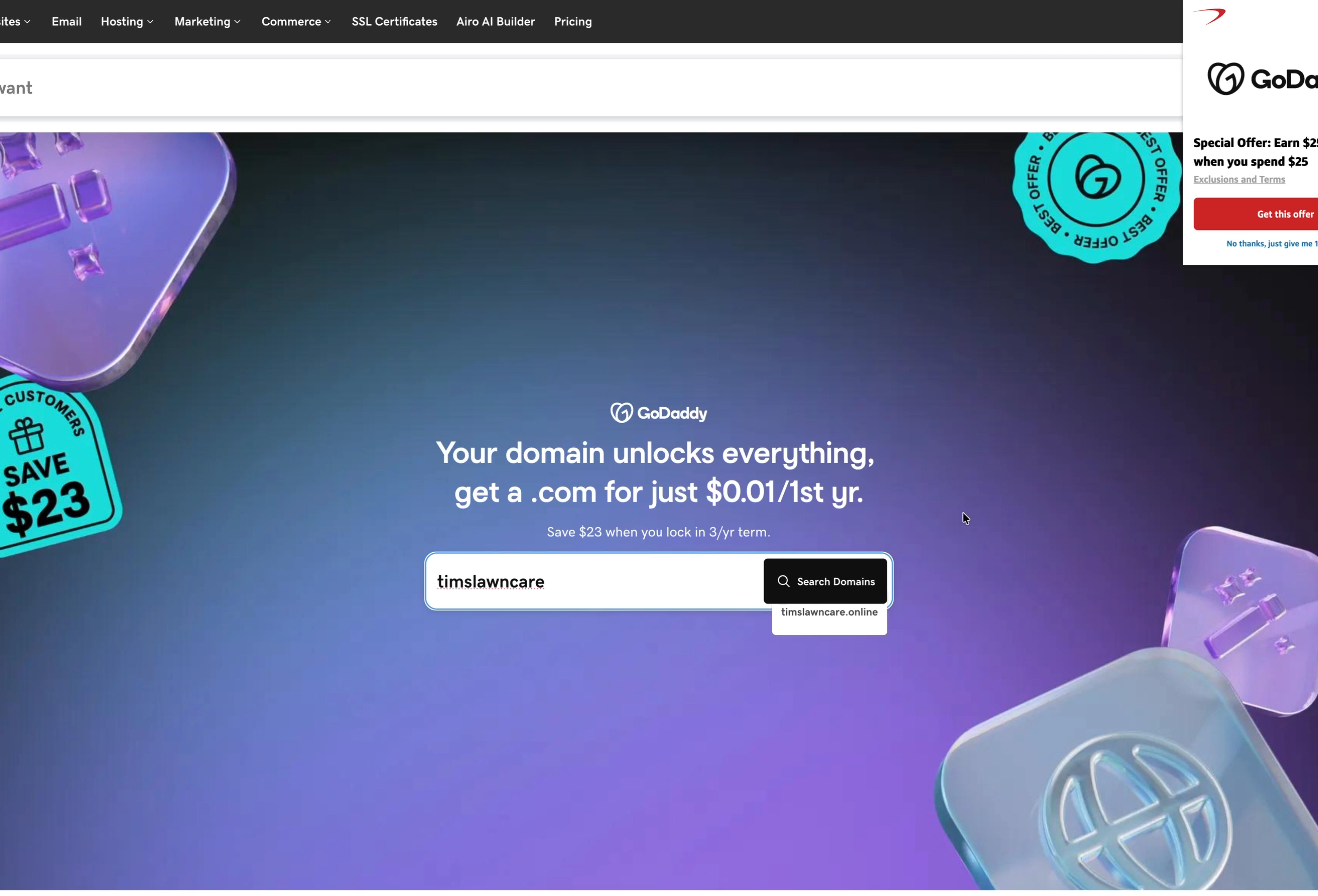
Go to godaddy.com, type the name you want into the search box and click Search Domains. You don't need to type an ending; GoDaddy shows the options.
Step 2: Pick your domain and check the renewal price
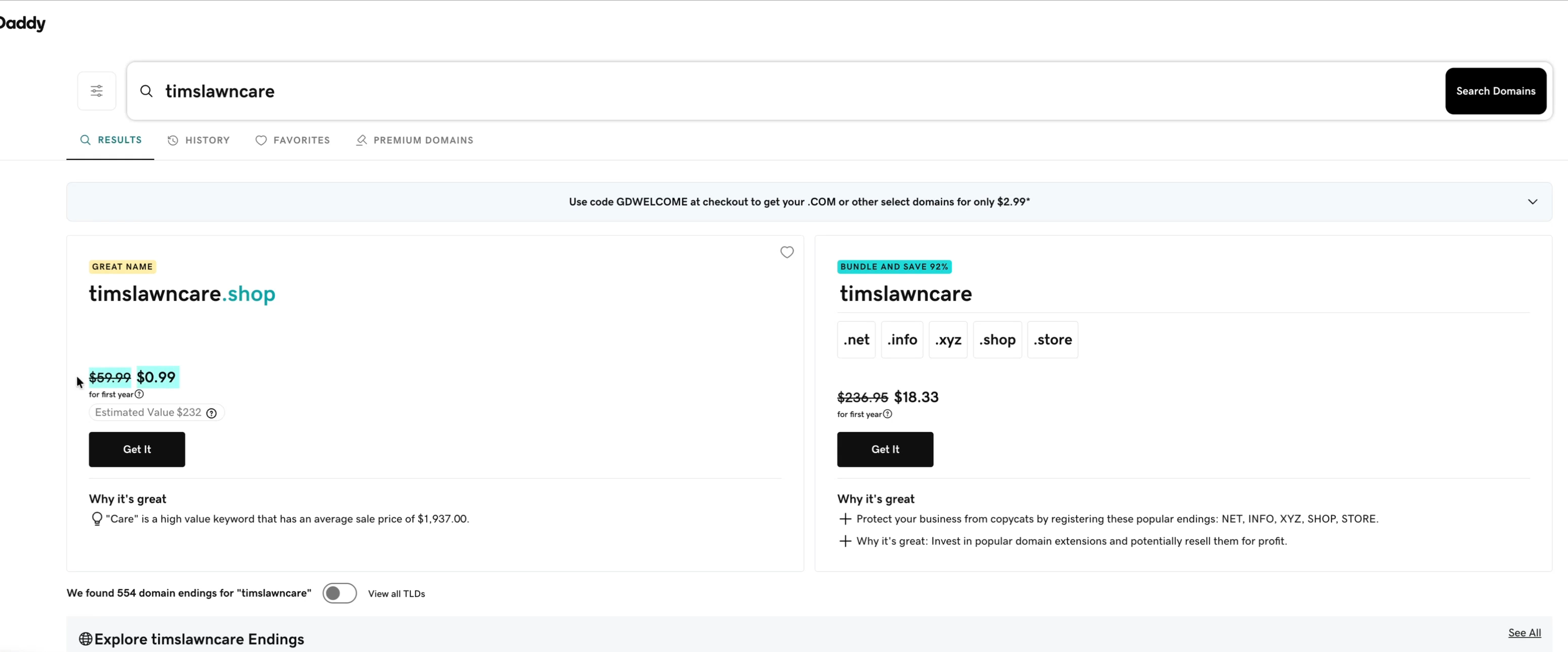
For the video, Tim bought timslawncare.shop rather than the .com, purely as a demo. It shows the trap well: $0.99 for the first year, then $59.99 a year, far more than a .com.
GoDaddy also pushes bundles of extra endings (.net, .info, .xyz, .store) "to protect your business from copycats." Most small businesses only need the one. Click Get It on the domain you want.
Step 3: Change the 2-year default
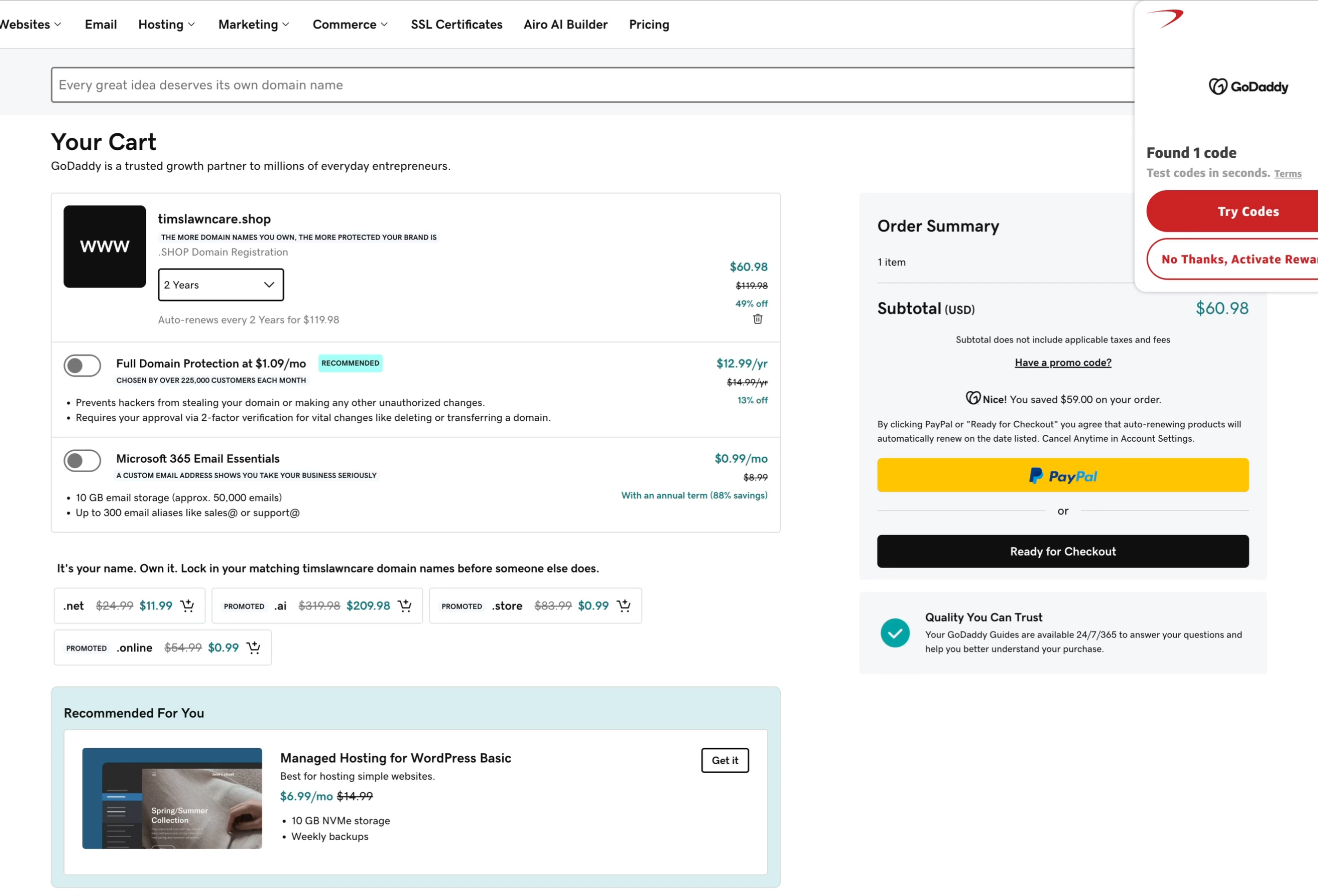
Watch this one. GoDaddy's cart defaulted to 2 Years, which would have charged $60.98 today and auto-renewed every two years for $119.98. Open the dropdown and pick the term you actually want. Tim chose 1 year, which dropped the cart to $0.99.
Step 4: Skip the upsells
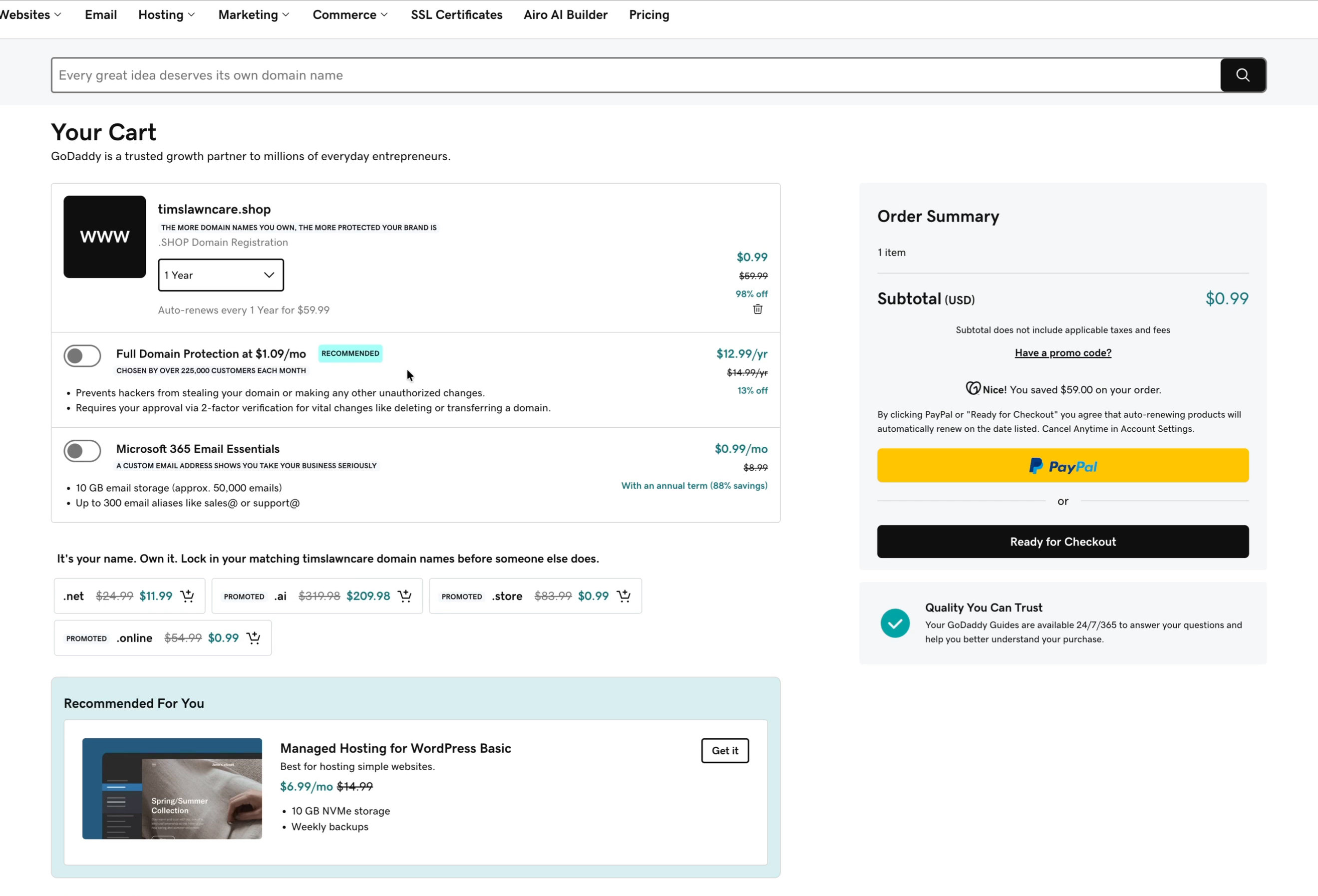
The cart offered three add-ons, all off by default. Leave them off:
- Full Domain Protection ($1.09 a month, billed $12.99 a year): you don't need it if two-factor authentication is on for your account. If you're nervous, it's there, but Tim's advice is to learn basic security habits instead.
- Microsoft 365 Email Essentials ($0.99 for the first month, then $8.99 a month): honestly a decent way to get business email, and a fair price. Tim's own pick is Google Workspace, which gives you the Gmail you already know for about the same price, unless you prefer Outlook.
- Managed Hosting for WordPress: WordPress is still a solid option in 2026, and "managed" means GoDaddy runs the server for you. But more businesses now build their site with AI tools, and you can add hosting any time later.
Skip the "Lock in your matching domain names" offers too, then click Ready for Checkout.
Step 5: Sign in and check out
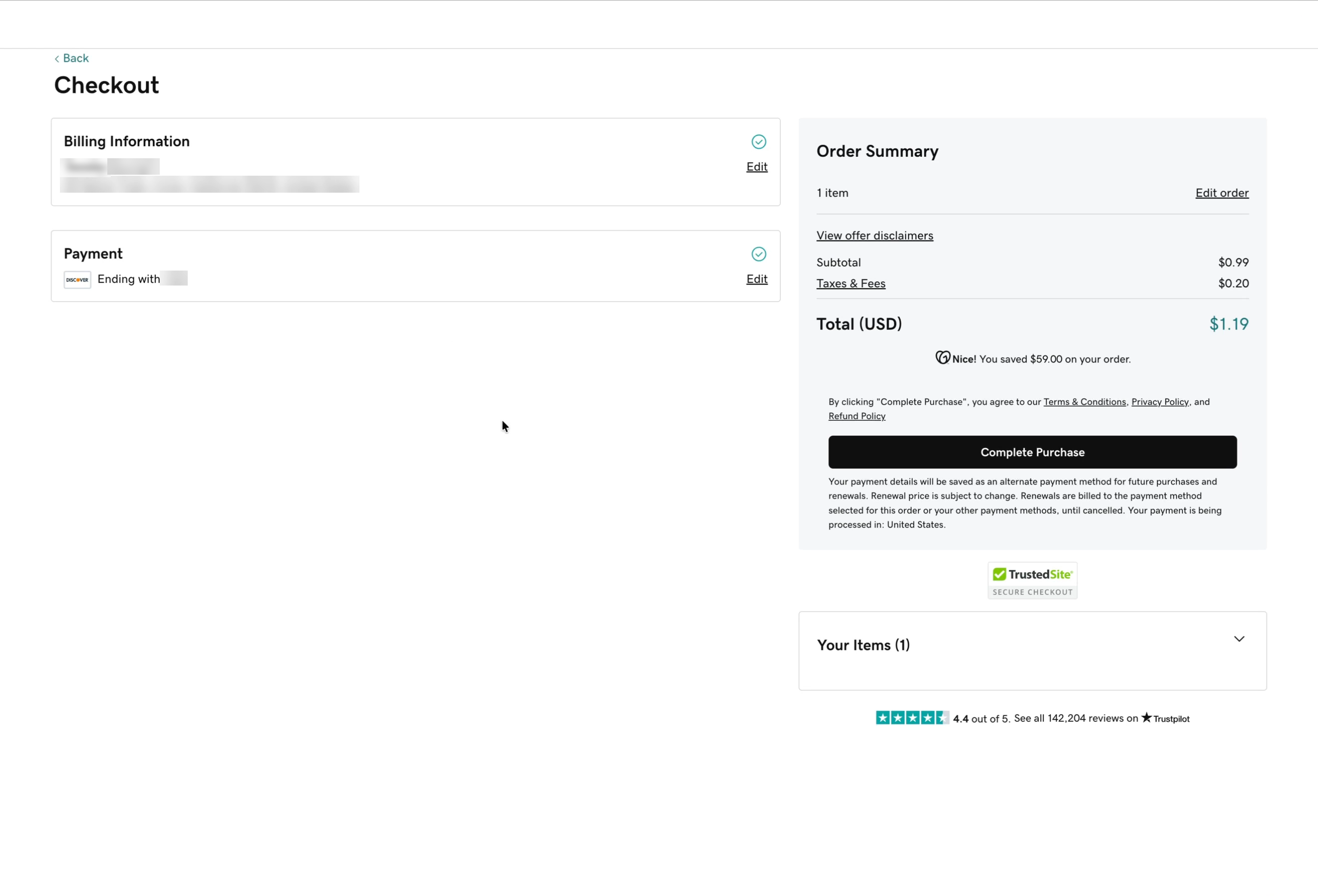
Sign in, or create a GoDaddy account and add your billing details. Turn on two-factor authentication so only you can get into the account. Then check the total is what you expect and click Complete Purchase.
Our total was $1.19: $0.99 for the domain plus $0.20 in taxes and fees. Note the fine print: your card is saved for renewals, which is what you want with auto-renew on.
Next: point your domain at your website
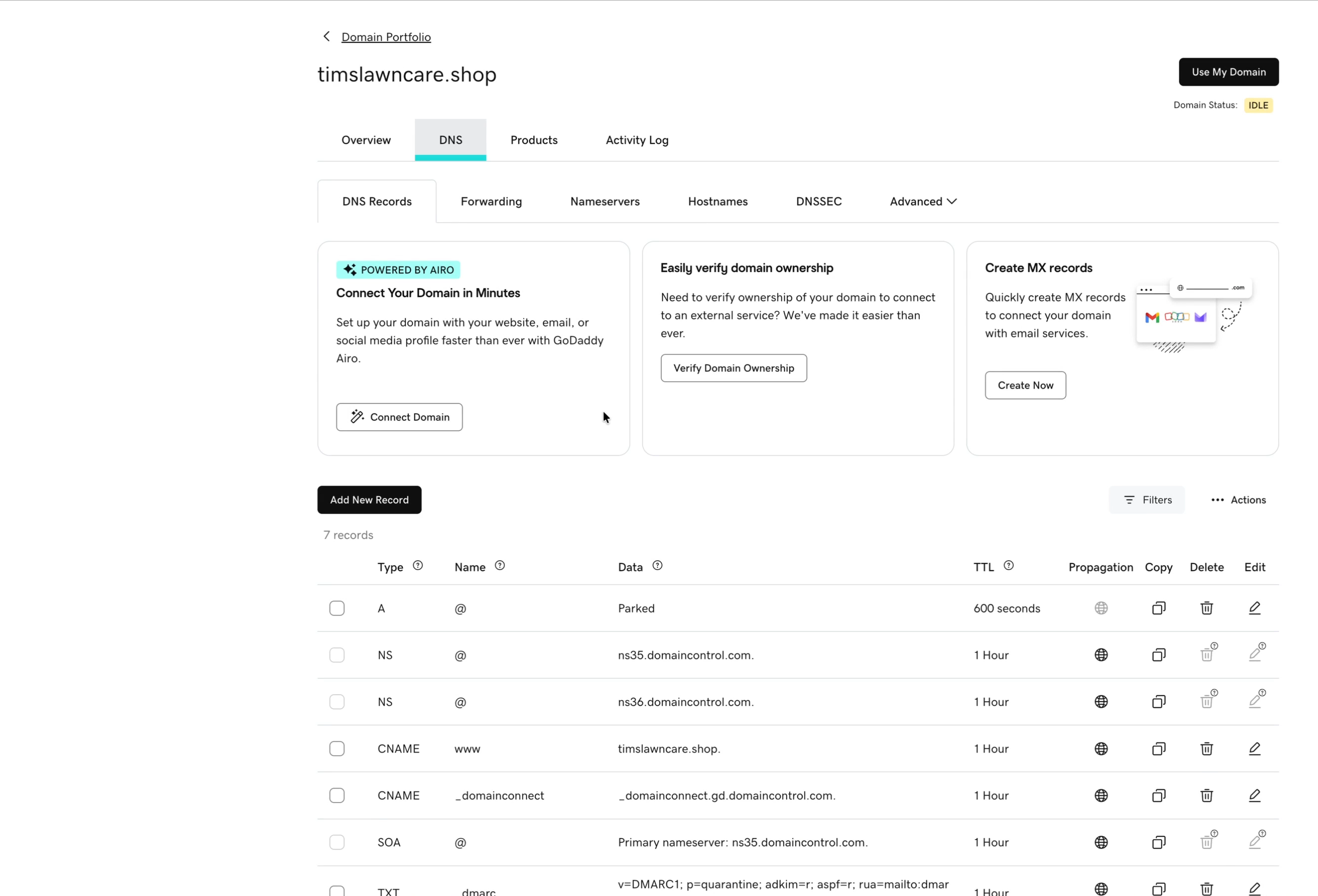
Your next steps depend on how you build your website, but the place you'll do it is the same. Go to your Domain Portfolio, click your domain and open the DNS tab.
GoDaddy is your registrar (where the domain is registered), and by default it also runs your DNS: the records that tell the internet where to send people who type your domain. A new domain's main record points to a GoDaddy "Parked" page. Your website platform will give you the records to enter here so your domain points at its servers.
Optional: move your DNS to Cloudflare
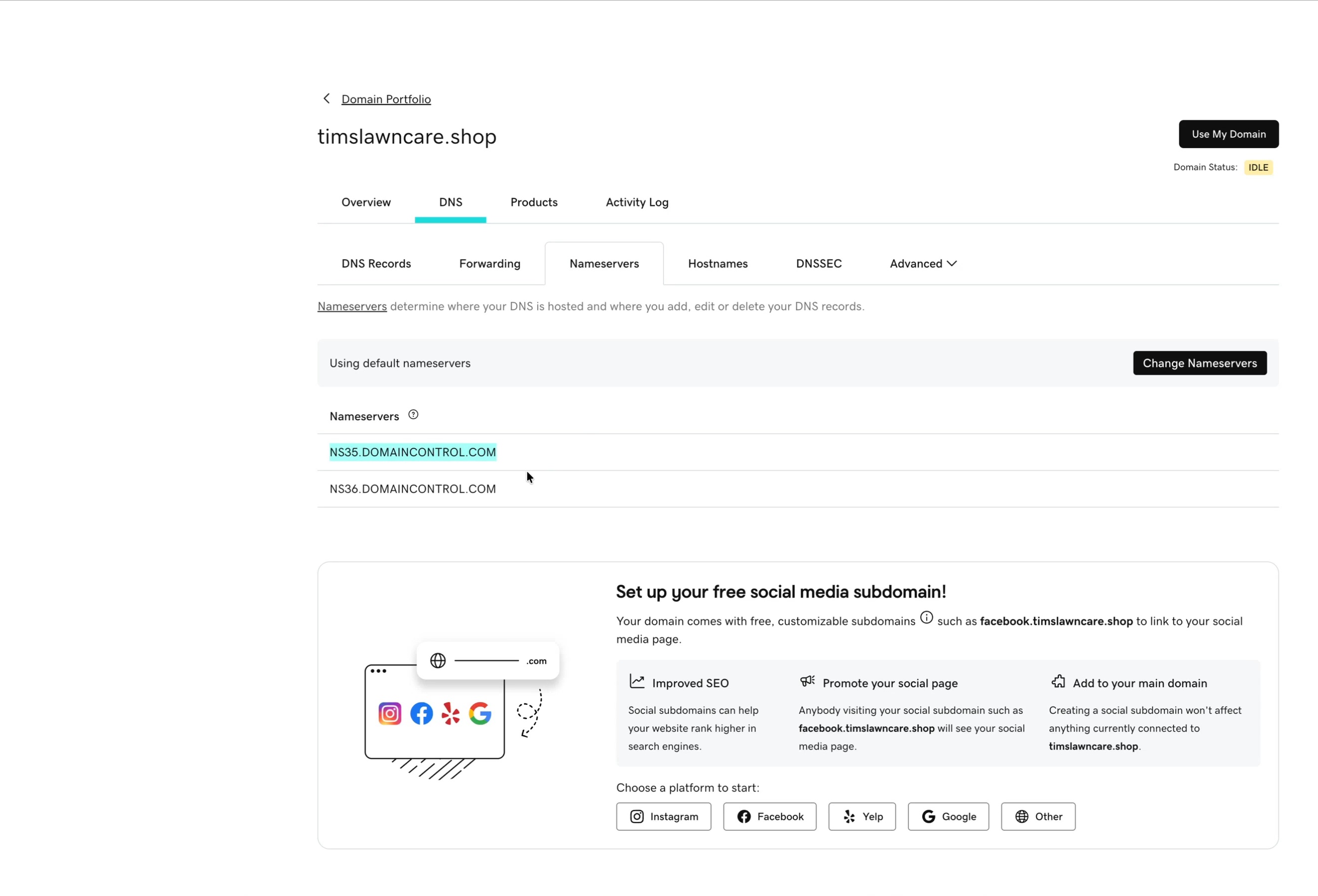
You don't have to use your registrar for DNS. The Nameservers tab says who controls your DNS records; by default that's GoDaddy's ns35 and ns36.domaincontrol.com. Click Change Nameservers and enter Cloudflare's, and your domain stays registered at GoDaddy while Cloudflare runs the DNS.
Cloudflare caches and spreads your site across its network for free, which speeds it up. Is that critical when you're starting out? Probably not. Using GoDaddy's DNS is perfectly fine, and you can switch later.
Once your domain is set up, check that email sent from it reaches inboxes with our free SPF, DKIM and DMARC checker. Need a business phone number to go with it? See how to get a business phone number.
Frequently asked questions
How do I buy a domain on GoDaddy?
Search for your name on godaddy.com, click Get It on the domain you want, change the cart's term from the 2-year default if needed, leave the add-ons off, click Ready for Checkout, sign in and click Complete Purchase.
How much does a .com cost on GoDaddy?
When we checked in October 2026, GoDaddy advertised a .com for $0.01 the first year, but only with a 3-year term ($45.99 up front), then $22.99 a year. Always check the renewal price and the term in your cart.
Do I need GoDaddy's Full Domain Protection?
Usually not. If two-factor authentication is on for your GoDaddy account, the extra $12.99 a year adds little for most small businesses.
Is domain privacy free on GoDaddy?
Yes. GoDaddy includes domain privacy free and turns it on by default.
Does buying a domain give me a website or email?
No. A domain is only the name. You set up a website and business email separately, then point the domain at them in the DNS settings.
Ready to get started?
Set up your AI phone agent in minutes. Try it free for 7 days.
Try Zinng Free for 7 Days
About the Author
Timothy Bramlett
Co-Founder & CEO, Zinng
Timothy Bramlett is an American entrepreneur, software engineer, and product strategist. He is the founder of Zinng, an AI-powered phone agent platform that helps businesses never miss a customer call with intelligent call handling, real-time transcripts, and instant summaries.