A domain name is your business's address online: the yourbusiness.com in your website and your email. Getting one takes about ten minutes and costs about the price of a lunch per year. The hard parts are picking a good name and not paying for extras you don't need.
We help small businesses set up their phones every day, and a domain is usually the first thing on the list after a phone number. Here's how we'd do it.
The short answer
- Pick a short, easy-to-spell name, ideally your business name or your service plus your town.
- Get the .com if it's available.
- Buy it from a domain registrar. We recommend one of three:
- Namecheap if you want the cheapest way to get started.
- GoDaddy if you want the easiest one to use.
- Cloudflare if your business already uses Cloudflare.
- Register it in your own name, with an email address you'll always have, and turn on auto-renew.
Step 1: Pick a name
Your customers will type this name, say it on the phone and read it off the side of your truck. Make it easy for them:
- Short and easy to spell. If you have to spell it out every time you say it, keep looking.
- No hyphens or numbers if you can avoid them. "Smith-Plumbing-1" gets misheard and mistyped.
- Your business name first. If it's taken, try adding your service or your town: smithplumbing.com, then smithplumbingdallas.com or callsmithplumbing.com.
- Say it out loud. Read it to someone over the phone and ask them to type it. If they get it wrong, so will customers.
- Check you're not stepping on someone's trademark before you put it on signs and trucks.
Every registrar's search box tells you instantly whether a name is free. If the name you want is taken, don't pay a "premium" or aftermarket price for it unless the name is truly worth it to your business. A slightly longer name you own outright is better than a perfect one you overpaid for.
Step 2: .com or something else?
Get the .com if you can. It's what customers assume and type by default, so an email to [email protected] has a habit of ending up at someone else's .com.
- .com: the default. Choose it whenever it's available.
- Your country's ending (.ca, .co.uk, .com.au) is a good choice if you only serve customers in that country.
- .net, .co, .biz and newer endings (.plumbing, .law) work, but expect people to type .com by mistake. If you use one, consider buying the .com too if it's cheap.
Step 3: Choose where to buy it
You buy a domain from a registrar. All of them sell the same .com names; they differ in price, ease of use and how hard they push extras. These are the three we recommend to business owners:
Namecheap
Cheapest to start
The lowest first-year .com price of the three, free privacy for life, and a simple checkout. Turn on auto-renew yourself; it isn't on by default.
GoDaddy
Easiest
The best-known name, with the most hand-holding for first-timers. Checkout offers plenty of extras, so read the cart carefully before you pay.
Cloudflare
If you already use it
Sells domains at cost with no markup, so it's the cheapest over the years. The catch: your domain must use Cloudflare's DNS, and it's more technical than the other two.
Our rule of thumb: if you're doing it yourself and want the lowest price to get started, use Namecheap. If you'd rather have the most guidance, use GoDaddy. If Cloudflare is already part of your setup, keep everything in one place there.
What a business domain costs
The number to compare is the renewal price, not the first-year price. Many registrars discount the first year, then charge more every year after that.
Here's what a .com cost at each registrar when we checked on October 15, 2026:
| Registrar | .com first year | Renews at | 5 years total | Free privacy | Auto-renew |
|---|---|---|---|---|---|
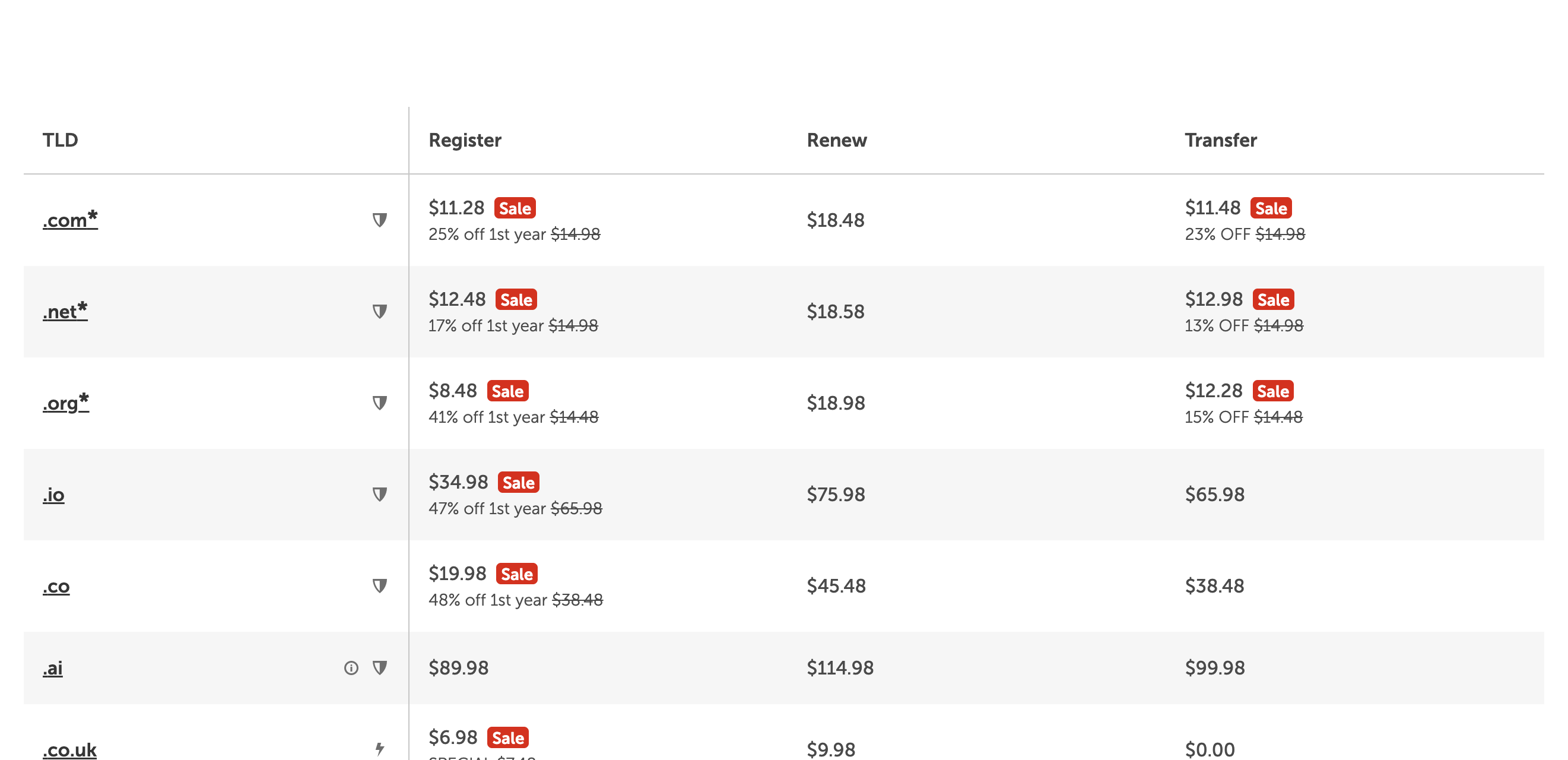
| Namecheap | $11.28* | $18.48/yr | $85.20 | Yes, for life | Off; turn it on |
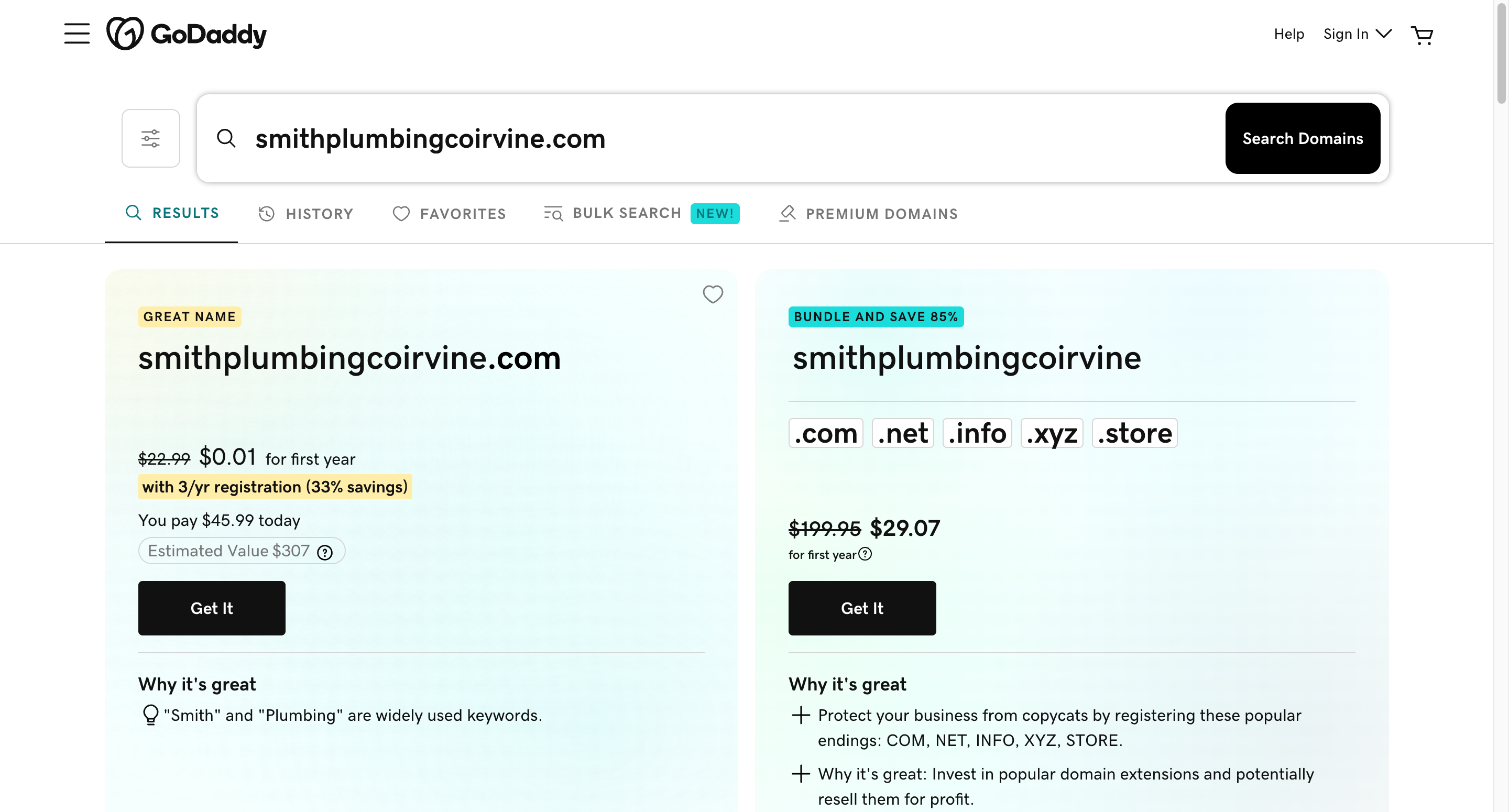
| GoDaddy | $0.01, but only with a 3-year term ($45.99 up front) | $22.99/yr | $91.97 | Yes, on by default | On |
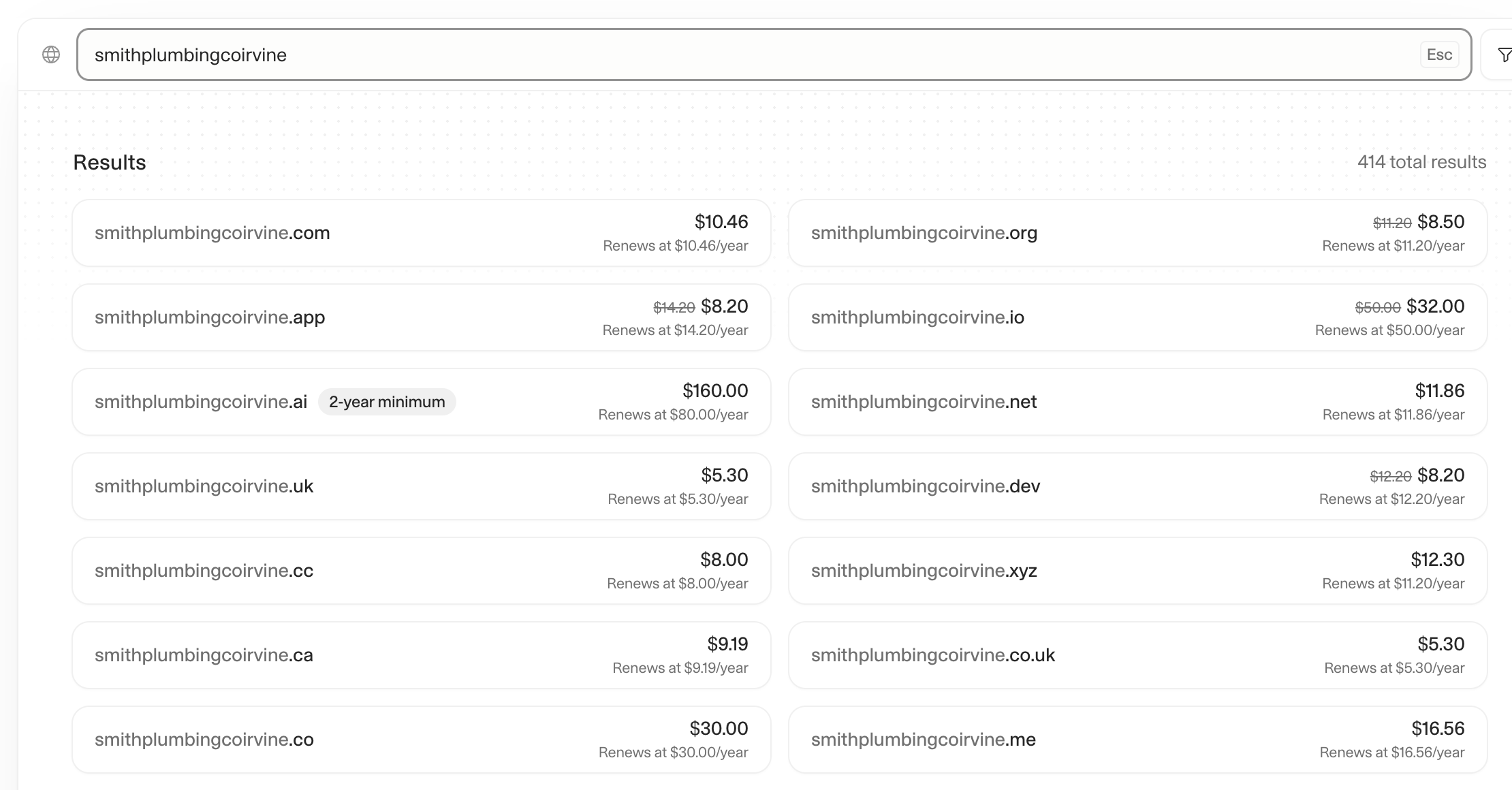
| Cloudflare | $10.46 | $10.46/yr | $52.30 | Yes (WHOIS redaction) | On |
Before tax. Namecheap and GoDaddy may add the $0.20-a-year ICANN fee at checkout; Cloudflare's price already includes it. *Namecheap also showed new-customer codes that cut the first .com year to about $6.48; codes change often. The 5-year total is the first-year price plus four renewals (for GoDaddy, the $45.99 three-year term plus two renewals).
So Namecheap is the cheapest way to get started, Cloudflare is the cheapest over time, and GoDaddy's $0.01 headline really means $45.99 today for three years, then $22.99 a year.
Using Cloudflare? Domains registered there must use Cloudflare's nameservers (DNS). That's no problem if your site already runs on Cloudflare, but if you or your web person want a different DNS provider, you'd have to move the domain to another registrar. You also need a Cloudflare account with a verified email.
Step 4: At checkout, what to keep and what to skip
Checkout is where a domain's cost gets inflated. Here's what to keep and what to skip:
- Keep: privacy protection. It hides your name, address and phone number from public domain records, which cuts down on spam calls and junk mail. All three of our picks include it free, so never pay extra for it.
- Keep: auto-renew. If a domain expires, your website and email stop working, and someone else can buy the name. GoDaddy and Cloudflare turn it on by default; at Namecheap you have to switch it on and mark a card "Use for auto-renewal."
- Consider: more than one year. It locks in the price and means one less renewal to think about.
- Skip for now: website builders, hosting, SSL certificates and email bundles. You can add them later if you need them, and you may get them cheaper or free elsewhere.
- Skip: extra endings you don't need. Registrars will suggest .net, .org and .biz versions of your name. GoDaddy, for example, showed a "Bundle and save 85%" five-ending bundle next to our search. Most small businesses only need the one.
Step 5: After you buy it
- Check who owns it. The registrant should be you or your business, not your web designer or an employee, and the account email should be one you'll always have.
- Turn on two-factor sign-in for your registrar account. Whoever controls the account controls your website and email.
- Set up business email on your domain (for example [email protected]). It looks more professional than a Gmail address on an invoice.
- Protect your email from spoofing. Our free SPF, DKIM and DMARC checker shows whether your domain's email is set up to reach inboxes, not spam.
- Point it at your website, or ask your web designer to connect it.
- Add it to your Google Business Profile, so customers searching for you find your site.
Want a matching business phone line too? See our guide on how to get a business phone number.
Mistakes to avoid
- Letting someone else register it for you. If a web designer or employee registers the domain in their own account, getting it back later can be a fight. Buy it yourself and give them access.
- Choosing on first-year price alone. A one-cent first year can mean paying for three years up front and $22.99 a year after that.
- Letting it expire. Keep auto-renew on and keep the card on file current.
- Using an email address on the same domain as the account email. If the domain lapses, the renewal reminders go to an inbox that no longer works. Use a personal address you'll always have.
Sources
- Namecheap: domain pricing, free domain privacy and auto-renewal setup.
- GoDaddy: domain search (price and term shown in the pricing tooltip) and What is Domain Privacy?
- Cloudflare: Cloudflare Registrar and Register a new domain (auto-renew, Cloudflare nameservers).
- All prices captured logged out on October 15, 2026, before tax. Prices change with promotions, so check before you buy.
Frequently asked questions
How do I get a domain name for my business?
Pick a short, easy-to-spell name, check that the .com is available at a domain registrar such as Namecheap, GoDaddy or Cloudflare, and buy it in your own name with auto-renew on. It takes about ten minutes.
How much does a business domain cost?
About $10 to $23 a year for a .com. When we checked in October 2026, Cloudflare charged $10.46 a year, Namecheap $11.28 the first year then $18.48, and GoDaddy $45.99 for a three-year term then $22.99 a year.
What is the best domain registrar for a small business?
Namecheap if you want the cheapest way to get started, GoDaddy if you want the easiest experience, and Cloudflare if your business already uses Cloudflare (it's also the cheapest over time). Compare renewal prices, not just the first year.
Should my business domain be .com?
Yes, if it's available. Customers type .com by default, so other endings get mistyped. A country ending like .ca or .co.uk is also a good choice if you only serve that country.
Who should own my business domain?
You or your business. Register it in your own registrar account with an email address you'll always have, and give your web designer access instead of letting them register it for you.
Ready to get started?
Set up your AI phone agent in minutes. Try it free for 7 days.
Try Zinng Free for 7 Days
About the Author
Timothy Bramlett
Co-Founder & CEO, Zinng
Timothy Bramlett is an American entrepreneur, software engineer, and product strategist. He is the founder of Zinng, an AI-powered phone agent platform that helps businesses never miss a customer call with intelligent call handling, real-time transcripts, and instant summaries.