If your business number is currently on Grasshopper and you want your Zinng AI receptionist to answer calls and texts on that number, you need to transfer (port) it to Zinng. This guide walks you through the entire process step by step. It takes about 10 minutes of your time, plus roughly 1 to 2 weeks for the port itself to complete (longer for toll-free numbers, see the note below).
Important
Do not cancel your Grasshopper account until the port is fully complete. If you cancel early, you can lose the number permanently. Your Grasshopper service keeps working the whole time and cancels on its own once the number moves.
Local vs Toll-Free: Which Applies to You
There are two versions of this process, and which one you follow depends entirely on whether your number is a regular local number or a toll-free number. Read this first so you know which path you are on.
Local number (a normal area-code number)
This is the simple path. All you need is your account number, your Support PIN, and your billing name and address exactly as Grasshopper has them. We send you a Letter of Authorization to sign and handle the rest.
Timeline: about 1 to 2 weeks.
Toll-free number (800, 888, 877, 866, 855, 844, 833)
A bit more involved. Toll-free numbers move through a separate national process (a RespOrg change), and because Grasshopper resells service on an underlying carrier, you will likely need a proper bill or a Customer Service Record (CSR) that shows your account number and address. Details below.
Timeline: about 2 to 4 weeks.
Everything in Steps 1 through 5 applies to both. If you have a toll-free number, there is one extra step (the Toll-Free Only section) that a local number can skip. Your number keeps working the entire time either way.
What You'll Need
For any number (local or toll-free):
- Access to your Grasshopper admin portal (dashboard.grasshopper.com or the Grasshopper app), with admin permissions
- Your account number (your Customer ID) and your 4-digit Primary PIN
- Your Grasshopper billing name and address, exactly as they appear on your account
Extra for toll-free (800) numbers:
- A recent Grasshopper bill or invoice (last 30 days) that shows your account number and address, or a Customer Service Record (CSR) from Grasshopper if the invoice does not show those details. See the Toll-Free Only section.
Step 1: Find Your Account Number and PIN
Almost everything a port needs lives on a single screen in Grasshopper. Sign in to your Grasshopper admin portal and go to Settings → Account (you need admin permissions to see it). On that page you will find:
- Account number — shown as your Customer ID. It is usually your main Grasshopper phone number.
- 4-digit PIN — the Primary PIN field. If one is not set, enter a new 4-digit number there. Grasshopper does not use a separate "port-out" or "transfer" PIN, this is the one a port uses.
- Billing name and address — the Contact Info section (Company Name and Contact Address). Copy these exactly.
- Your invoices — under View Previous Invoices, pick the most recent month and click Download Invoice. You only need this for a toll-free port (see Step 2).
Grasshopper has two admin portal styles (the "Legacy Admin Portal" and the newer "Admin Portal"), but on both the path is Settings → Account. If you cannot find any of the above, call Grasshopper Support at 1-800-820-8210 and ask for your account number and the PIN needed to port your number out.
Step 2: Gather Your Account Details
Collect the following so the port goes through on the first try. The name and address must match Grasshopper's records exactly, mismatches are the most common cause of port delays.
- The phone number(s) you want to port
- Your account number (Customer ID)
- Your 4-digit Primary PIN
- The account holder / billing name on the Grasshopper account
- The address on file with Grasshopper (from Contact Info)
- Toll-free numbers only: your most recent Grasshopper bill or invoice, or a CSR (see the next section)
Porting a local number? You can skip the next section and go straight to Step 3, the account number, PIN, and matching name and address are all that a local port needs.
Toll-Free Only: Get a Bill or CSR That Shows Your Account Details
This section only applies if you are porting a toll-free number (800, 888, 877, 866, 855, 844, or 833). Local numbers do not need it.
A toll-free port requires a document that proves the account details: your account number, the account holder name, and the service address. First try downloading your latest invoice from Settings → Account → View Previous Invoices → Download Invoice.
Here is the catch. Grasshopper resells phone service on top of an underlying carrier, and the invoice you download is often just a credit-card charge receipt. It may not actually print your account number or service address. If that is the case, do one of the following:
- Send a screenshot of Settings → Account showing your Customer ID and Contact Info alongside the invoice, so the account number and address are visible, or
- Request a Customer Service Record (CSR) from Grasshopper. The CSR is the official record of your account number, name, and address as the underlying carrier has them, and it is the document that reliably unblocks a toll-free port. Call Grasshopper Support at 1-800-820-8210 or email [email protected] and ask for your CSR for porting.
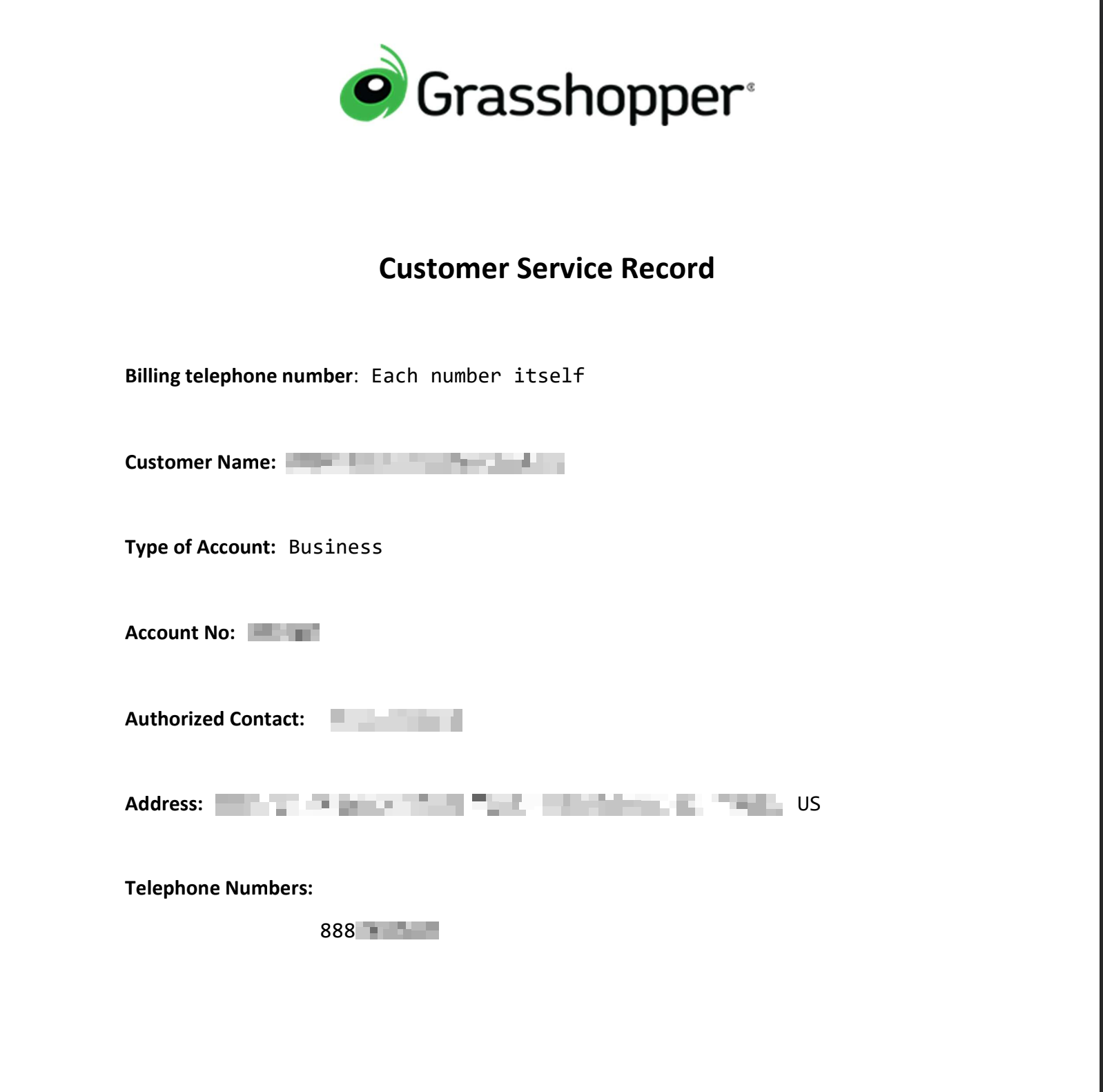
Grasshopper Support will email you the CSR. It is a one-page document that lists your account number, customer name, authorized contact, and service address. Here is what one looks like (details blurred):
Use the Account No from the CSR
The CSR usually lists a separate Account No (a short number, for example 107600) that is different from your phone number. In the self-serve portal your account number often shows as your main number, but when the CSR lists a distinct Account No, that number from the CSR is the authoritative one to use for the port. If they differ, go with what the CSR says.
Not sure which you need? Just send us whatever your invoice shows and we will tell you if it is enough or if we need the CSR. We can also request the CSR from Grasshopper on your behalf.
Step 3: Send Your Details to Zinng
Start your Zinng trial, then send your Zinng contact (or email [email protected]) the number you are porting, your account number, your Primary PIN, and the billing name and address on file. For a toll-free number, also include your most recent bill or your Customer Service Record (CSR).
From there, number porting is our job. We handle the carrier side and keep you posted until your number is live on Zinng.
Step 4: Sign the Letter of Authorization
Once we have your details (and, for a toll-free number, your bill or CSR), we prepare a Letter of Authorization (LOA) and send it to you. The LOA is what gives us permission to move the number on your behalf, and it is a normal part of every port, local or toll-free. All you have to do is sign it and send it back.
The LOA usually arrives as a PDF. If you are not sure how to sign a PDF, you do not need to print anything, you can sign it online for free in a couple of minutes. We have a short walkthrough here: How to Sign a PDF for Free. Once it is signed, send it back to us and we start the port.
Step 5: Wait for the Port to Complete
Grasshopper port-outs typically take about 1 to 2 weeks, depending on how many numbers you are moving. Toll-free numbers (800, 888, 877, and similar) take longer, usually around 2 to 4 weeks, because they go through a separate toll-free porting process. Your number keeps working on Grasshopper the entire time, so you will not miss calls during the transfer. There is usually a brief cutover (a few minutes) at the exact moment the number switches to Zinng. We will email you when it goes live.
Step 6: Cancel Your Grasshopper Account
Only after we confirm the port is complete should you cancel your Grasshopper plan. Once the number has moved, Grasshopper service for that number typically cancels on its own, but check your account and close out anything remaining so you are not billed further.
Things to Know
- It is free. Grasshopper does not charge a fee to port your number out.
- Keep your account active. Do not cancel Grasshopper until the port is done, or you risk losing the number.
- US and Canada, local and toll-free. Grasshopper local numbers and North American toll-free numbers can be ported. International numbers cannot.
- Toll-free needs one extra document. Local numbers just need your account number, PIN, and matching name and address. Toll-free numbers also need a recent bill or a Customer Service Record (CSR), because they go through the separate RespOrg process.
- Details must match. The account name and address you give us must match Grasshopper's records exactly, or the port can be rejected.
Ready to get started?
Set up your AI phone agent in minutes. No credit card required.
Try Zinng Free for 7 Days
About the Author
Timothy Bramlett
Co-Founder & CEO, Zinng
Timothy Bramlett is an American entrepreneur, software engineer, and product strategist. He is the founder of Zinng, an AI-powered phone agent platform that helps businesses never miss a customer call with intelligent call handling, real-time transcripts, and instant summaries.