Most callers who reach a small business voicemail hang up without leaving a message. In a 2016 Moneypenny report, it was 69% of them.
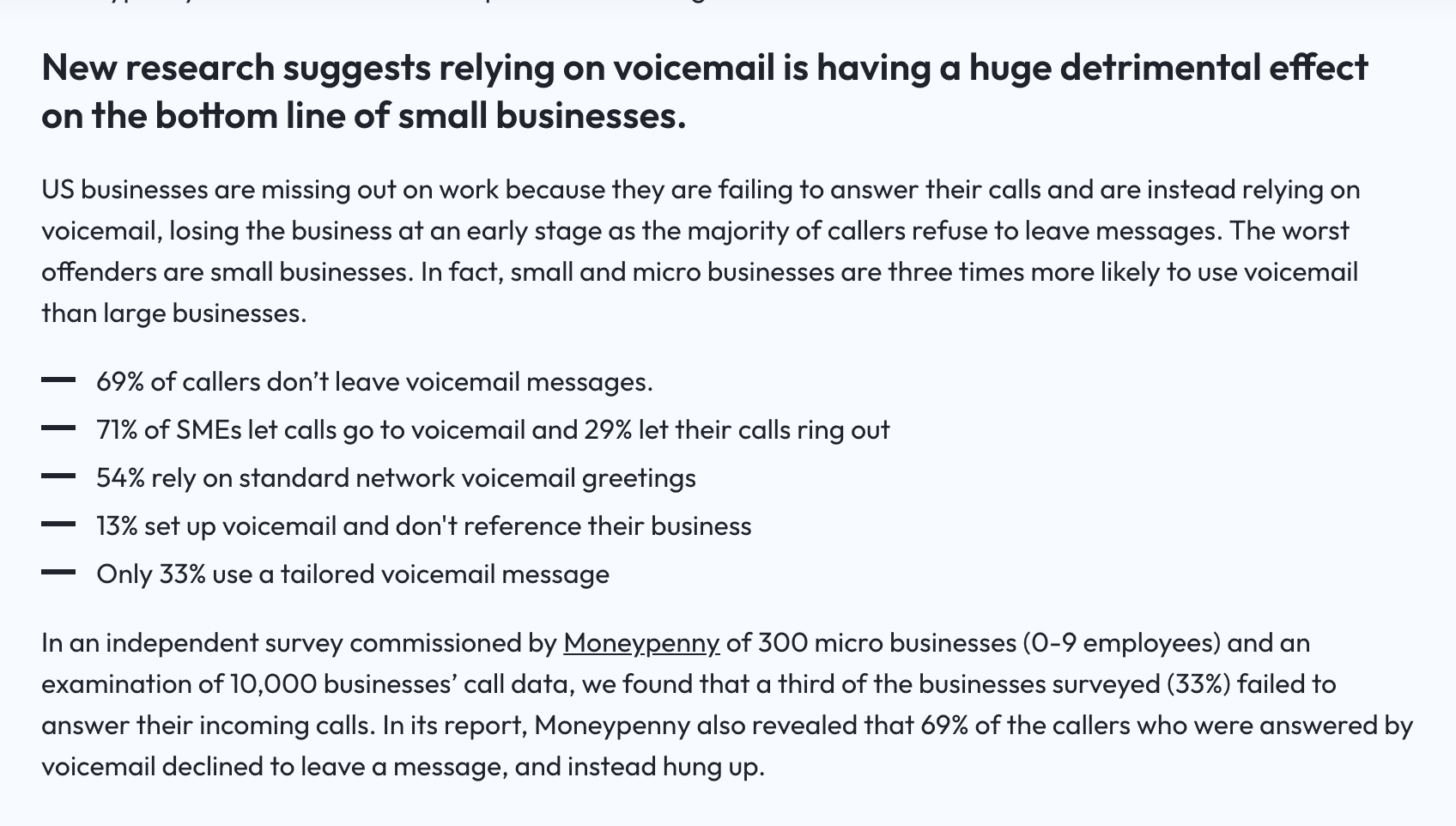
So an out-of-office greeting has one job. It has to give the caller a reason to wait for you, or somewhere better to go.
Below are 15 out-of-office voicemail scripts you can read straight into your phone. They cover vacations, holidays, sick days, lunch, after hours, long leave, and the owner who is the only one answering.
What to include in an out-of-office voicemail greeting
Every good out-of-office greeting answers four questions for the caller. Google's own summary for this search lists the same ones.
Keep the whole thing under 30 seconds. A common tip is to say you're back one day later than you really are, so you have a day to catch up.
15 out-of-office voicemail greeting examples
Swap the brackets for your own details. Read each one out loud once before you record it, because what looks fine on paper can sound stiff.
Vacation
1. Vacation, with a backup person
"Hi, you've reached [Name] at [Business]. I'm out of the office until [Monday, June 9] with no access to messages. If you need help before then, call [Backup Name] at [number]."
2. Vacation, checking messages
"Hi, this is [Name] with [Business]. I'm away until [date] but checking messages once a day, so leave your name, number and what you need. I'll get back to you within one business day."
Holiday closure
3. Single holiday
"Thanks for calling [Business]. We're closed today for [Thanksgiving] and back at [8 a.m. on Friday, November 27]. Leave a message and we'll call you back that morning."
4. Holiday week
"Thanks for calling [Business]. Our office is closed from [December 24] through [January 1] and reopens [Monday, January 4]. You can still book online at [website], and we'll return messages when we're back."
Sick day
None of the top three Google results for this search include a sick day greeting. Keep it short and skip the details; nobody needs to hear about your fever.
5. Out sick today
"Hi, you've reached [Name] at [Business]. I'm out of the office today and plan to be back [tomorrow]. Leave a message and I'll call you back then, or call [Backup Name] at [number] if it's urgent."
6. Business closed for illness
"Thanks for calling [Business]. We're closed unexpectedly today and are reaching out to everyone with an appointment to reschedule. If we haven't called you yet, leave your name and number and we'll call you first thing tomorrow."
Lunch or a short break
7. Lunch hour
"Thanks for calling [Business]. We're at lunch until [1 p.m.] and will call you back this afternoon. Leave your name and number after the tone."
After hours and weekends
8. Closed for the night
"Thanks for calling [Business]. We're open [Monday through Friday, 8 to 5], and we'll call you back the next business morning. Leave your name, number and the reason for your call."
9. After hours, with an emergency line
"You've reached [Business] after hours. If this is an emergency like [a water leak or no heat], call [on-call number] now. For anything else, leave a message and we'll call you back in the morning."
Extended leave
10. Parental or medical leave
"Hi, you've reached [Name] at [Business]. I'm on leave until [month] and not checking this voicemail. [Backup Name] is covering my clients and can be reached at [number or email]."
11. Leave with no set return date
"Hi, this is [Name] at [Business]. I'm away from the office for a while, and this mailbox isn't being checked. Please call our main line at [number] so someone can help you right away."
Travel and events
12. Business trip or trade show
"Hi, you've reached [Name]. I'm at [the trade show] through [Thursday] with limited time for calls. Leave a message, or text this number and I'll reply between sessions."
13. Weather or emergency closure
"Thanks for calling [Business]. We're closed today because of [the storm] and expect to reopen [tomorrow at 9]. Check [website or Facebook page] for updates, and leave a message if you'd like a call back."
When you're the only one answering
14. On a job
"Hi, you've reached [Name] with [Business]. I'm on a job right now and will call you back within [two hours]. Leave a message, or text this number with your address and what's going on."
15. Owner away, no backup
"Thanks for calling [Business], this is [Name]. I'm away until [date] and will return every message on [the day I'm back]. If you need [an appointment or a quote], you can request one anytime at [website]."
Need a greeting for normal business hours too? Our business voicemail greeting scripts cover the everyday ones.
Out-of-office greetings when you're the only one
Most out-of-office examples online assume you work in an office with a coworker to send callers to. If you run the business alone, there's no "please contact my colleague."
Owners in r/smallbusiness handle it by telling callers how to reach them faster. This one asks for a text instead of a voicemail:

Another owner keeps it simple and suggests saying how soon you'll call back. They also leave their email out of the greeting, since spammers grab it:
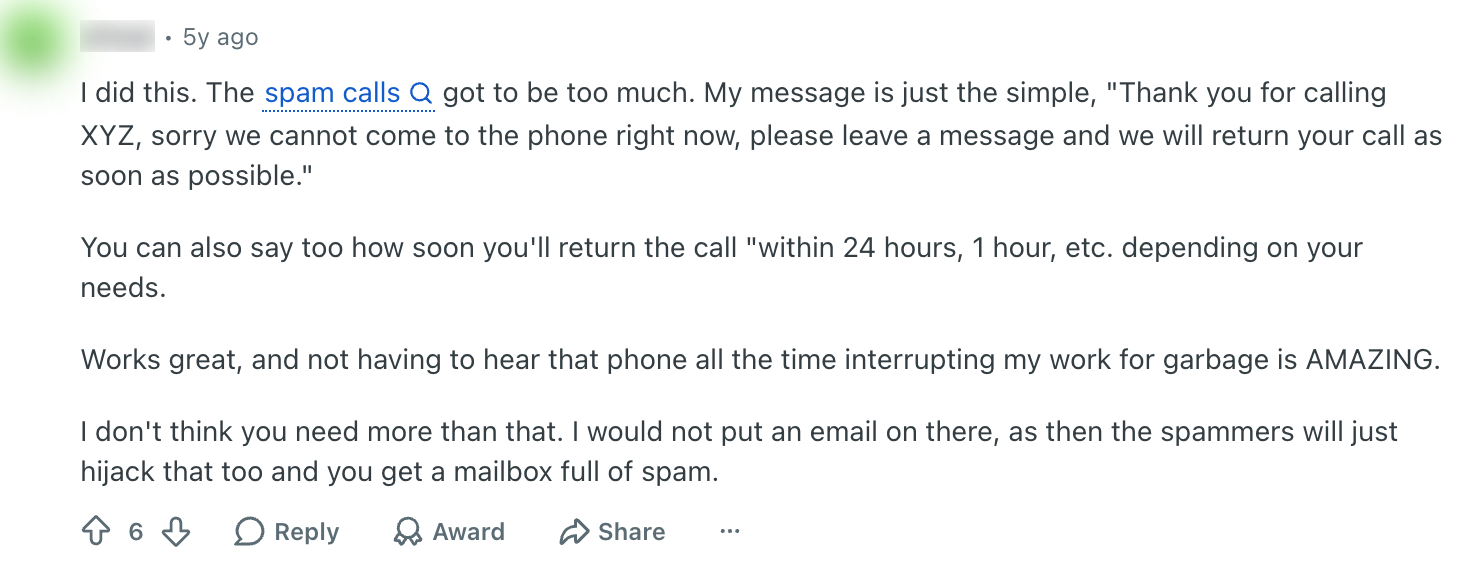
If your phone number can take texts, say so in the greeting. A caller who won't leave a voicemail will often send a text.
What not to say in an out-of-office greeting
- Where you are or why. "I'm in Cancun" or a medical reason tells strangers more than they need, and that your home may be empty.
- A coworker's name you haven't cleared. Ask them first, and make sure they'll actually be there.
- A callback time you can't keep. "Within the hour" from a beach is a promise you'll break.
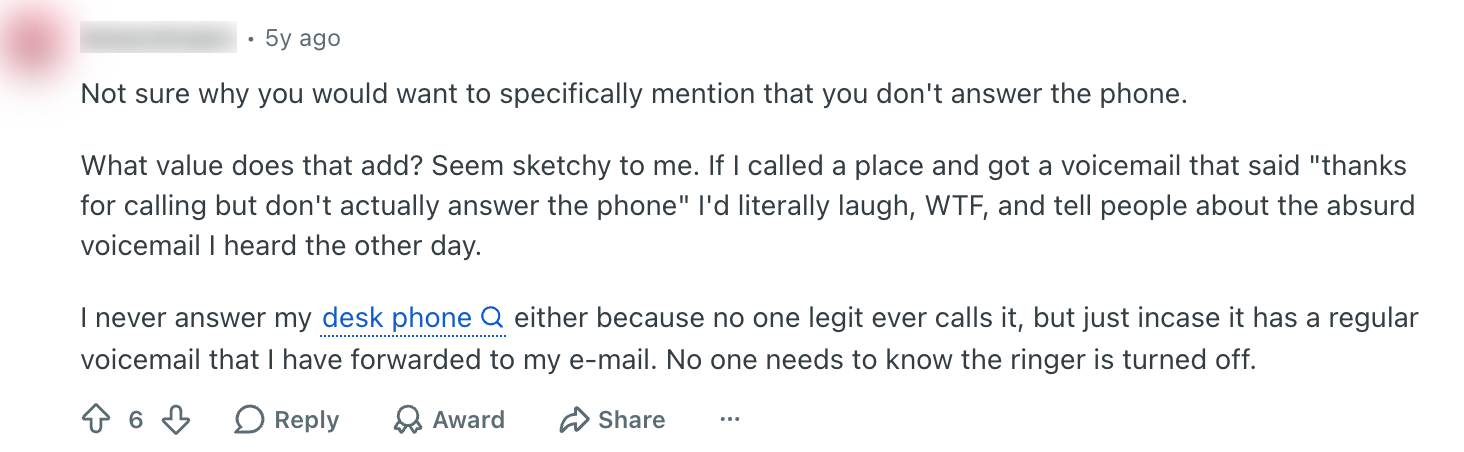
- "I never answer the phone." Even if it's true, it makes callers wonder what else you skip.
One commenter in r/smallbusiness put that last one bluntly:
How to change your voicemail greeting
Where you record it depends on what answers your calls. Here are the official steps for the most common phones and apps, checked on October 24, 2026.
iPhone
Open the Phone app. In the newer unified layout, tap Calls, then Edit, then Edit Voicemail Greeting; in the classic layout, tap Voicemail, then Greeting.
Tap Custom, then Record. Apple notes this isn't supported by every carrier, so if you don't see it, use your carrier's voicemail menu instead.
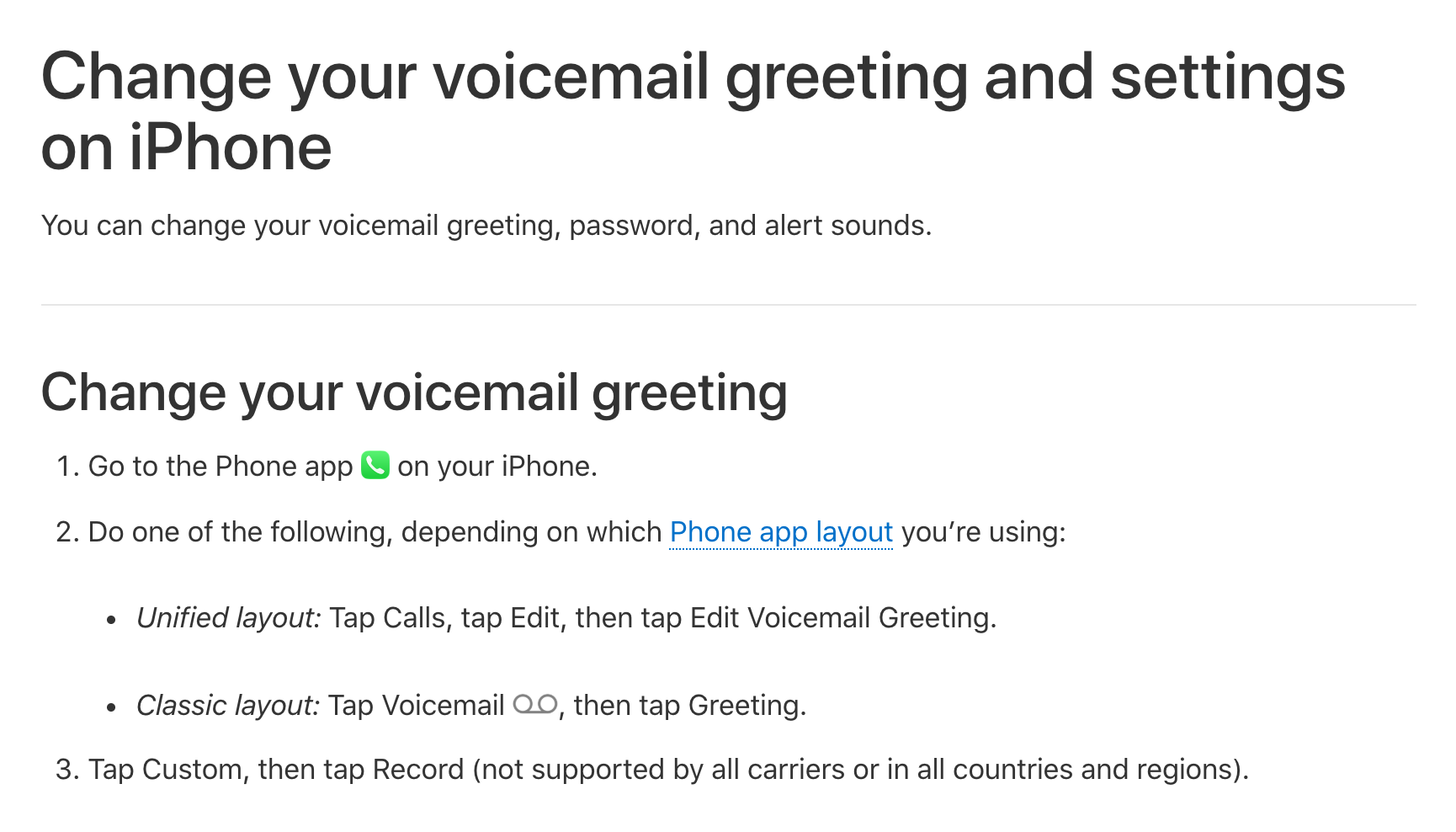
The iPhone can't schedule a greeting. You record the out-of-office one, then change it back yourself when you return.
Android and Samsung
On most Android phones, your greeting lives in your carrier's voicemail, not in the phone. Samsung says to open the Phone app and touch and hold 1, then follow the prompts to record a greeting.
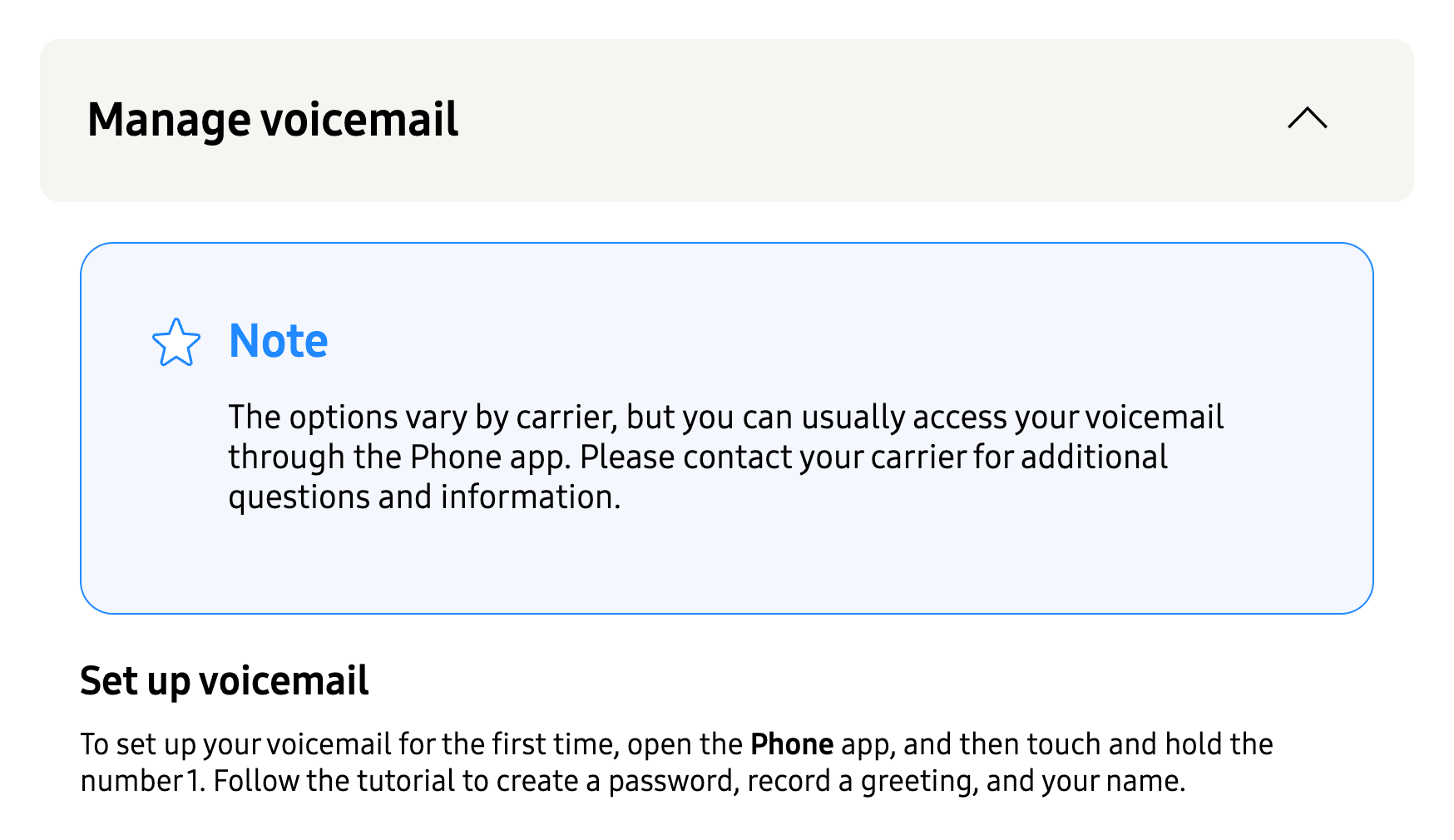
To change it later, call your voicemail the same way and look for the greeting option in the menu. The exact keys differ by carrier, and Google's help for its own Phone app doesn't list greeting steps at all.
Google Voice
Google Voice is the easiest for out-of-office greetings. You can save up to 10 greetings and switch between them, so you record your vacation one once and reuse it.
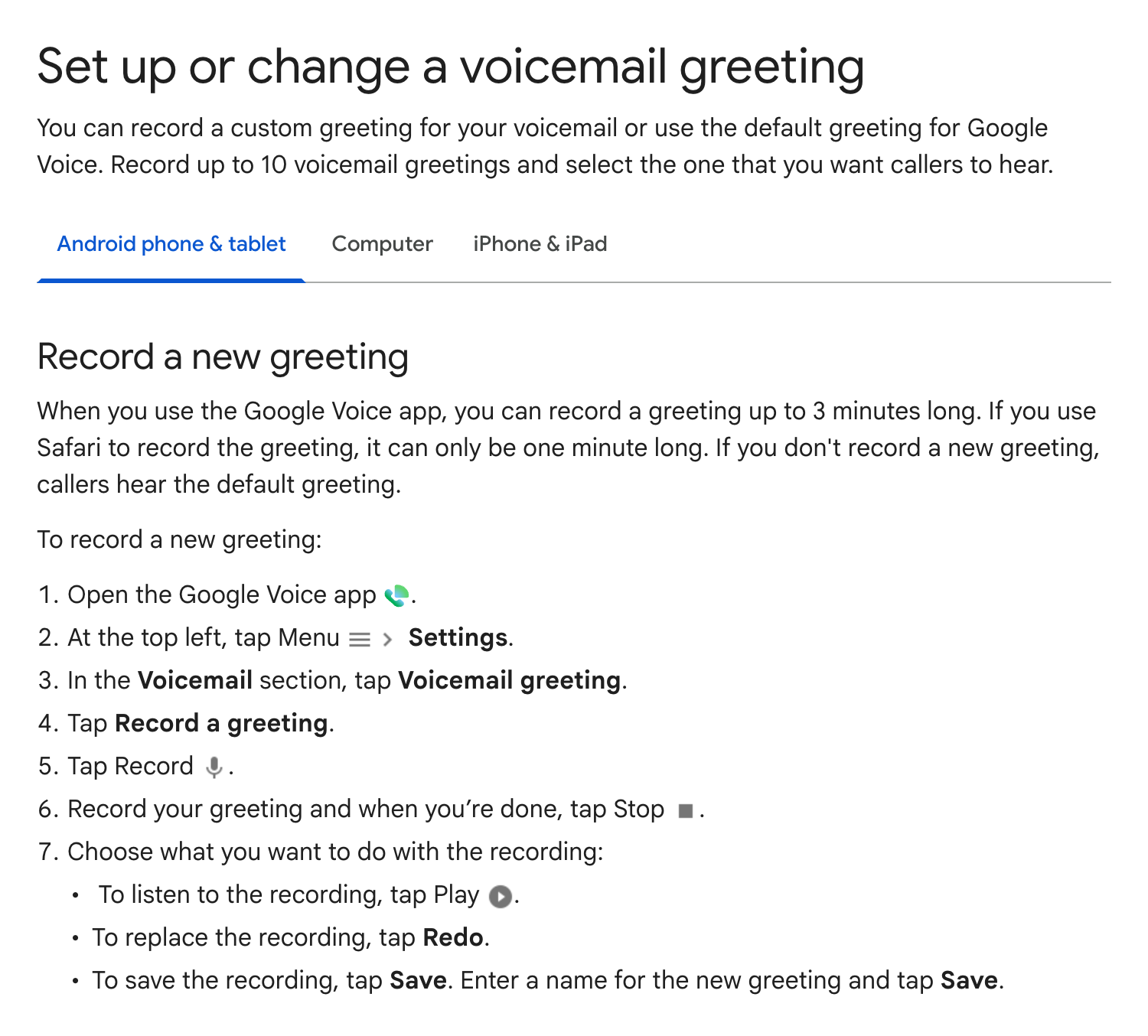
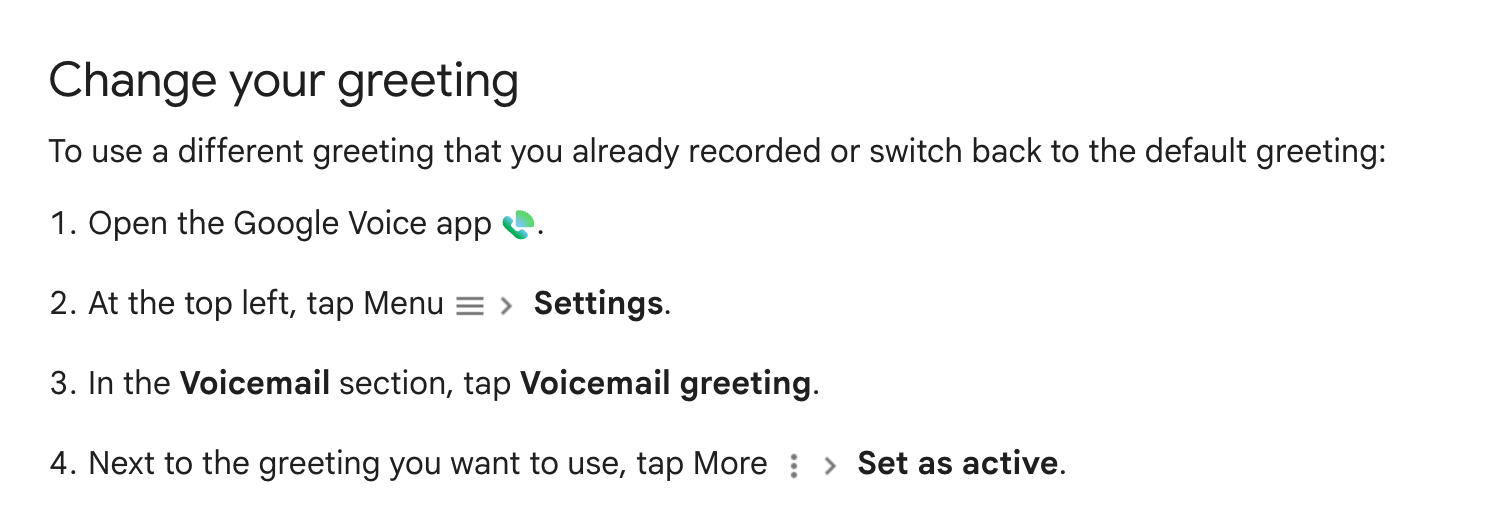
When you leave, open Settings, then Voicemail greeting. Tap More next to your out-of-office greeting and choose Set as active.
More on plans and setup in our Google Voice for business guide.
Microsoft Teams
Teams has its own out-of-office voicemail setting. Go to Settings and more, then Settings, then Calls, and look for Manage out-of-office voicemail.
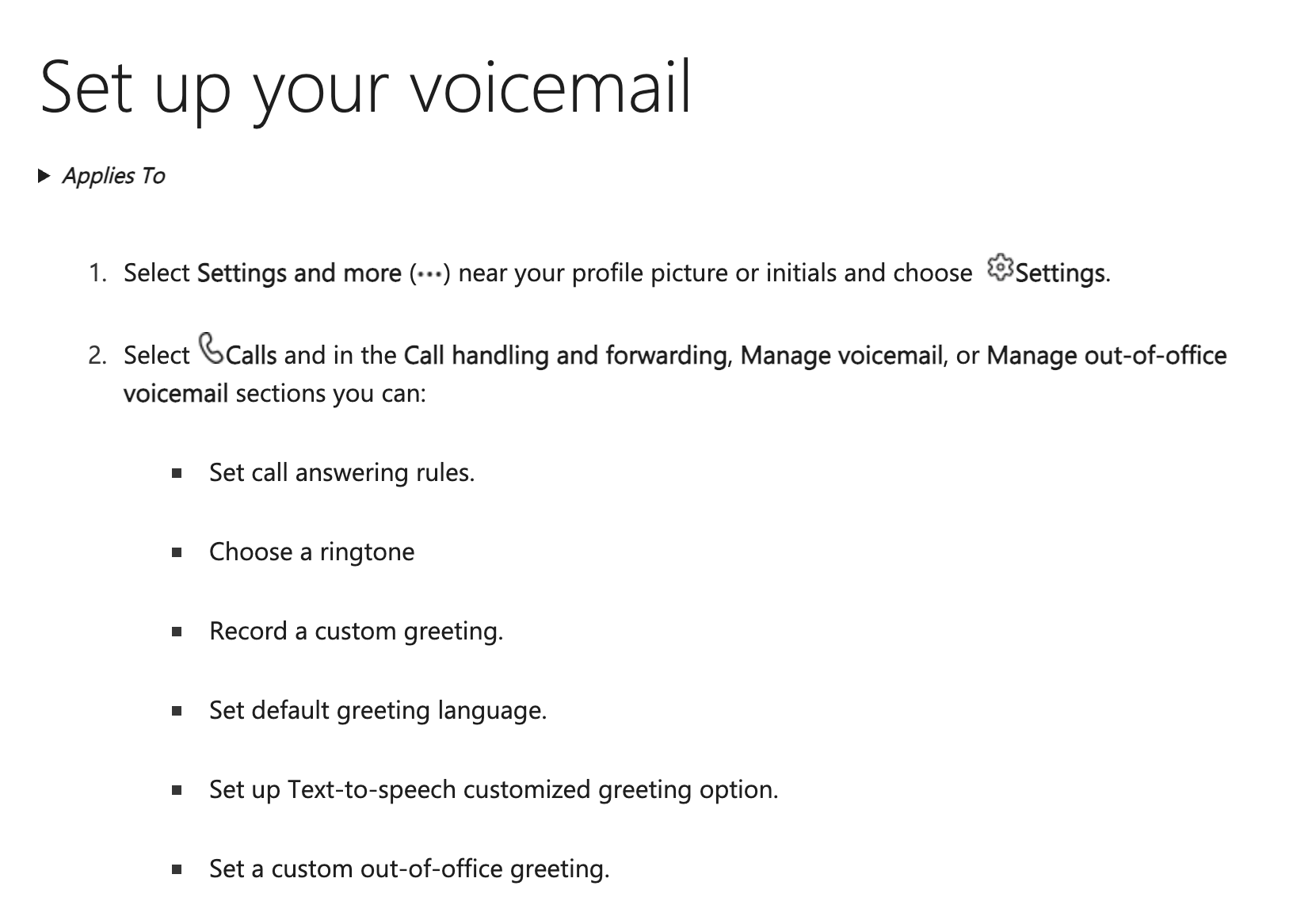
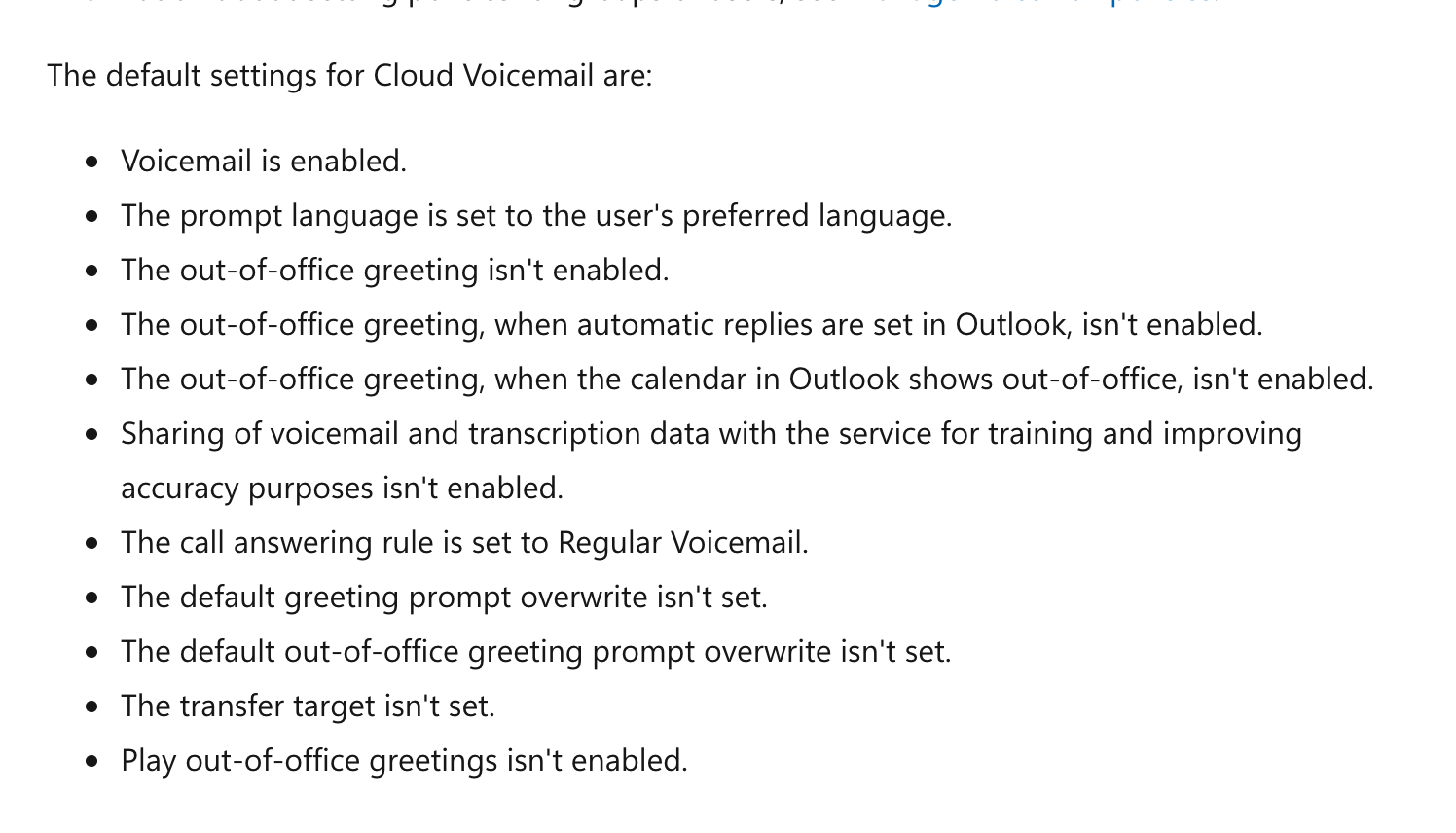
Teams can play your out-of-office greeting when your Outlook automatic replies are on, or when your calendar shows you out. But Microsoft's admin docs say all of that is off by default, so turn it on before you leave.
Closing the whole office for a holiday is a different job. An admin in r/MicrosoftTeams pointed a small office to an auto attendant with a shared voicemail instead:
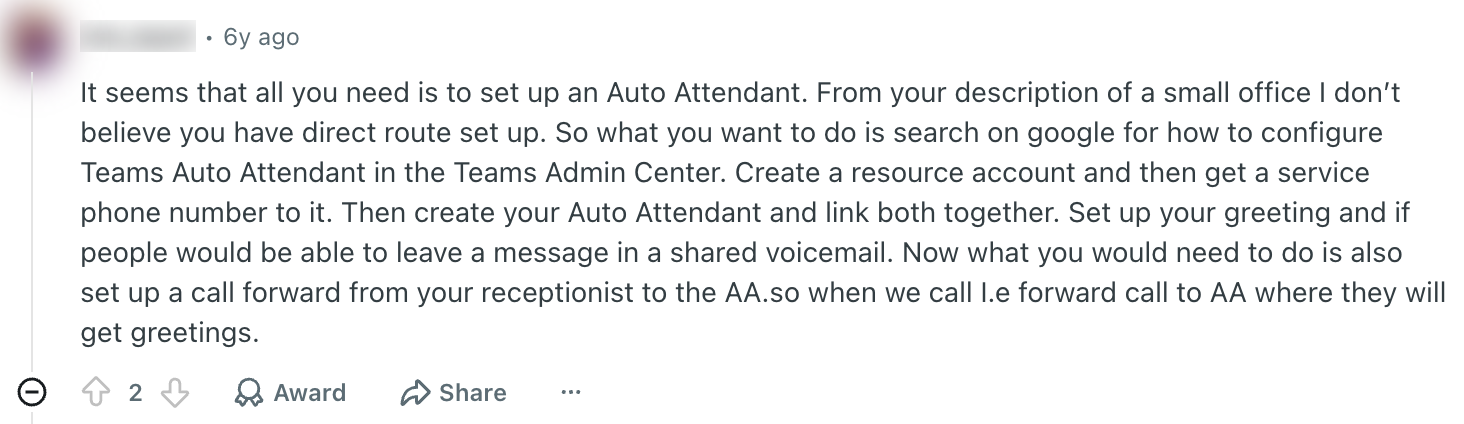
Not sure what an auto attendant is? Our phone tree guide explains it.
Outlook
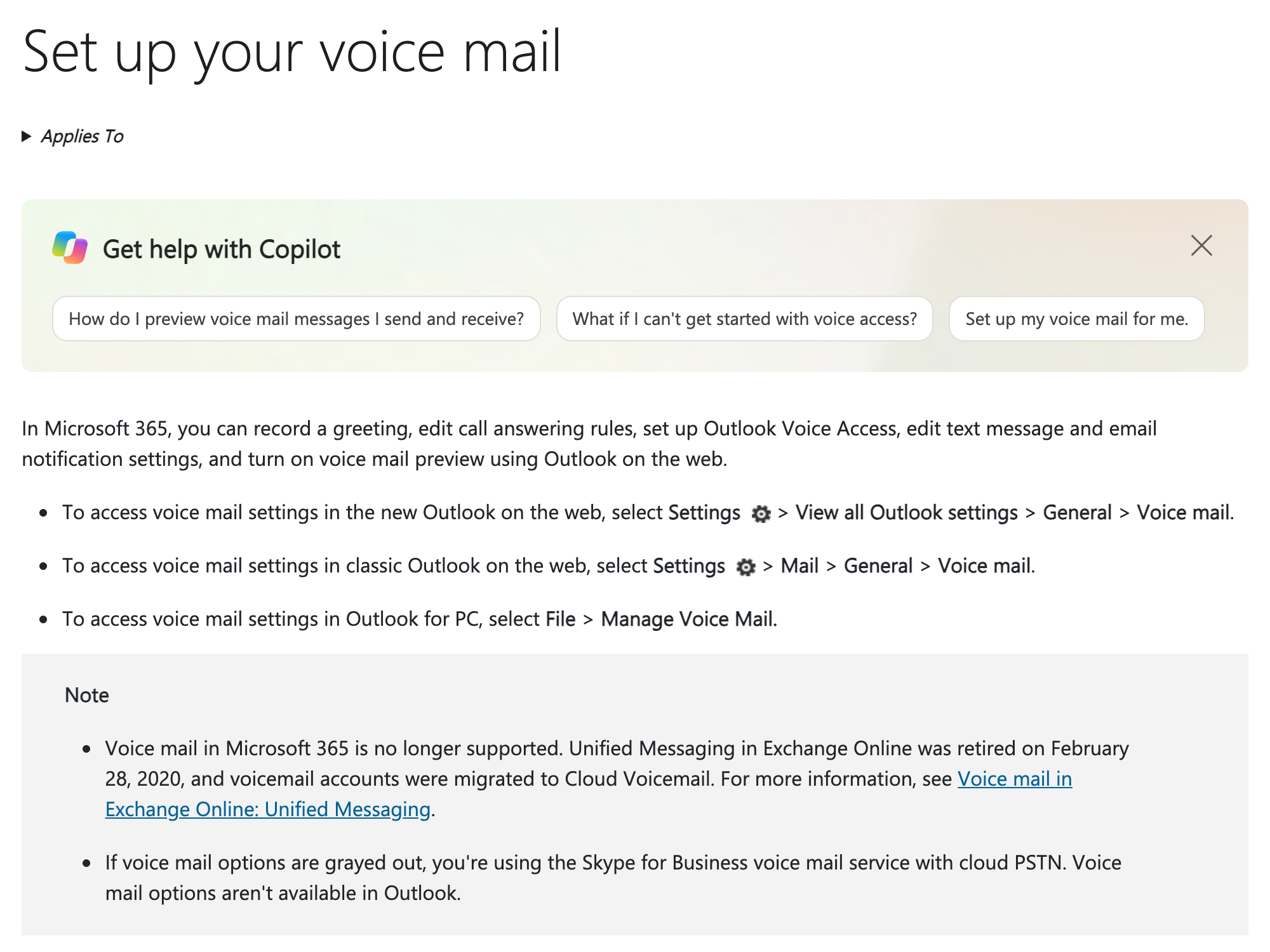
Older guides tell you to set your voicemail greeting in Outlook. That stopped working when Microsoft retired Exchange Online voicemail on February 28, 2020, and moved those mailboxes to Teams.
Remember to switch it back
A holiday greeting playing in February tells callers nobody is minding the store. Set a phone reminder for the morning you're back before you record the out-of-office version.
Google Voice makes this a two-tap change, and Teams can follow your Outlook auto-reply once it's turned on. On an iPhone or a carrier mailbox, you have to re-record or switch back to your normal greeting by hand.
Better than an out-of-office voicemail
Even the best greeting still asks the caller to wait. Many won't, and we dug into why in does anyone actually leave voicemails anymore?
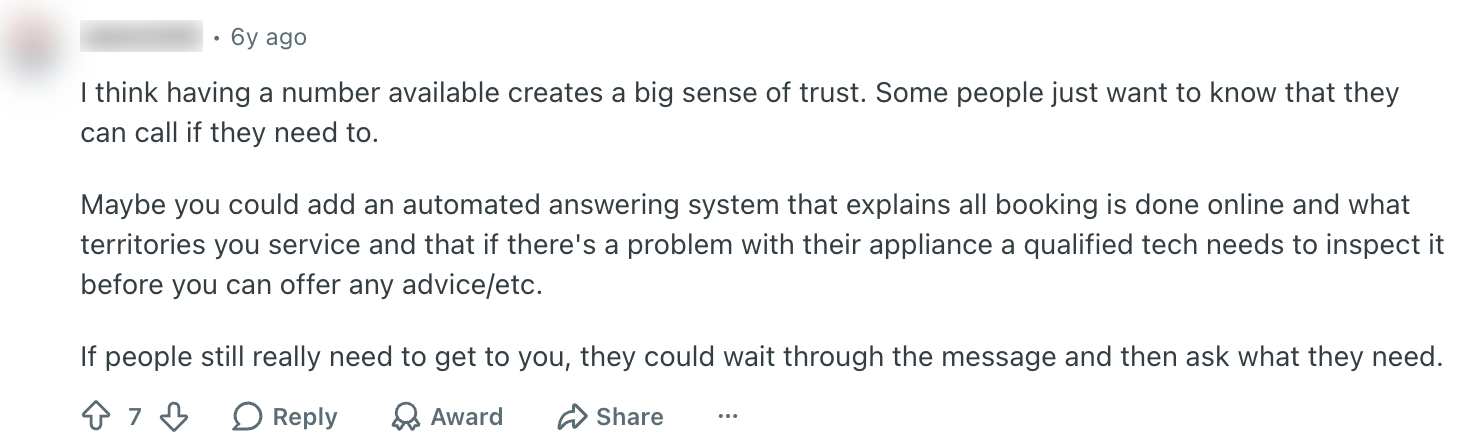
Customers still want to be able to call you, even when you're away. This owner in r/smallbusiness said a phone number builds trust on its own:
An AI phone agent goes one step further. It picks up while you're out, answers common questions, and books the appointment or transfers the call to whoever is covering.
Zinng starts at $49 a month for 300 minutes, with done-for-you setup and a 7-day free trial. You can hear a demo built from your own website in about a minute.
Sources
All pages were checked and captured on October 24, 2026. Moneypenny sells call answering, so treat its numbers as industry data.
- Moneypenny, Small Business Call Report (survey of 300 businesses with 0 to 9 employees plus call data from 10,000 businesses, November 21, 2016). The page mentions both U.S. and British businesses.
- We did not use the widely repeated "80% of callers don't leave voicemails." Its only trail we found is a 2014 CRM magazine column that credits "Forbes" without linking a study.
- iPhone: Apple, change your voicemail greeting.
- Android: Samsung, adjust call settings and Google Phone app, check your voicemail.
- Google Voice: set up or change a voicemail greeting.
- Microsoft: Teams voicemail setup, Cloud Voicemail settings, Outlook voice mail (retired).
- Owner quotes: public Reddit threads in r/smallbusiness and r/MicrosoftTeams, linked where quoted. These are individual opinions from 2020 and 2021, not research.
- Zinng: zinng.ai pricing.
FAQ
What is a good out-of-office voicemail message?
Say who you are, the date you'll be back, whether you're checking messages, and who to contact if it's urgent. For example: "Hi, you've reached Sam at Lakeside Plumbing. I'm out until Monday, June 9; for urgent help, call Chris at 555-0142."
How long should an out-of-office greeting be?
Under 30 seconds, and shorter is better. Two or three sentences is enough for almost any situation.
What do you say on a voicemail when you're on vacation?
Give your name, say you're away until a specific date, and name a backup person or a way to get help sooner. You don't need to say you're on vacation or where you are.
How do I set an out-of-office voicemail on my iPhone?
In the Phone app, tap Calls, Edit, then Edit Voicemail Greeting (or Voicemail, then Greeting, in the classic layout). Tap Custom and Record, and remember to switch back when you return, since the iPhone can't schedule it.
How do I set an out-of-office voicemail in Teams?
Go to Settings, then Calls, and open Manage out-of-office voicemail to record or type your greeting. The option to play it automatically when your Outlook auto-reply is on is off by default, so turn it on.
Should I give my return date in my voicemail?
Yes, because it tells callers whether to wait or find help elsewhere. Many people give a date one day after they're really back, so they have time to catch up on messages.
Ready to get started?
Set up your AI phone agent in minutes. Try it free for 7 days.
Try Zinng Free for 7 Days
About the Author
Timothy Bramlett
Co-Founder & CEO, Zinng
Timothy Bramlett is an American entrepreneur, software engineer, and product strategist. He is the founder of Zinng, an AI-powered phone agent platform that helps businesses never miss a customer call with intelligent call handling, real-time transcripts, and instant summaries.