Android does call forwarding better than the iPhone. Most Android phones let you forward only the calls you miss, right from the Phone app, no codes needed.
The catch is that every brand hides the setting in a different place. Here's where it lives on Samsung and Pixel, which option to pick, and the carrier codes for when the menu isn't there.
How to forward calls on Android: the quick answer
Samsung Galaxy
Phone app > ⋮ > Settings > Supplementary services > Call forwarding.
Google Pixel
Phone app > sidebar ☰ > Settings > Calling accounts > your SIM > Call forwarding.
Then
Pick when unanswered (or always), enter the number, and tap Enable (Samsung) or Turn on (Pixel).
No menu?
Dial your carrier's code, like *71 on Verizon or **61*number# on T-Mobile.
Other phones that use Google's Phone app, like most Motorolas, look similar to Pixel. Menu names can differ a little by brand and Android version.
How do I forward calls on a Samsung Galaxy?
Samsung's own steps: open the Phone app, tap More options (the three dots), then Settings. Tap Supplementary services, then Call forwarding.
Choose Always forward, Forward when busy, Forward when unanswered, or Forward when unreachable. Enter the number and tap Enable.
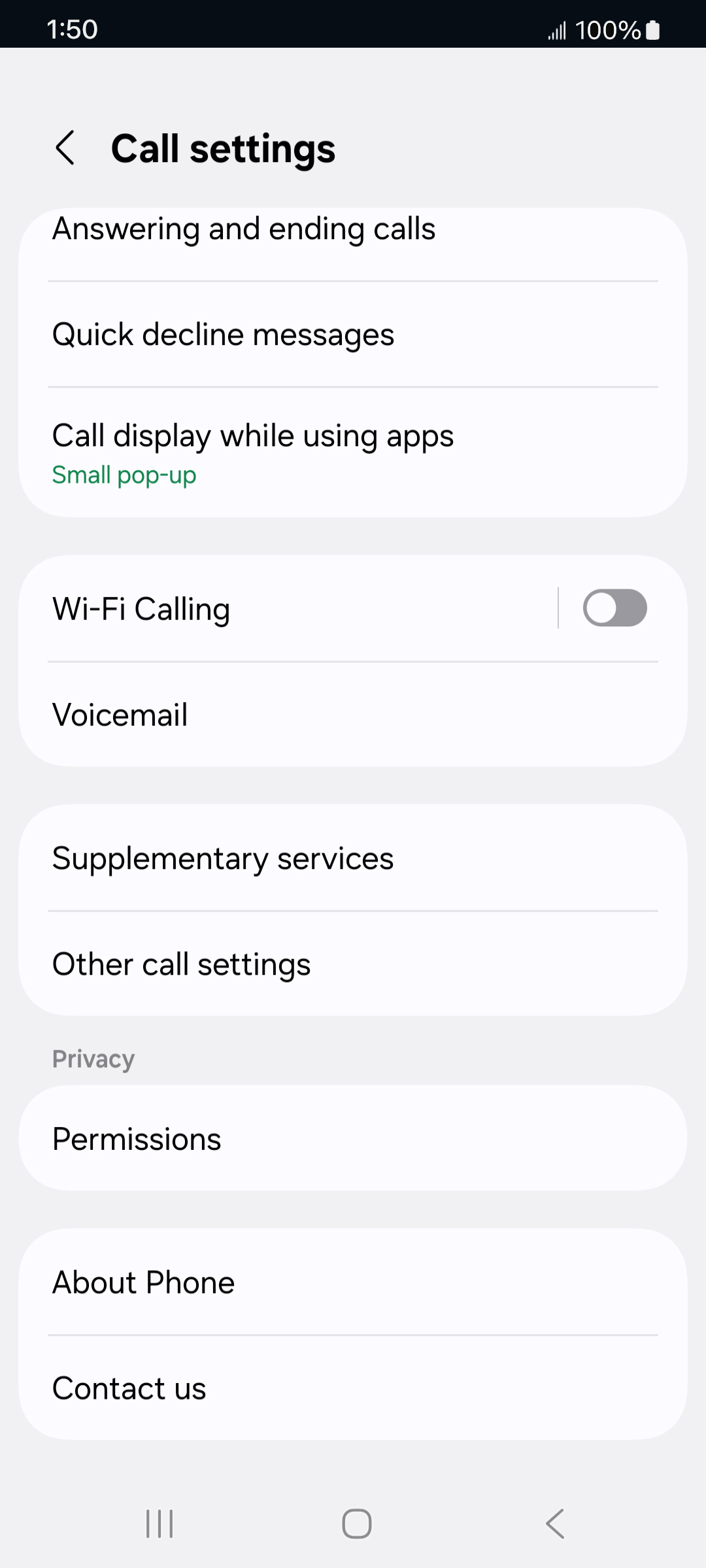
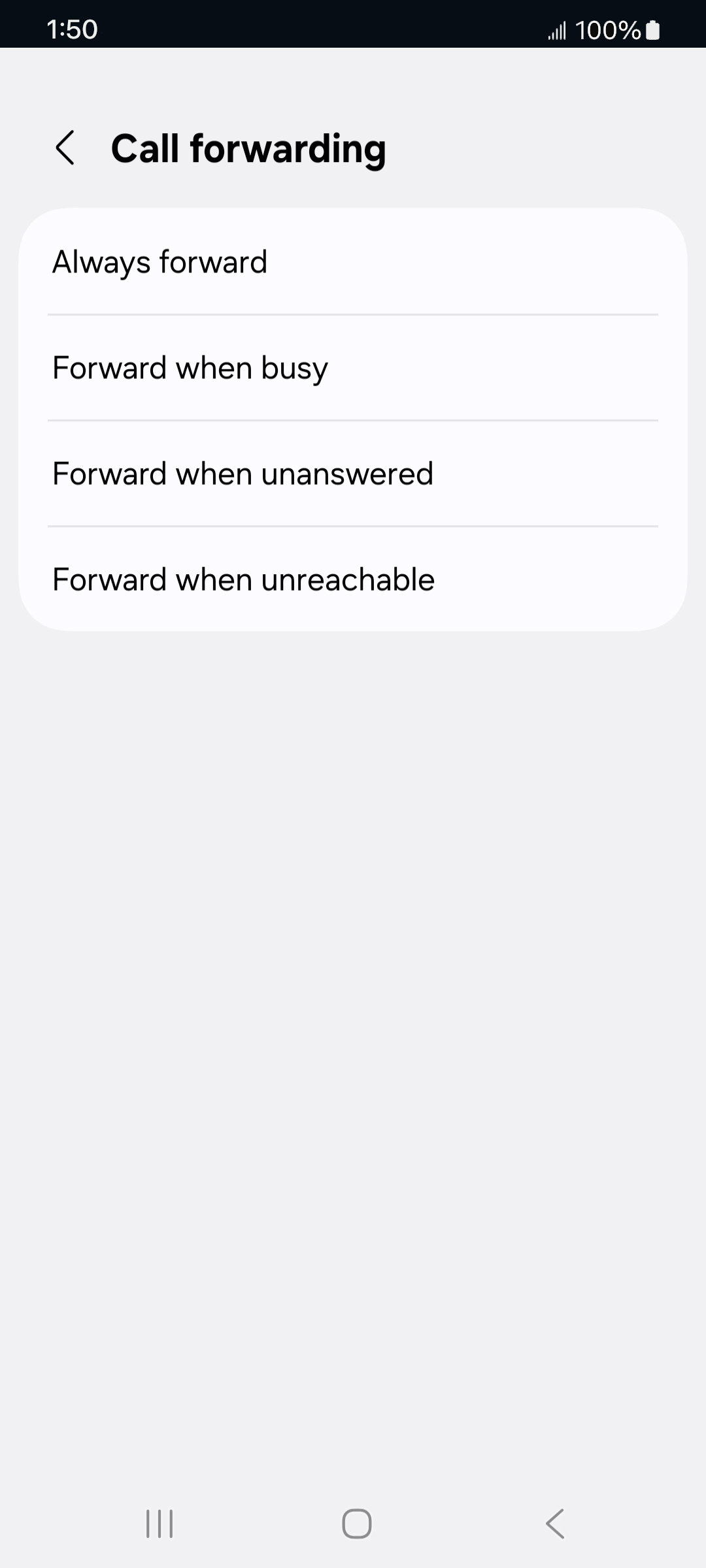
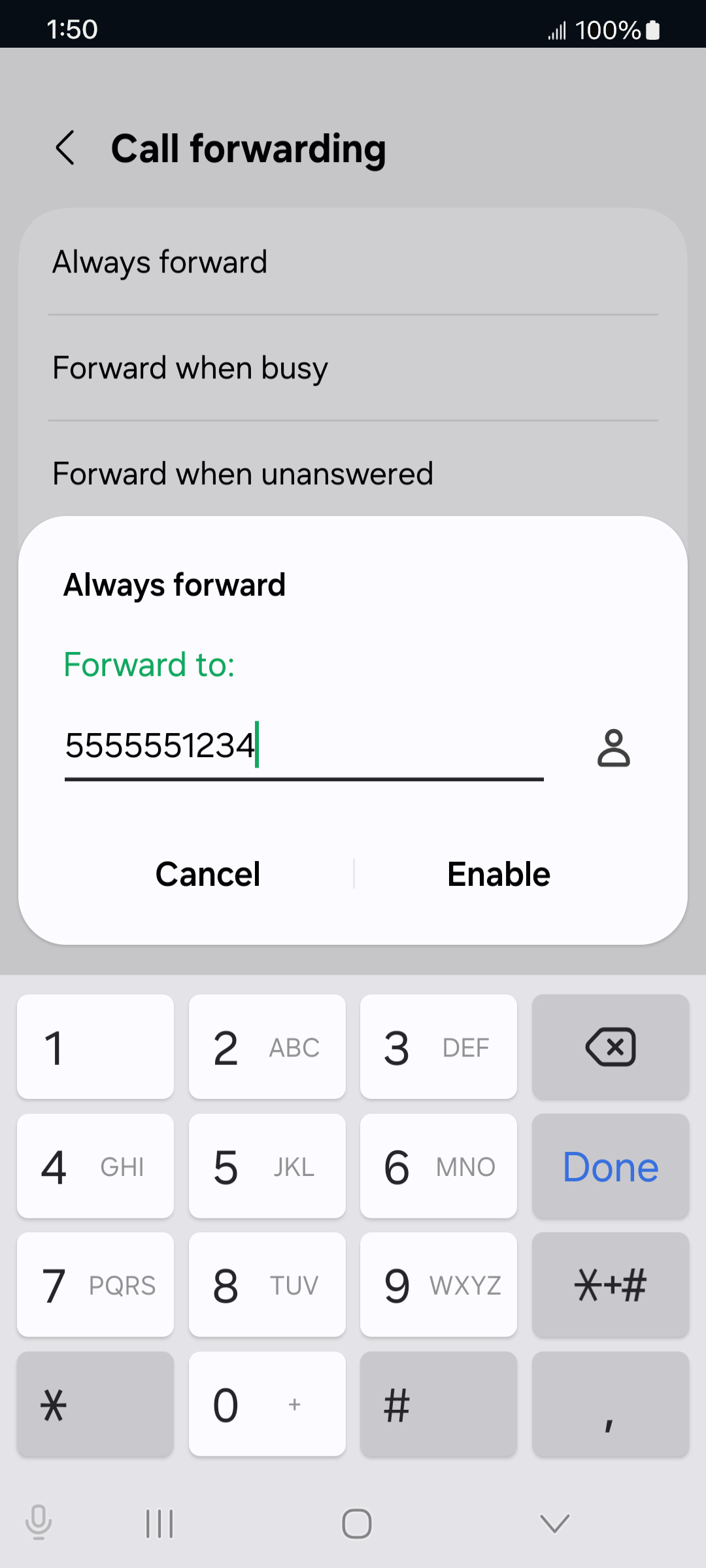
Samsung notes that availability varies by carrier and phone model. On Dual SIM phones, check which line you're setting, because forwarding is per SIM.
Some options can also be locked by the carrier. One Galaxy S21 owner on Dual SIM found "Always forward" greyed out on their second SIM:
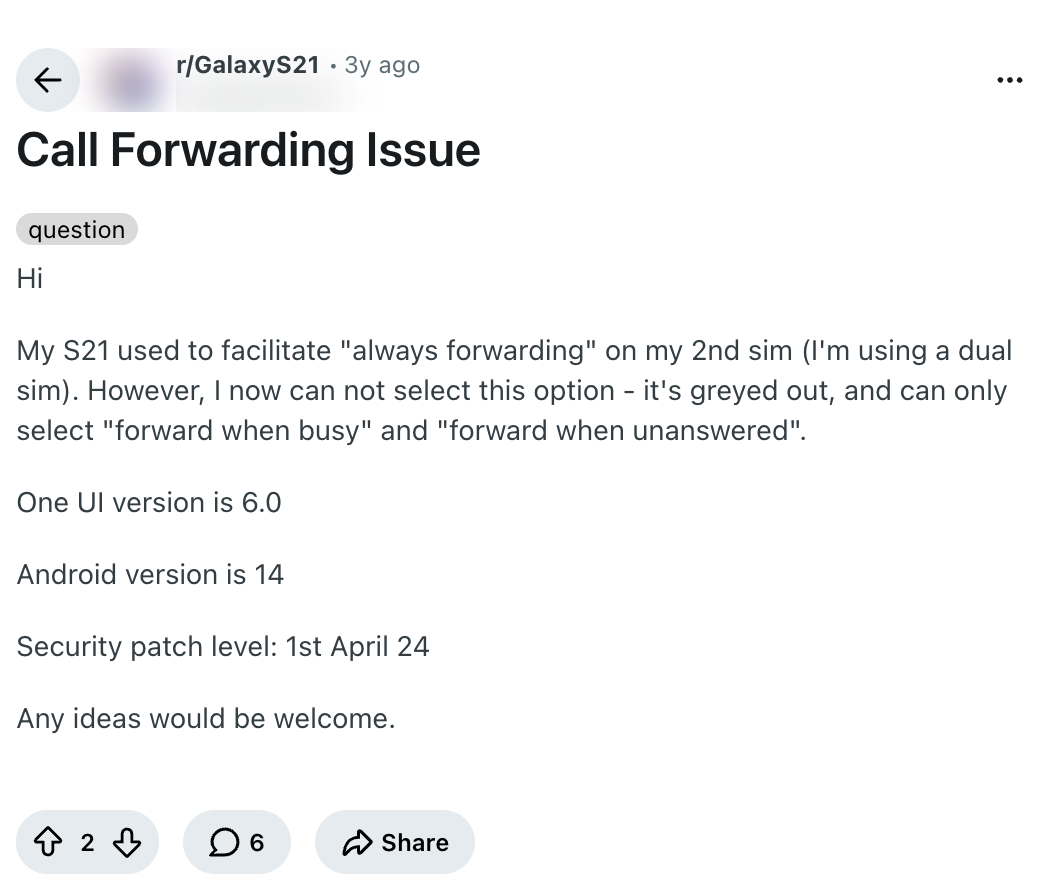
If that happens to you, the dial codes below usually still work. Otherwise your carrier has to enable it on the line.
How do I forward calls on a Google Pixel?
Open the Phone app, tap the sidebar icon (☰), and tap Settings. Tap Calling accounts, choose your SIM, then Call forwarding.
You'll see the same four choices: always, when busy, when unanswered, and when unreachable. Tap one, enter the number, and tap Turn on.
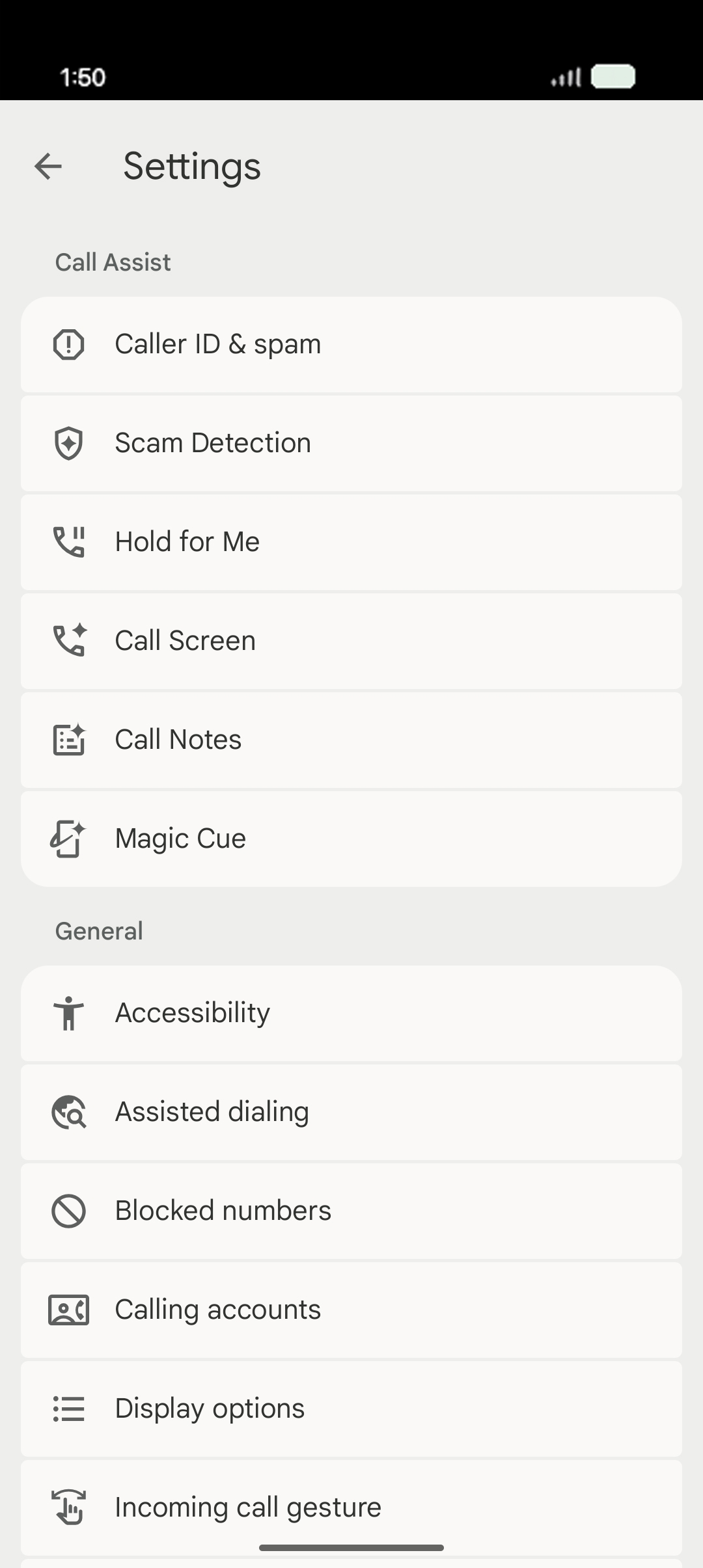
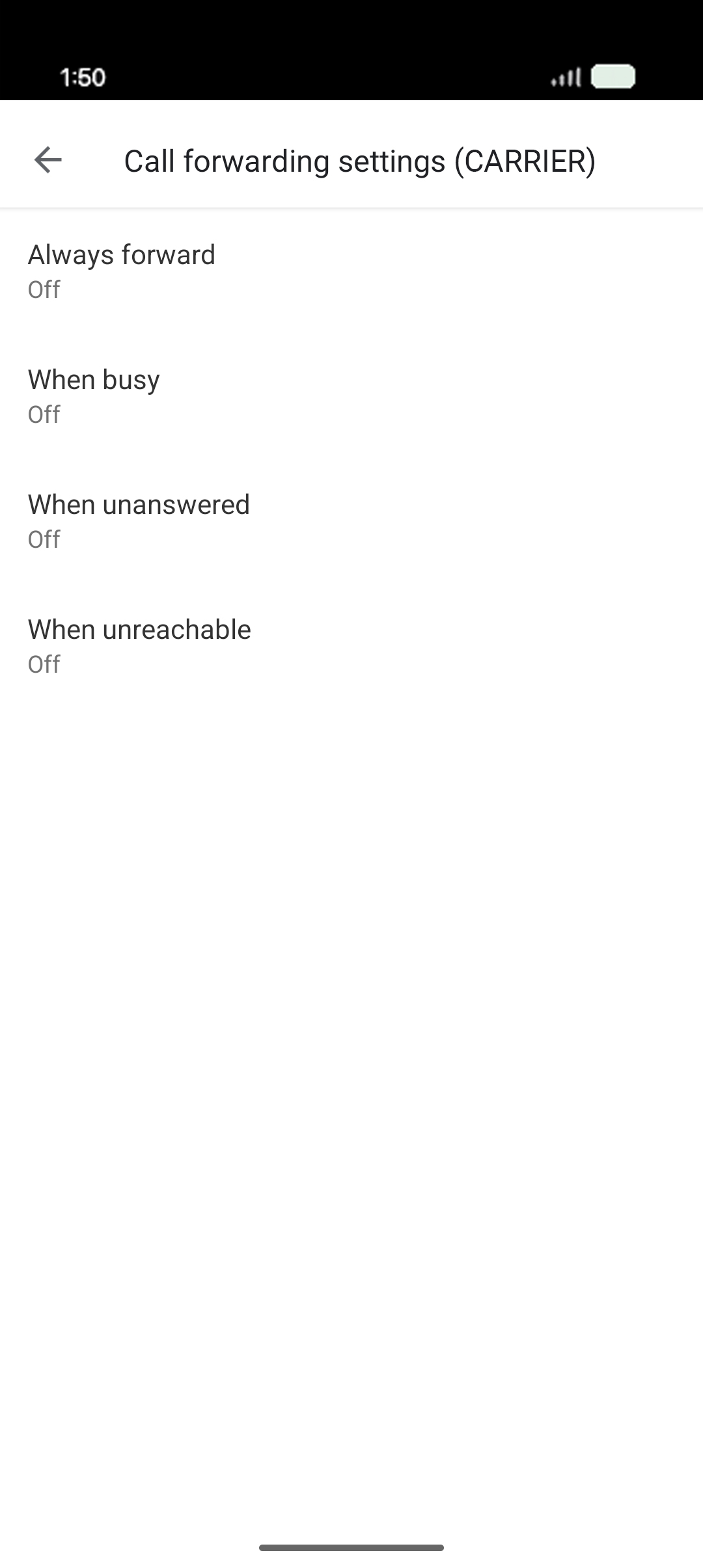
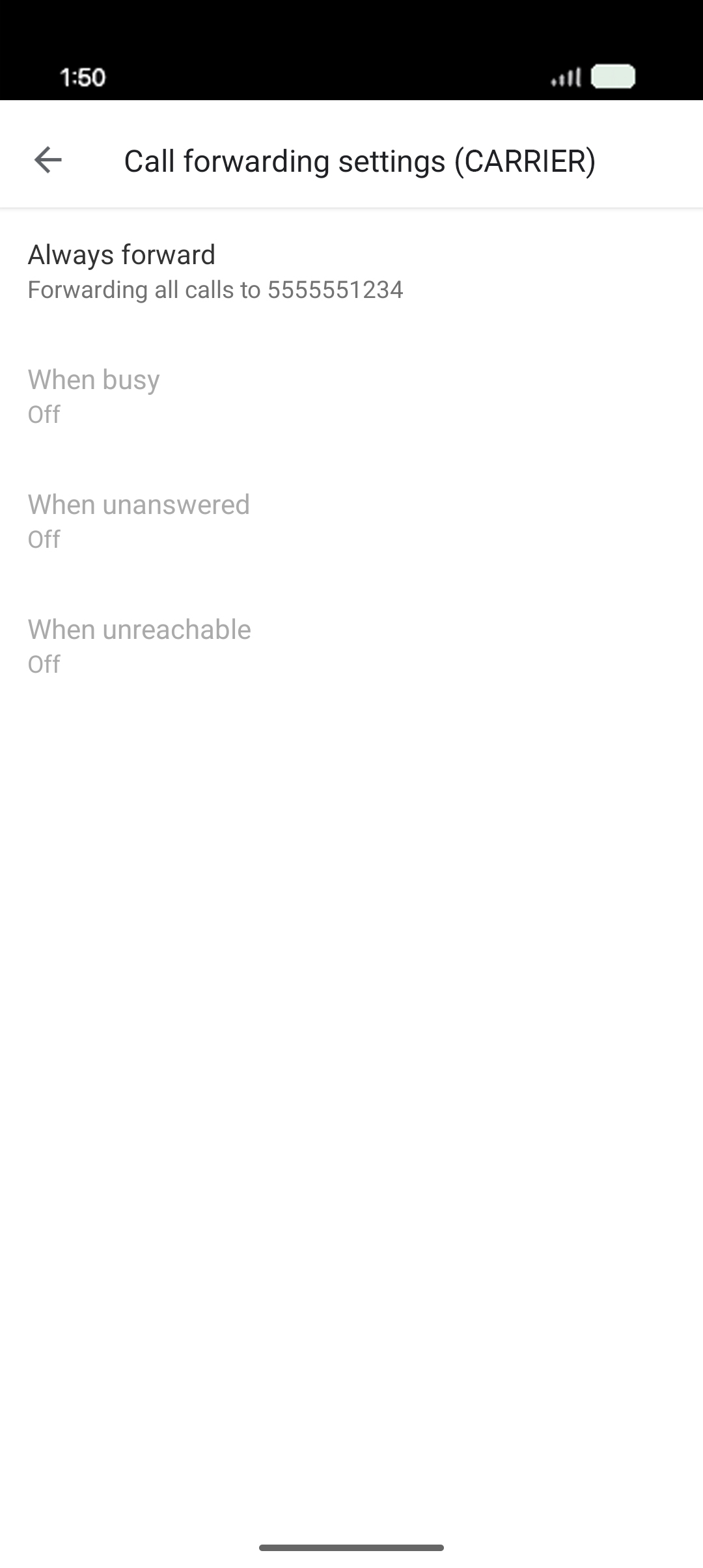
When forwarding is on, a phone receiver with an arrow shows in the status bar. Neither menu shows a setting for how long your phone rings first; on T-Mobile, a code sets that, covered below.
Pixel gotcha: Take a Message
Newer Pixels have a feature called Take a Message that answers missed calls with its own voicemail. Google says that if your carrier's conditional forwarding doesn't work with it, you should turn Take a Message off.
It's in Phone app > Settings > Take a Message. Switch it off if your missed calls never reach the forwarded number.
Which call forwarding option should I pick?
| Option | What happens | Use it when |
|---|---|---|
| Always | Your phone never rings; every call goes to the other number. | You're away and someone else is covering. |
| When unanswered | Your phone rings first; calls you miss move on. | Most people, most of the time. |
| When busy | Calls that arrive while you're on another call move on. | You take a lot of calls back to back. |
| When unreachable | Calls forward when your phone is off, in airplane mode, or has no signal. | You work in basements, on roofs, or out of coverage. |
You can turn on unanswered, busy, and unreachable together. Leave Always off, though, because it overrides the other three.
Android call forwarding codes by carrier
Codes work on any Android phone, even when the menu is missing. Open the Phone app keypad, dial the code, and press Call.
| Carrier | Forward all | Forward missed | Turn off |
|---|---|---|---|
| Verizon | *72 + number | *71 + number | *73 |
| AT&T | **21*number# | **61*number# | ##002# |
| T-Mobile | **21*1number# | **61*1number# | ##004# |
On Verizon, the codes are Verizon's documented method, and some Verizon Android owners report the forwarding menu is missing. Our Verizon, AT&T and T-Mobile guides list every code.
On T-Mobile you can also set how long your phone rings before forwarding. T-Mobile's code table allows 5 to 30 seconds, like **61*1number**20# for 20 seconds.
Using a different carrier? Our call forwarding codes tool builds the exact code for your carrier and number.
How to turn off call forwarding on Android
- Samsung: Phone > ⋮ > Settings > Supplementary services > Call forwarding, tap each option and turn it off.
- Pixel: Phone > Settings > Calling accounts > your SIM > Call forwarding, then switch each option off.
- Verizon: dial *73.
- AT&T: dial ##002# to clear every type at once.
- T-Mobile: dial ##004#, which T-Mobile says resets call forwarding to default.
Then call your number from another phone. If it rings and goes to your own voicemail, forwarding is off.
Android call forwarding not working?
- "Call forwarding settings error" or the menu won't load: turn off Wi-Fi Calling and try again with cell signal.
- No Supplementary services menu: your carrier doesn't expose it. Use the dial codes above.
- Missed calls still go to voicemail: on a Pixel, turn off Take a Message. On any phone, make sure Always is off.
- Calls forward from the wrong number: on Dual SIM, set forwarding on the line customers actually call.
Forwarding your Android for business calls
If your cell is your business line, "when unanswered" is the setting to use. You still take the calls you can, and the ones you miss don't die in voicemail.
Forward them to Zinng and an AI receptionist answers 24/7. It answers questions, books appointments, texts you a summary, and can transfer urgent callers back to you.
Your phone rings first. Zinng catches the rest.
Every missed call answered, from $49/month.
Start your 7-day free trialOn an iPhone instead? See our iPhone call forwarding guide, or the call forwarding overview for landlines and every carrier.
Sources
- AT&T device support: Pixel 10 Pro call forwarding tutorial (Pixel steps and screens) and its Galaxy S25 tutorial (Samsung screens), checked November 2026.
- Reddit: r/GalaxyS21: Always forward greyed out.
- Samsung: Calling features on your Galaxy phone (checked November 2026).
- Google: Handle your missed or declined calls with Take a Message (checked November 2026).
- Verizon: Call Forwarding FAQs (checked November 2026).
- T-Mobile: Self-service short codes (checked November 2026).
The AT&T ** codes are the standard GSM codes; AT&T doesn't list them on a public support page, so if one fails, ask AT&T.
Frequently asked questions
Where is call forwarding on Samsung?
Open the Phone app, tap the three dots, then Settings > Supplementary services > Call forwarding. If you don't see it, dial your carrier's code instead.
Can Android forward only unanswered calls?
Yes. Pick "Forward when unanswered" in the call forwarding menu, or dial *71 on Verizon and **61*number# on AT&T or T-Mobile.
How do I stop call forwarding on Android?
Switch off each option in the call forwarding menu. Or dial *73 on Verizon, ##002# on AT&T, or ##004# on T-Mobile.
Why can't I find call forwarding on my Android phone?
Your carrier controls whether the menu appears, and some Verizon owners report it's missing. The dial codes still work.
Ready to get started?
Set up your AI phone agent in minutes. Try it free for 7 days.
Try Zinng Free for 7 Days
About the Author
Timothy Bramlett
Co-Founder & CEO, Zinng
Timothy Bramlett is an American entrepreneur, software engineer, and product strategist. He is the founder of Zinng, an AI-powered phone agent platform that helps businesses never miss a customer call with intelligent call handling, real-time transcripts, and instant summaries.