This is a step-by-step walkthrough of setting up a custom business email address, like [email protected], with Google Workspace. Our founder Tim Bramlett recorded it on a real domain, timslawncare.shop, and every screenshot below is from that setup.
Setup takes about 20 minutes. Most of that is the signup, and the DNS part is close to one click if your domain uses Cloudflare.
Don't have a domain yet? Start with how to get a domain name for your business, and buy a .com. Tim uses a .shop only because this is a tutorial.
Watch the video
The video runs about 20 minutes. Everything in it is written out below.
Chapters: 0:00 Why Google Workspace · 2:02 Plans and pricing · 2:30 Zoho Mail, the free alternative · 3:19 Signing up · 4:24 Using a domain you already own · 5:03 Admin user and two-factor authentication · 6:21 Starter plan and the 14-day free trial · 7:27 Skipping extra users · 7:55 Verifying your domain · 8:30 Adding the records at GoDaddy or any DNS host · 9:13 One-click setup with Cloudflare · 11:39 Testing with Zinng's free checker · 14:26 Getting a DMARC record from AI · 14:57 p=none vs. quarantine vs. reject · 16:20 Adding the DMARC record · 17:51 Testing again · 19:00 Next up: catch-all email
The short answer
- Go to Google Workspace, pick the Starter plan and click Get started.
- Enter your business name and your name, then choose Use a domain you already own and type your domain.
- Create your admin address (for example [email protected]) with a strong password, and turn on two-factor authentication.
- Start the 14-day free trial, add your billing details and skip adding users for now.
- Verify your domain. With Cloudflare it's one click (Sign in to Cloudflare, then Authorize). With any other DNS host, add the TXT and MX records Google shows you.
- Send a test email to our free SPF, DKIM and DMARC checker.
- Add a DMARC record (a TXT record named _dmarc), since Google doesn't add one for you, then test again.
Why Google Workspace?
Tim recommends Google Workspace for most small businesses for a simple reason: it's Gmail. Most people already know the interface, and with Workspace you get it on your own domain. It works in the Gmail app on your phone, too. It's also what we use behind the scenes at Zinng.
On a tight budget? Zoho Mail has a free plan with custom domain email. The catch is that you have to use Zoho's own apps. The free plan doesn't support IMAP or POP, so you can't connect Apple Mail or other email apps. Zoho's paid tier is also cheaper than Google's. If price matters most, check it out. For about $8 a month, though, Tim thinks Google Workspace's simplicity is worth it.
Step 1: Pick a plan (Starter is enough)
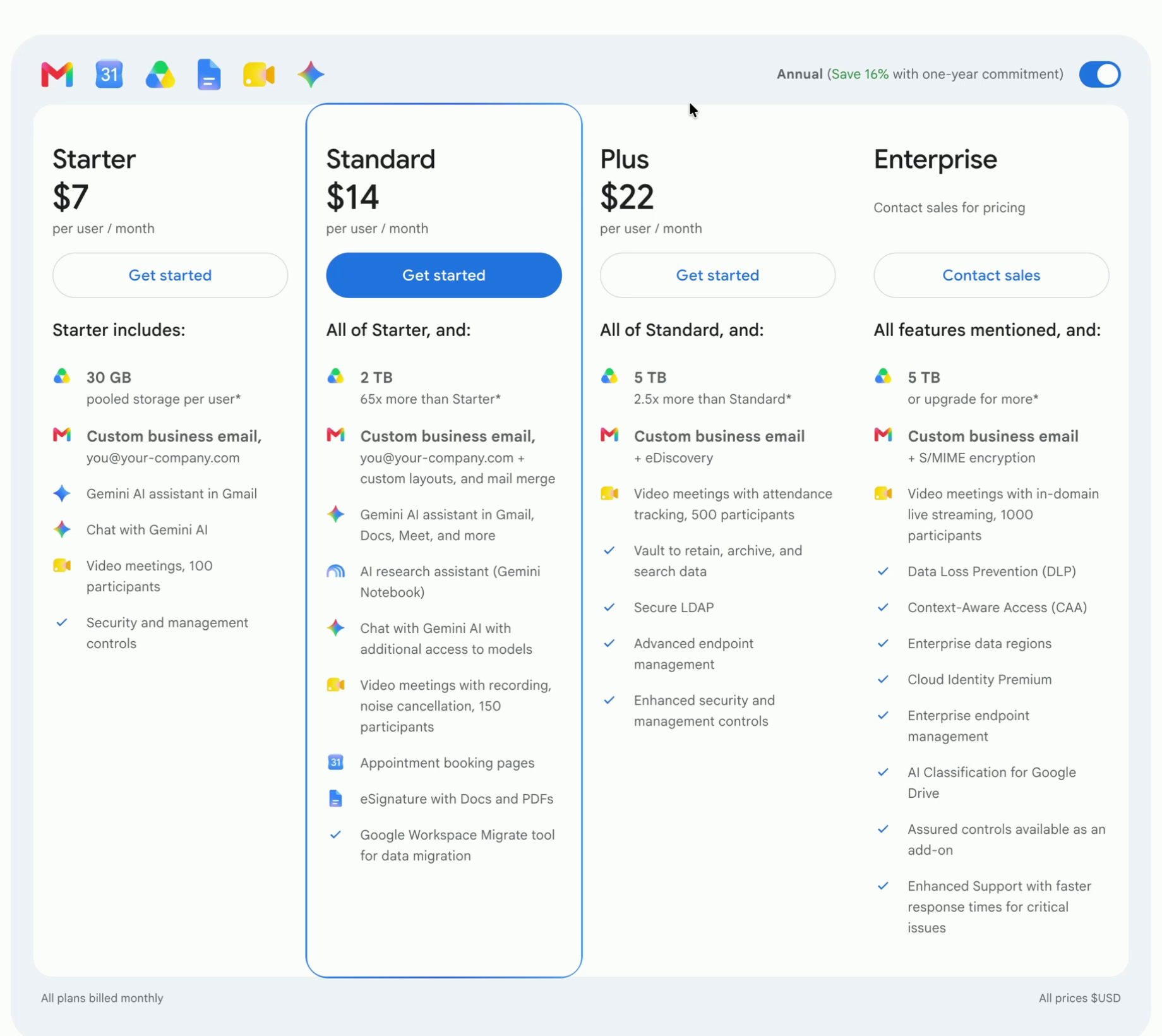
Google Workspace has four plans: Starter, Standard, Plus and Enterprise. For a small business, especially if it's just you, Starter is the way to go. It includes custom business email, 30 GB of storage per user, Gemini in Gmail and video meetings for up to 100 people.
Starter is $7 per user per month on an annual commitment, or $8.40 per user per month billed monthly. That's about what every major business email provider charges. You pay per user, so each extra employee mailbox adds the same again.
Step 2: Sign up with a domain you already own
Click Get started on Starter. Enter your business name and your own name, then a current email address. That one is only a backup contact, so a personal email is fine.
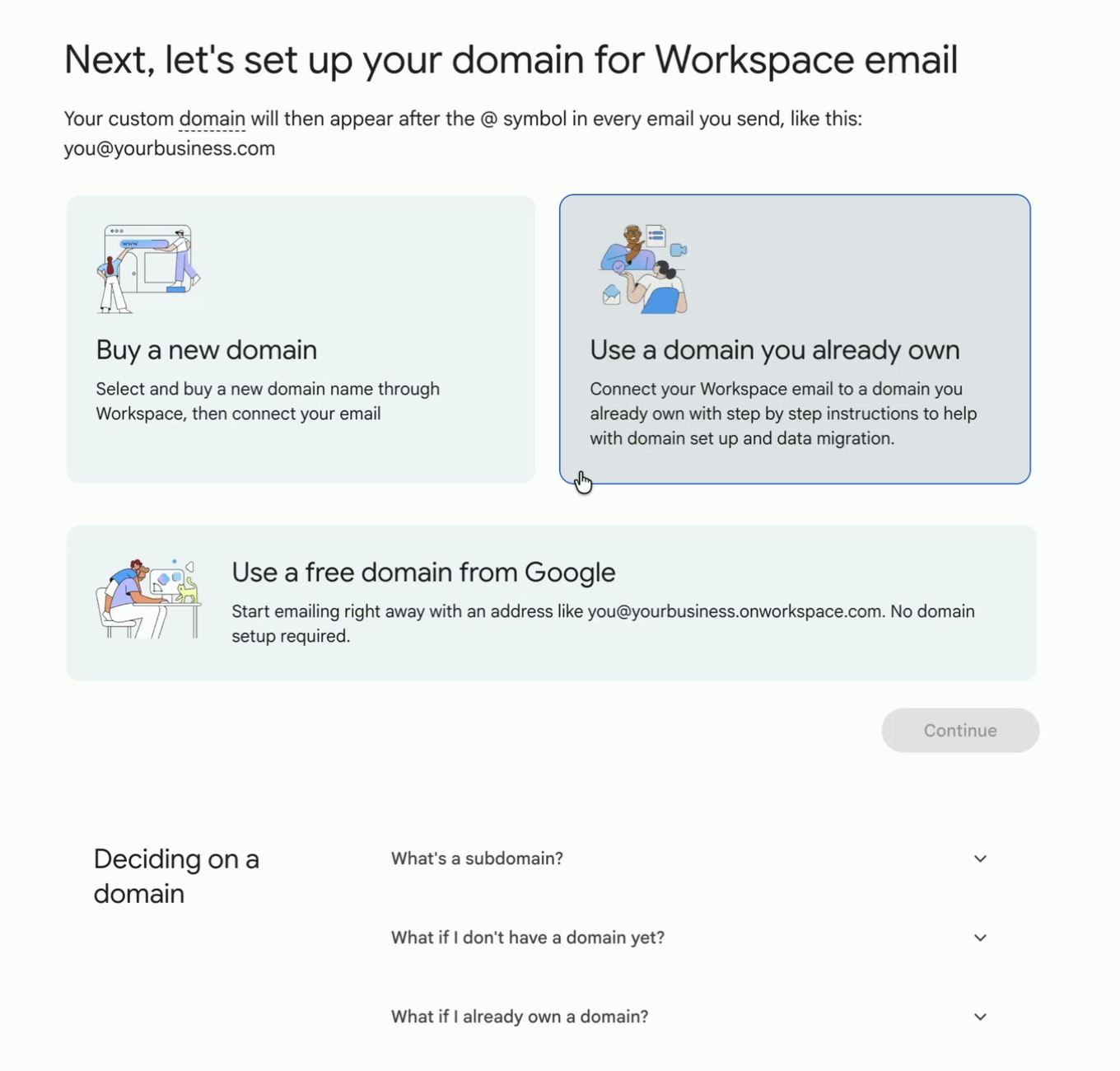
Next, Google asks how you want to set up your domain. Choose Use a domain you already own, which is what most businesses will do, click Continue and type your domain. You can also buy a new domain here, or use a free address like [email protected], but that doesn't look like your business.
Now create your admin username and password. This becomes your first email address. Tim kept it simple with [email protected].
Turn on two-factor authentication. A password alone isn't enough. Tim talks to a business owner who's been hacked about once a week. One recently had scam emails sent out under their domain, and their customers clicked on them. Set up two-factor authentication on this account and every other account your business uses.
Google then signs you in to the new account. It may ask you to prove you're a real person, for example by scanning a QR code and sending a text message from your phone.
Step 3: Start the free trial and skip extra users
Select Starter again and choose the 14-day free trial. Google shows the monthly option first. Add your business address and a credit card, then click Checkout.
If you don't see the Starter option, Tim suggests opening the signup in a new Chrome profile. Google sometimes hides it.
Google then asks whether you want to add more users. This confuses people: your own address already exists. Each extra user adds to your monthly price, so click Skip for now unless you're ready to set up your team. You can add people later.
Step 4: Verify your domain
Now Google needs proof that you own the domain, plus a few DNS records so email reaches Google and isn't marked as spam. How you do this depends on who runs your domain's DNS.
If your DNS is on Cloudflare: one click
Google detects Cloudflare and offers Sign in to Cloudflare. Make sure you're already signed in to Cloudflare in the same browser, then click it. This is why Tim moved this domain's DNS to Cloudflare first; here's how to move your GoDaddy DNS to Cloudflare for free.
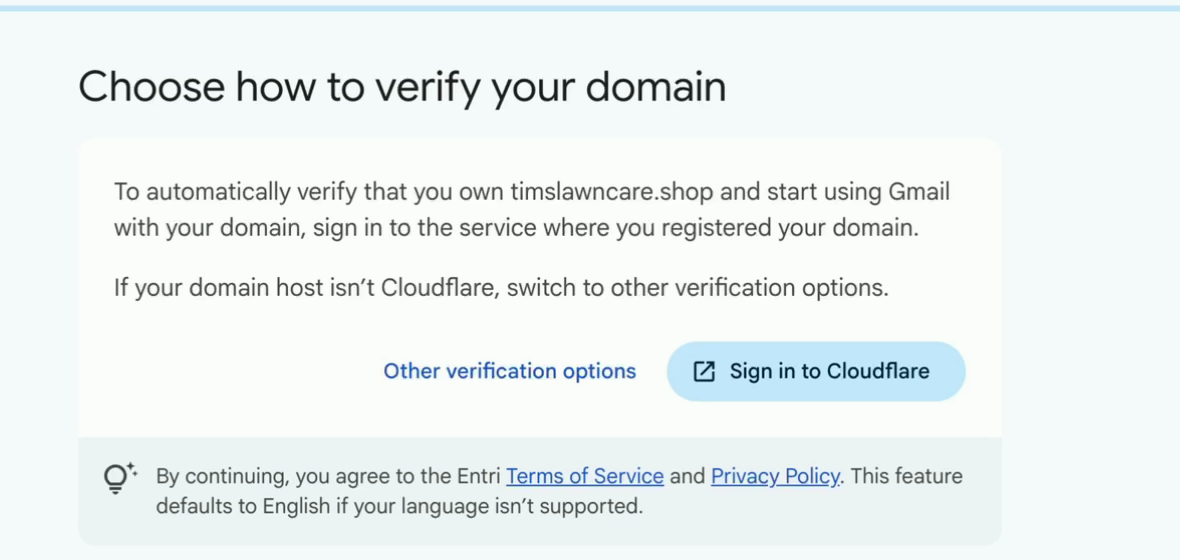
Cloudflare then lists the records Google wants to add and asks you to approve them. It's a one-time authorization; Google can't make changes later. Click Authorize.
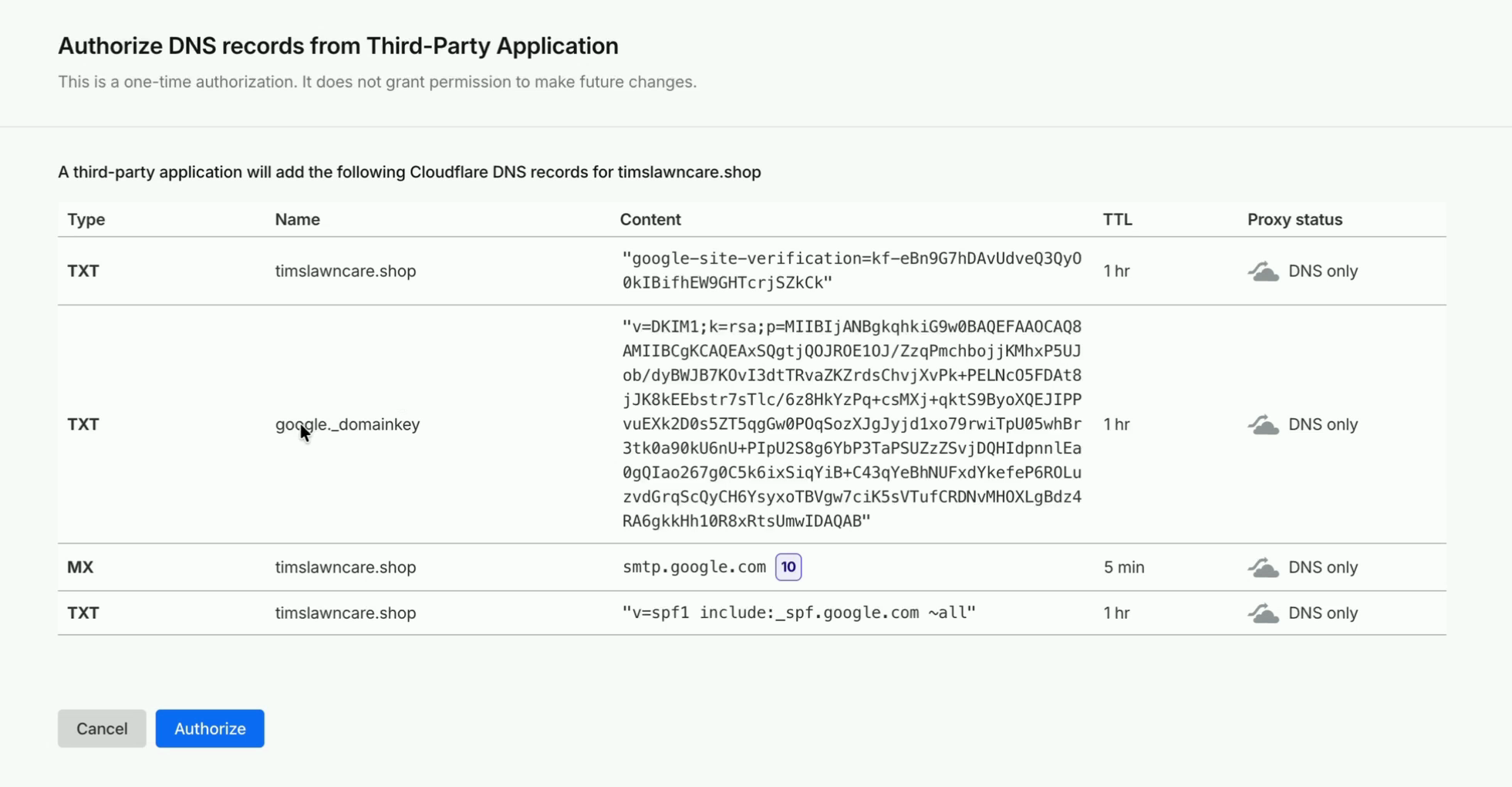
These records do more than verification:
| Type | Name | Value | What it does |
|---|---|---|---|
| TXT | @ | google-site-verification=... | Proves you own the domain |
| TXT | google._domainkey | v=DKIM1; k=rsa; p=... | DKIM: a digital signature on every email you send |
| MX | @ | smtp.google.com | Delivers incoming mail to Google |
| TXT | @ | v=spf1 include:_spf.google.com ~all | SPF: allows Google to send email for your domain |
Your verification code and DKIM key will be different from Tim's, so always copy them from your own screen.
If your DNS is at GoDaddy or anywhere else
Click Other verification options and Google shows the records to add. In GoDaddy, or whichever company runs your DNS, open your domain's DNS records page and click to add a new record. For each one, Google tells you the type (mostly TXT, plus an MX record), the name and the value. Add them, save, and go back to Google to verify. It's the same records as above; Cloudflare just does it for you.
Once that's done, Google says Gmail is set up. You can skip importing old data and the Premium upsell.
Step 5: Send a test email and check your setup
Sign in to Gmail with your new address and send yourself a test from another email account. Tim sent one from his phone and it arrived right away.
Receiving mail isn't the whole story, though. You also need your emails to land in your customers' inboxes and not their spam folder. To check, use our free SPF, DKIM and DMARC checker. We built it after some of our own customers' replies to us started landing in spam, and they didn't know how to fix it.
- Click Get my test address and copy it.
- From your new Workspace address, send an email to it. The subject and body can be empty.
- Go back to the checker. It's already waiting and shows the results within moments.
Tim's result: SPF and DKIM were Good, but DMARC was a Problem. Google set up the first two automatically but not DMARC.
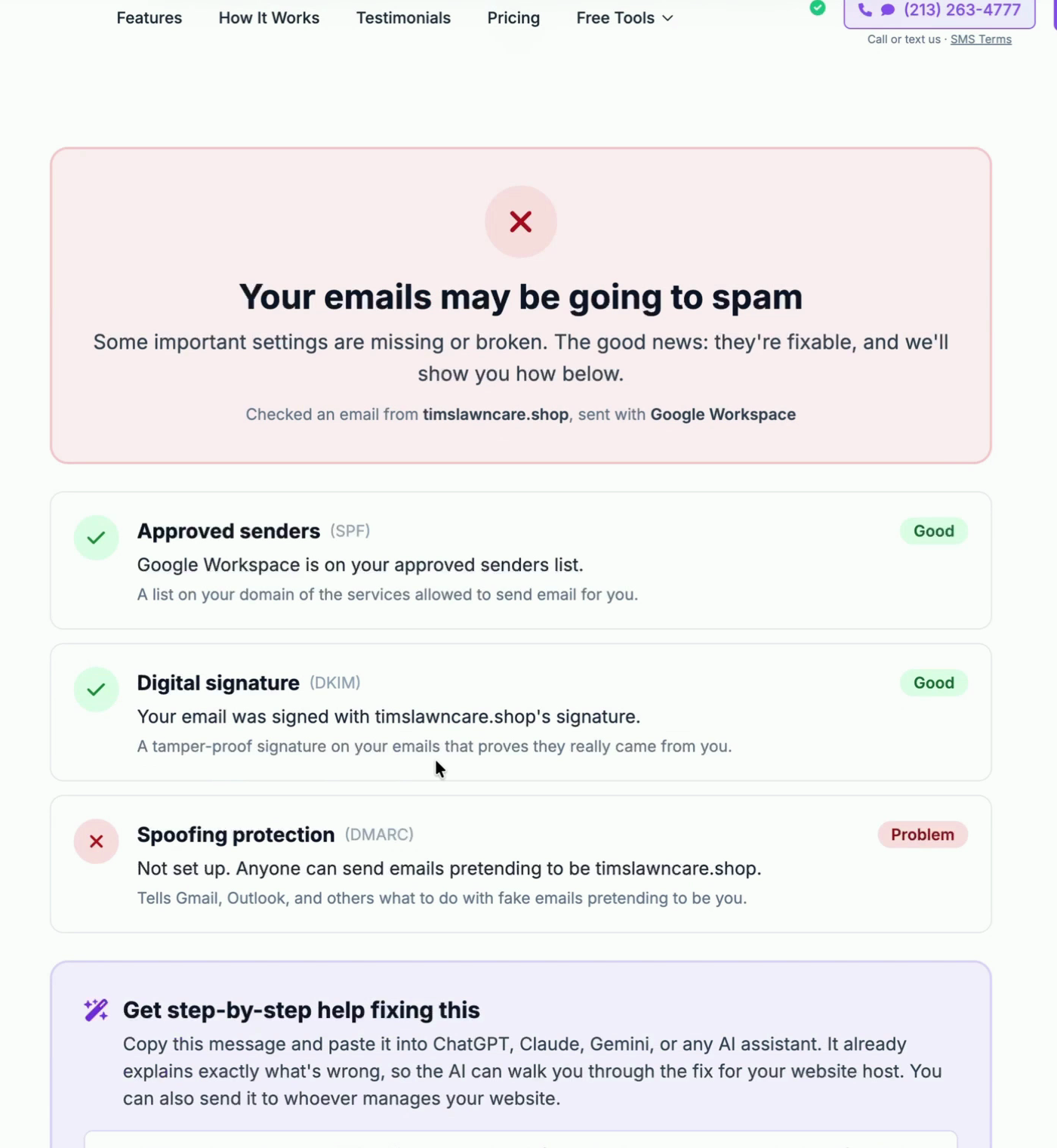
Under the results, the checker has a ready-made prompt you can copy into ChatGPT, Claude or Gemini. It explains exactly what's wrong, so the AI can walk you through the fix for your DNS host.
Step 6: Add a DMARC record
DMARC tells Gmail, Outlook and other providers what to do with email that claims to be from your domain but fails the SPF and DKIM checks. Without it, anyone can send email pretending to be you. It also tells them where to send you reports.
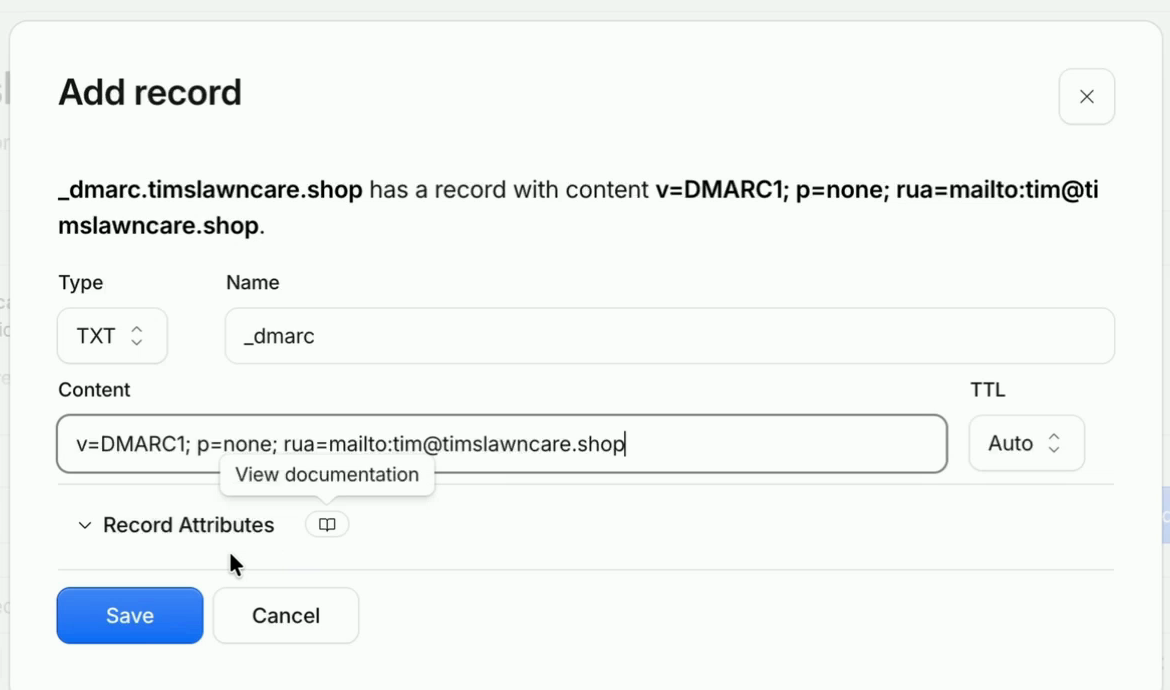
It's a single TXT record. Tim asked Claude for one, telling it that he only sends email from Google. Here's the record he got:
v=DMARC1; p=none; rua=mailto:[email protected]Replace [email protected] with an address where you want the reports. Tim's AI filled in his personal email at first, and he switched it to his new business address.
The important part is p=, the policy:
- p=none: monitor only. Emails that fail still get delivered, and you get reports. Start here.
- p=quarantine: emails that fail go to spam.
- p=reject: emails that fail are blocked outright.
To add it in Cloudflare, go to your domain's DNS records and click Add record:
- Type: TXT
- Name: _dmarc
- Content: your DMARC record
Click Save. With any other DNS host, add the same TXT record on its DNS page.
Setting up email security used to take four or five separate records. Now Google adds most of it for you, and DMARC is the only one left to add by hand.
Step 7: Test again
Refresh the checker, get a new test address and send another empty email. For Tim the new record worked right away, and the result changed to Almost there: SPF and DKIM Good, and DMARC "Needs attention" because it's set to only watch (p=none).
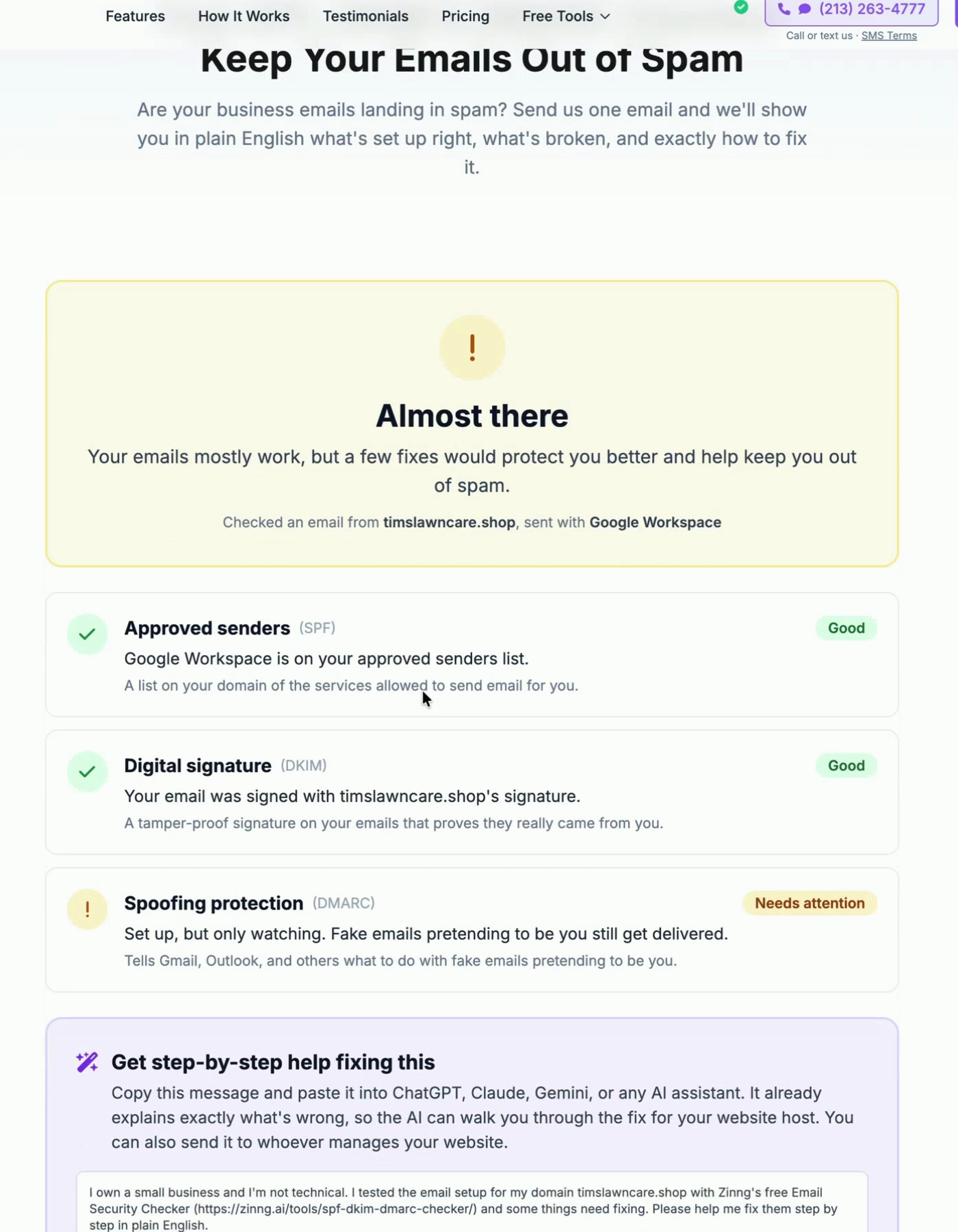
That warning won't hurt your deliverability. It means fake emails pretending to be you would still get through. Once you're confident all your real email passes (the DMARC reports show this), edit the record and change p=none to p=quarantine, and later to p=reject if you like.
That's it: your business email can send and receive, works in the Gmail app, and is set up to stay out of spam.
Next: a catch-all address
Tim's next tutorial covers how to set up a catch-all email in Google Workspace. With one, mail sent to any address at your domain, like support@ or sales@, reaches your inbox without paying for extra users. On Microsoft 365 instead? See how to set up a catch-all email on GoDaddy Microsoft 365.
Frequently asked questions
How much does Google Workspace cost for custom email?
The Starter plan is $7 per user per month with an annual commitment, or $8.40 per user per month billed monthly. It includes custom email on your domain, 30 GB of storage per user and Google's other apps. There's a 14-day free trial.
Can I get a custom domain email for free?
Zoho Mail has a free plan that supports a custom domain, but you have to use Zoho's apps, since the free plan doesn't support IMAP or POP. Google Workspace has no free plan, only the 14-day trial.
What DNS records does Google Workspace need?
A TXT record to verify the domain, an MX record pointing to smtp.google.com to receive mail, an SPF TXT record (v=spf1 include:_spf.google.com ~all) and a DKIM TXT record at google._domainkey. You should also add a DMARC TXT record at _dmarc yourself.
Do I need Cloudflare to set up Google Workspace?
No. Cloudflare just makes it easier: Google adds all the records with one authorization click. With GoDaddy or another DNS host, you copy the same records from Google into your DNS settings by hand.
Does Google Workspace set up DMARC automatically?
No. In our setup Google added the verification, MX, SPF and DKIM records, but not DMARC. Add a TXT record named _dmarc with a value like v=DMARC1; p=none; rua=mailto:[email protected], then tighten the policy to quarantine or reject later.
How do I check if my business emails are going to spam?
Send one email to the test address from our free SPF, DKIM and DMARC checker. It shows in plain English what's set up right, what's missing and how to fix it.
Ready to get started?
Set up your AI phone agent in minutes. Try it free for 7 days.
Try Zinng Free for 7 Days
About the Author
Timothy Bramlett
Co-Founder & CEO, Zinng
Timothy Bramlett is an American entrepreneur, software engineer, and product strategist. He is the founder of Zinng, an AI-powered phone agent platform that helps businesses never miss a customer call with intelligent call handling, real-time transcripts, and instant summaries.