How to Sign Your HIPAA Business Associate Agreement (BAA)
Required for healthcare, dental, medical, and veterinary practices before your AI phone agent can handle live patient calls.
HIPAA Is Currently Free (and Likely to Cost in the Future)
Right now, HIPAA compliance on Zinng costs $0 extra. It's included with any plan. We expect to introduce a HIPAA tier or add-on in the future, but accounts that enable HIPAA compliance during this period will keep it free for the lifetime of the account. If you might ever handle patient information, enabling it now and signing the BAA locks in zero cost forever.
What a BAA Is and Why You Need One
A Business Associate Agreement (BAA) is the contract HIPAA requires between a healthcare provider (the "Covered Entity") and any service that handles protected health information on the provider's behalf (the "Business Associate"). If your Zinng AI phone agent receives calls that include patient information, HIPAA classifies Zinng as a Business Associate and a signed BAA between us is mandatory before that agent can handle live calls.
Without a signed BAA, you cannot legally route protected health information through Zinng, no matter how technically capable the platform is.
Enabling HIPAA on Your Account
Before you can sign the BAA, HIPAA compliance has to be enabled on your team's account. There are two ways this happens.
Path A: You enabled it during onboarding
During Zinng onboarding, Step 3 (Compliance Check) asks: "Will your phone agent handle patient or medical information?" with two options:
- Yes: Healthcare, dental, medical, or veterinary practice
- No: Other business types (real estate, services, etc.)
If you selected Yes and acknowledged the HIPAA notice, HIPAA compliance is already enabled on your account and you can skip ahead to the next section to sign your BAA.
Path B: You said no during onboarding (or skipped it)
If you selected No or didn't go through the compliance step, you'll need us to enable HIPAA on your account before the BAA flow becomes available. Reach out and we'll get it switched on, usually within the same business day:
- Use the chat widget in the bottom right of any Zinng page.
- Email [email protected] with "Enable HIPAA compliance for my account" in the subject line.
- Call us at (213) 263-4777.
We'll confirm by email once it's enabled, and you can proceed with the steps below.
How to Sign the BAA
Once HIPAA is enabled on your account, signing the BAA takes about two minutes.
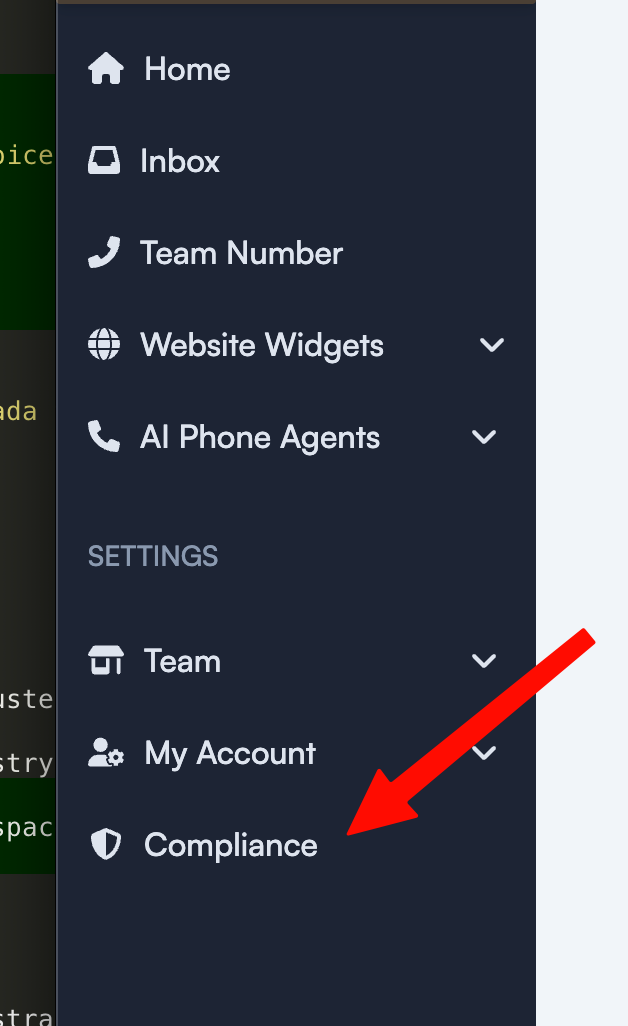
Step 1: Open the Compliance section in your dashboard
Sign in to your Zinng dashboard. In the left sidebar, scroll down to the SETTINGS section and click Compliance.
Step 2: Open the Business Associate Agreement
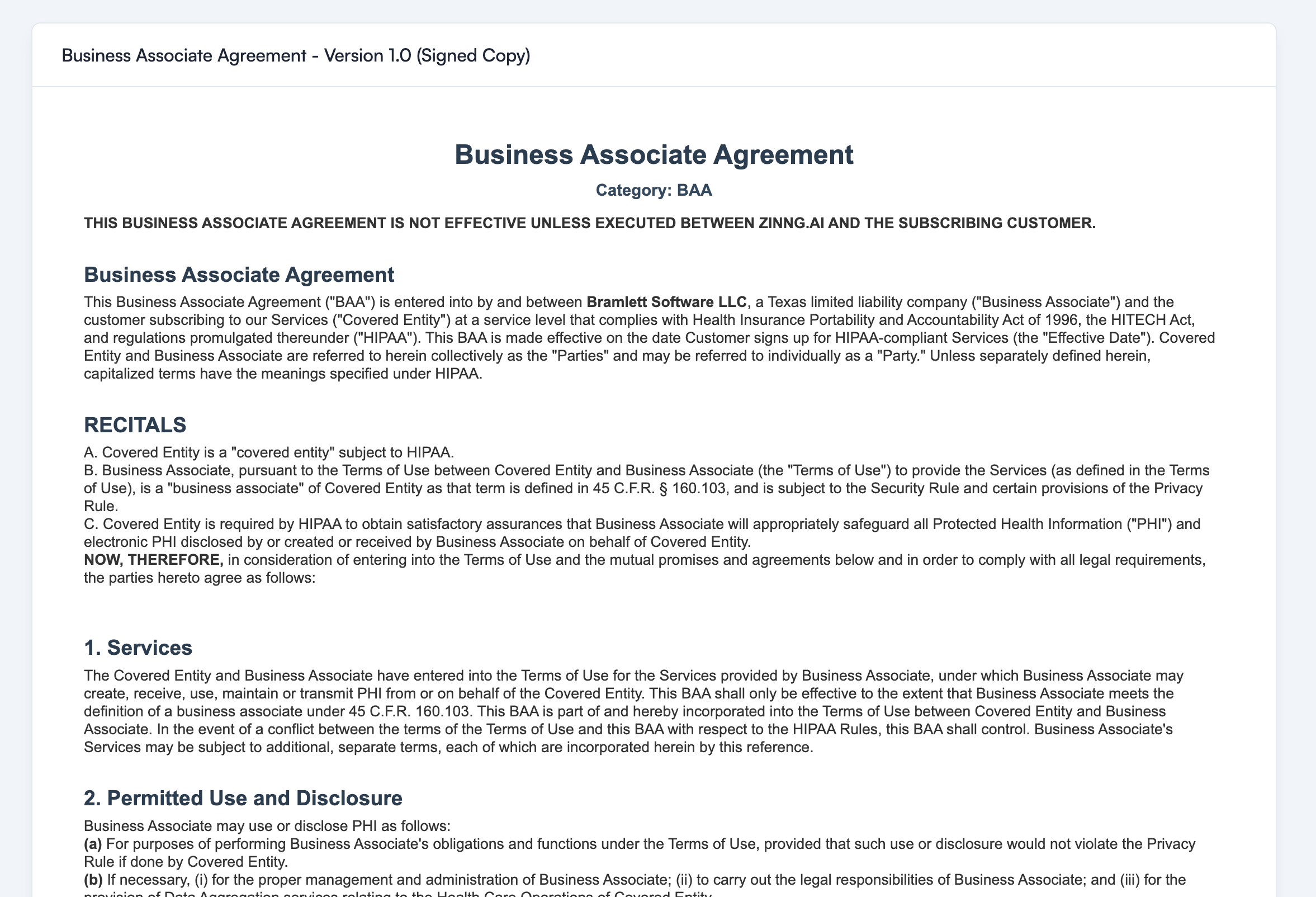
On the Compliance page, you'll see an option to view and sign your Business Associate Agreement. Click into it to open the agreement.
Screenshot placeholder: the Compliance page with the Sign BAA option.
Step 3: Review and electronically sign
Read through the agreement. When you're ready, sign electronically at the bottom of the document. The signature creates a fully executed Version 1.0 BAA between you (the Covered Entity) and Bramlett Software LLC, doing business as Zinng (the Business Associate).
Screenshot placeholder: the signature pad / electronic signature field.
Step 4: Download your signed copy
After signing, the document updates to show a "Signed Copy" badge and the version (currently Version 1.0). You can download the executed BAA as a PDF directly from this page and keep it with your other compliance records.
Screenshot placeholder: the download button or download confirmation.
After You Sign
Once the BAA is signed:
- Your AI phone agent can handle live calls that involve protected health information.
- The signed PDF stays available on the Compliance page so you can re-download it any time.
- If we ever update the BAA (a new version, regulatory changes, etc.), you'll be notified and asked to sign the new version. The historical signed copies stay on file.
- You don't need to renew the BAA on a schedule. It stays in effect for as long as your Zinng account is active and you handle patient information through us.
What the BAA Covers at a High Level
The Zinng BAA is a standard HIPAA-compliant Business Associate Agreement structured around the requirements in 45 C.F.R. parts 160 and 164 (the HIPAA Privacy and Security Rules) and the HITECH Act. At a high level, it covers:
- Permitted uses and disclosures of protected health information (PHI) by Zinng on your behalf, including a HIPAA-permitted Data Aggregation use that lets Zinng aggregate PHI for your Health Care Operations.
- Safeguards Zinng is required to maintain to protect PHI, including administrative, physical, and technical security measures appropriate to the Security Rule.
- Breach and Security Incident reporting obligations, in the time and manner required by 45 C.F.R. 164.410.
- No sale of PHI. Zinng cannot sell PHI or receive remuneration in exchange for PHI (HITECH Section 13405(d) and 45 C.F.R. 164.502(a)(5)(ii)).
- Probes and reconnaissance scans carve-out. Routine network probes and scans count as Security Incidents but do not require per-event notice unless they result in actual unauthorized access to PHI.
- Subcontractor flow-down. Any third parties Zinng uses to handle PHI must agree to the same restrictions Zinng has.
- Your rights as the Covered Entity, including the right of the U.S. Department of Health and Human Services to access Zinng's relevant books and records to verify HIPAA compliance.
- Term and termination, with a 15-day cure period for material breach. Because separating your PHI from Zinng's operational records is treated as infeasible, the BAA's protections extend indefinitely to any PHI Zinng retains after termination, and further use is limited to internal management and required legal purposes.
- Governing law: Texas, with venue in Texas state and federal courts.
This is intentionally a high-level summary. The actual agreement you sign is the controlling document. If you need to review the full text before signing, you can open it from the Compliance page without committing your signature.
Frequently Asked Questions
Will HIPAA compliance stay free forever?
For accounts that enable HIPAA compliance now (during the current free period), yes. We've committed to keeping it free for the lifetime of those accounts. We expect to introduce a paid tier or add-on for accounts that enable HIPAA after that period ends, but anyone who's already on the free grandfathering keeps it.
Do I need to sign the BAA before I can finish onboarding?
No. If you selected Yes during the onboarding compliance step, you can finish configuration and test your agent without a signed BAA. What you can't do without the signed BAA is route real patient calls to your agent. Sign it before you go live.
What happens if I try to take live calls without a signed BAA?
For accounts flagged as handling patient information, Zinng prevents the agent from receiving live calls until the BAA is signed. You'll see a prompt to complete the BAA before the agent can be set live.
My business doesn't handle patient information. Do I need to sign a BAA?
No. If you selected No during onboarding (or are in a business type that doesn't touch protected health information), the BAA doesn't apply to your account and the Compliance section won't show a BAA to sign. Most Zinng customers don't need a BAA at all.
I selected No during onboarding but I do handle patient info. Can I switch?
Yes. Contact support (chat widget, [email protected], or phone) and ask us to enable HIPAA compliance on your team. We'll switch it on, then you can go through the steps above to sign the BAA. There's no penalty for getting this wrong during onboarding.
Can each team member sign their own BAA?
No. The BAA is signed at the team level by the team owner or an authorized representative of the practice. One BAA covers the entire team and all agents on that account.
What if I need to make changes to the BAA?
The Zinng BAA is offered as a standard form so we can support it at scale. If your organization requires negotiated changes (a custom rider, specific clauses your legal team requires, etc.), reach out to [email protected] and we'll discuss what's possible. Enterprise customers can usually accommodate reasonable redlines.
Is my signed BAA legally binding without a wet ink signature?
Yes. Electronic signatures are legally binding for HIPAA BAAs under the federal E-SIGN Act, and Zinng's electronic signing flow satisfies the requirements. The signed PDF available for download is your legally executed copy.
Where can I find the BAA again later?
Always at Settings → Compliance in your Zinng dashboard. You can re-download the signed PDF, view the current effective version, and see any prior versions if we've updated the agreement.
Still have questions?
Compliance questions are some of the most important questions we get, so don't hesitate to ask. Use the chat widget in the bottom right of any Zinng page, call (213) 263-4777, or email [email protected] and we'll get you a clear answer.