
Texts not sending? Why a message is blocked and the fix
Find out why a text in your inbox won't send: opted-out contact, landline, toll-free verification, plan limits or an expired conversation, and the fix.
When a text cannot be sent, the message box in the inbox is disabled and shows the reason, or an error appears when you send. Find your message below to see what it means and what to do.
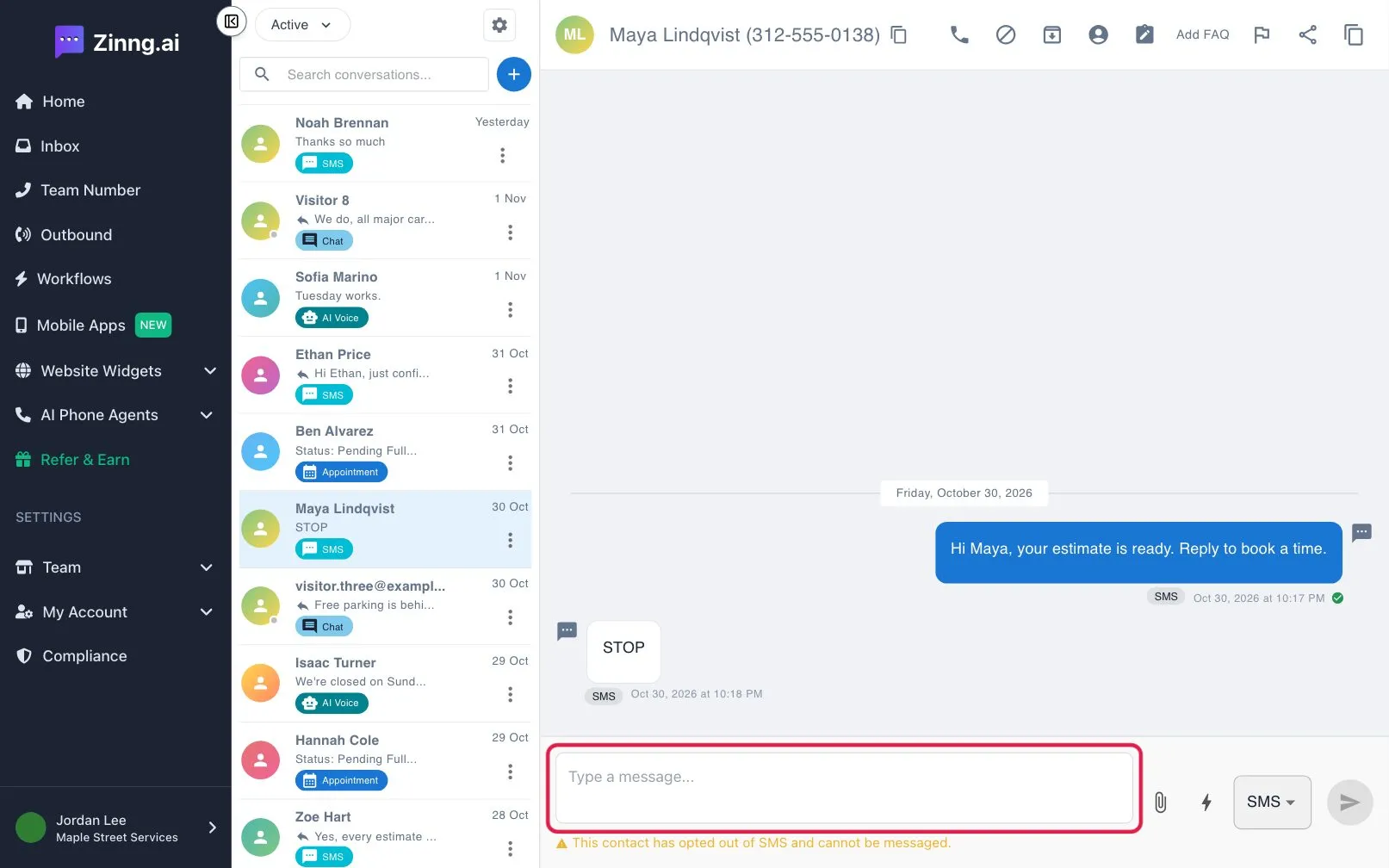
Why can’t I text this contact?
Section titled “Why can’t I text this contact?”“SMS and MMS messaging is available on paid plans only”
Section titled ““SMS and MMS messaging is available on paid plans only””Your account is on the free plan. Start a plan from Team, then Subscription.
“This contact has opted out of SMS and cannot be messaged”
Section titled ““This contact has opted out of SMS and cannot be messaged””The contact replied to stop texts. You cannot text them again.
“Phone number required for SMS/MMS messaging”
Section titled ““Phone number required for SMS/MMS messaging””The contact has no phone number saved. Add one to the contact, or reply by another method shown in the send menu.
“This number cannot receive SMS/MMS” or “No SMS support”
Section titled ““This number cannot receive SMS/MMS” or “No SMS support””The number is a landline or another line type that cannot receive texts. Call the contact instead.
“This number already failed to receive a text message and is blocked”
Section titled ““This number already failed to receive a text message and is blocked””An earlier text to this number failed, so Zinng will not send another. Check the number is a correct mobile number.
“SMS Capability is not available. Please contact support.”
Section titled ““SMS Capability is not available. Please contact support.””Your team has no number that can send texts yet. Email [email protected].
“Texting from this toll-free number is disabled”
Section titled ““Texting from this toll-free number is disabled””A toll-free number needs an approved toll-free verification before it can text. The message tells you which stage you are at:
- Until its verification is submitted and approved: complete the verification in Settings.
- While its verification is under review: wait. Review usually takes up to 3 business days.
- Because its verification was rejected: the message shows the reason. Update the details and resubmit.
“Sending SMS to contacts without a prior interaction requires the Pro plan and A2P10DLC registration”
Section titled ““Sending SMS to contacts without a prior interaction requires the Pro plan and A2P10DLC registration””You can only text contacts who have called or texted you first. To text someone who has not, you need the Pro plan or higher and an approved SMS registration. See the SMS registrations page.
“This conversation has been inactive for over 90 days”
Section titled ““This conversation has been inactive for over 90 days””On plans without an approved SMS registration, a conversation expires 90 days after the last contact. The contact needs to call or text you first, or you need an approved SMS registration on the Pro plan or higher.
“This is a transcription of an AI voice call”
Section titled ““This is a transcription of an AI voice call””AI voice call records cannot be texted from the call itself. Open or start a text conversation with the contact instead.
Still blocked?
Section titled “Still blocked?”Email [email protected] and include the exact message you see.